MuMu Player 12 Review 2026: Is It the Fastest, Lightest Emulator?
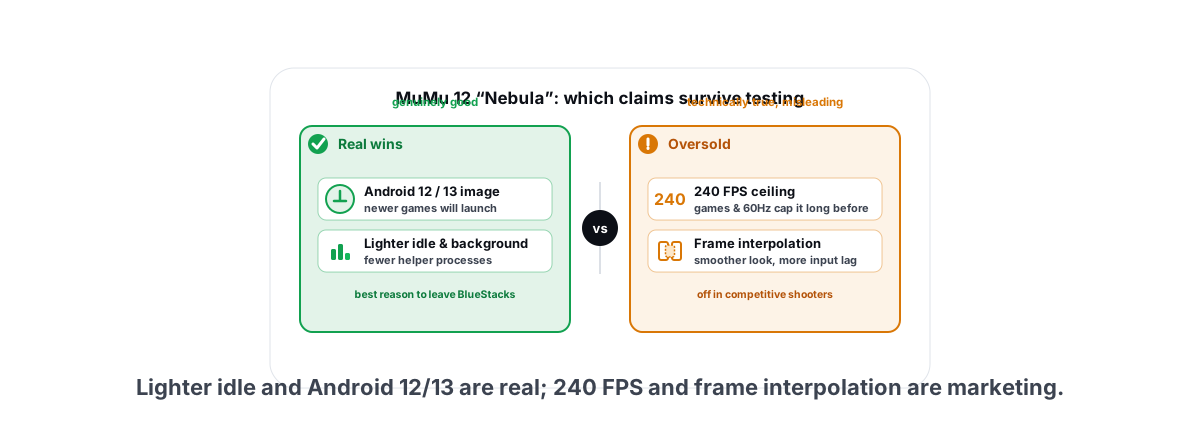
This MuMu Player 12 review for 2026 answers the only question that matters: is it the fastest, lightest Android emulator now, or just the loudest? It spent the year selling an Android 12/13 runtime, a "Nebula" engine, lower CPU use, 240 FPS, and frame interpolation. Some of that is real and useful. Some is marketing wearing a benchmark costume. Here is what survives once you actually run it.
What MuMu 12 and the Nebula engine claim
MuMu Player 12 is NetEase's current emulator build, and the headline is the Android version: it ships an Android 12/13 (API 31/33) image instead of the Android 9 that older emulators dragged around for years. That matters because a growing list of 2026 mobile games check the Android version and either refuse to launch or run in a degraded mode on Android 9.
The "Nebula" branding wraps a few separate things: a reworked rendering path, a CPU scheduler meant to use fewer threads at idle, a claimed 240 FPS ceiling, and a frame-interpolation feature that inserts generated frames to smooth motion. Marketing treats these as one upgrade. They are not. Each behaves differently, and you should judge them separately.
The honest summary up front: MuMu 12's Android version and idle CPU behaviour are genuinely good. The 240 FPS and frame-interpolation numbers are technically true and practically misleading. Below, each one gets taken apart on its own.
CPU and RAM use vs BlueStacks and LDPlayer
This is the claim worth taking seriously. MuMu 12 idles lighter than BlueStacks in most setups, and it sits roughly level with LDPlayer 9. The gap is widest at the launcher screen and in lighter 2D games, and it shrinks once a heavy 3D title is hammering the GPU.
Numbers depend on your hardware, the game, and your settings, so treat any single figure with suspicion. The shape that stays consistent across machines looks like this:
| State (4 cores / 4–6GB allocated) | MuMu 12 | BlueStacks 5/10 | LDPlayer 9 |
|---|---|---|---|
| Idle at launcher (CPU) | Low | Higher | Low–moderate |
| Idle RAM working set | ~1.5–2.5GB | ~2–3GB | ~1.5–2.5GB |
| Mid 3D game (e.g. CODM) | Moderate, GPU-bound | Moderate, GPU-bound | Moderate, GPU-bound |
| Background bloat (helper services) | Lean | Heaviest | Moderate |
The real takeaway: in a heavy game all three emulators converge, because at that point your GPU and your CPU-to-GPU pipeline are the limit, not the emulator's overhead. Where MuMu 12 wins is the stuff around the game — fewer background helper processes, a lighter launcher, less idle churn. On a low-end PC that headroom is the difference between a playable session and a stuttery one.
One caveat people skip: RAM allocation is a setting, not a verdict. Hand any emulator 8GB and 6 cores and it will happily use them. "MuMu uses less RAM" only means something when every emulator is allocated the same amount. If you are unsure how much to give it, the math in how much RAM and how many CPU cores an emulator needs applies to MuMu 12 exactly as it does to the rest — 4 cores and 4GB is usually the sweet spot, not "max everything".
The 240 FPS and frame-interpolation claims, honestly
Two separate claims get bundled together here, and both need a hard look.
The 240 FPS ceiling
A 240 FPS option exists. Whether you ever see 240 actually rendered frames is a different question, and the answer is almost always no. The game has to support that frame rate — most mobile titles cap internally at 60, 90, or 120, and CODM and BGMI will not let an emulator unlock more than the game's own ceiling regardless of where the emulator slider sits.
Then there is your monitor. On a 60Hz or 75Hz display, 240 in the counter is a number you cannot see — the panel physically cannot show frames faster than its refresh rate. And there is your GPU: a GTX 1050 Ti or an iGPU is not pushing a heavy mobile title at 240 anyway.
So the 240 setting is real, but for the overwhelming majority of games and PCs it is a ceiling you will never touch. Treat it like a car speedometer that reads 300 — the number is printed, the road is not there. If your goal is a genuine high-refresh feel, the realistic target and the steps to hit it are in how to get 90 or 120 FPS on an Android emulator. A locked 90 or 120 on a game that supports it is the win, not a fantasy 240.
Frame interpolation
Frame interpolation generates intermediate frames between the ones the game actually renders, so motion looks smoother on a high-refresh screen. It is the same idea as TV "motion smoothing" and a cousin of GPU frame generation on PC — DLSS 4 Multi Frame Generation and FSR 4 do the same trick for desktop games. It also carries the same catch.
Interpolated frames are not real game state. They are guessed images inserted between two real frames, which means the engine has to hold a real frame back to interpolate toward it — and that adds input latency. For a turn-based or casual game, fine: it looks smoother and you will not feel the delay. For a shooter where you are flicking and tracking, that added lag is exactly what you do not want. The desktop version of this trade-off is laid out in is frame generation worth it, and the logic carries straight over: smoother-looking is not the same as more-responsive.
Anti-emulation handling
The Android 12/13 image is the single biggest reason to care about MuMu 12 in 2026, and it is mostly about which games will even launch.
Plenty of newer titles refuse to run, or run with reduced functionality, on the Android 9 images older emulators shipped. A current Android version clears a lot of that. MuMu 12 also markets specific tuning for heavier titles, and in practice it launches and runs a wide catalogue that trips up older builds.
Emulator-hostile anti-cheat is the important asterisk. Some publishers run an anti-cheat that is openly hostile to emulators. Whether a game like that runs on any given emulator on any given day is a moving target — it can work after an emulator update and break after a game update, then flip back. Do not buy "runs it perfectly" as a permanent feature from anyone, MuMu included. It is a truce, not a guarantee. If a game like that is your main one and it has a native PC client, you are usually better off on that client.
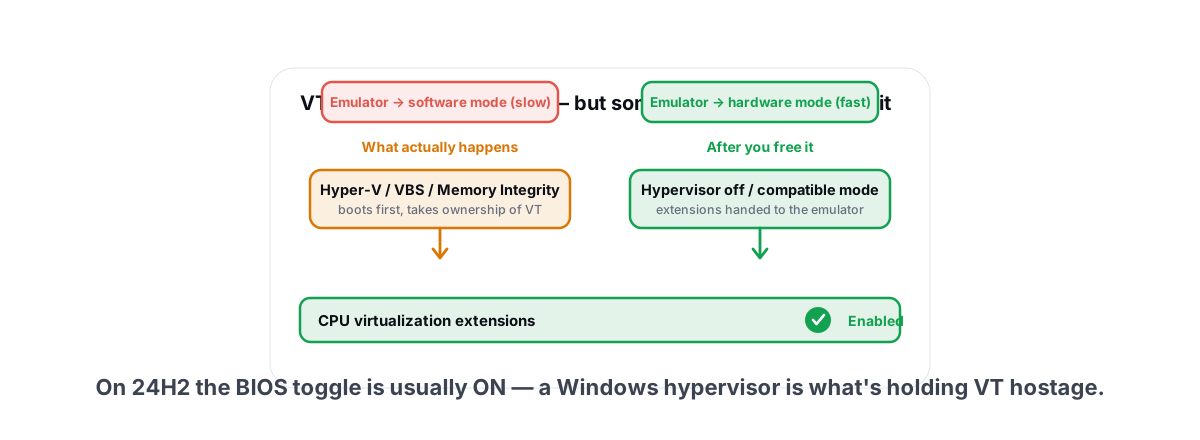
Two things make or break compatibility on any emulator, MuMu included: virtualization and the renderer. If VT-x / AMD-V (SVM) is off in your BIOS, MuMu falls back to a slow software path and some games detect it. On Windows 11 24H2 and 25H2 that toggle is frequently greyed out because a Hyper-V-based security feature is holding it — the fix is in enabling VT-x / SVM when it is greyed out on 24H2. For the renderer, the right pick is game-dependent; OpenGL vs Vulkan vs DirectX for emulators walks through when each wins instead of guessing.
Ban-risk reality vs the hype
This is where you should be most skeptical of marketing, because no emulator vendor controls the ban policy — the game does.
The honest framing is simple: playing on an emulator is a policy decision made by each game's publisher, and it can change without warning. Some games officially support emulator play, often with separate emulator-only matchmaking. Some tolerate it. Some ban for it outright, and a few use anti-cheat that flags the emulator environment itself. MuMu being "anti-emulation optimized" does not move you out of that reality — at best it avoids tripping detection today, which is not the same as being safe forever.
The full breakdown, including which popular games sit in which bucket, is in is playing on an emulator bannable. Read it before you sink an account you care about into any emulator.
No emulator can promise you will not get banned. The only honest claim is "not detected right now," and "right now" expires with the next game update. If the account matters, check the game's official stance first.
Worth separating two fears that get muddled: getting banned for using an emulator, and getting banned for using a PC optimizer. They are unrelated. A user-mode tool that only changes Windows settings runs nothing inside the game, and each publisher decides what its anti-cheat allows — the reasoning is in can a PC optimizer get you banned. The emulator question is the one with real stakes here, not your Windows tweaks.
Best MuMu 12 settings for low-end PCs
If you are on a 4–8GB, 4-core machine or an older GPU, the default "high performance" preset usually over-allocates and stutters. Pull it back. The goal is a stable frame rate you can feel, not a big number in the counter.
- CPU: 4 cores, RAM: 4GB. On a 6-core/12-thread CPU like a Ryzen 5, 4 cores leaves Windows and the GPU driver room to breathe. More cores rarely helps a single mobile game and can starve the host.
- Resolution: match your need, not your monitor. 1280×720 is plenty for most mobile games and far lighter than 1080p. Higher DPI mostly burns GPU for sharpness you will not notice in a fast match.
- Frame rate: 60 or 90, not 240. Set a target the game and your GPU can actually hold. A locked, steady 60 beats a jittery 120 every time.
- Frame interpolation: off for shooters, optional for casual.
- Renderer: test both. Vulkan is often smoother on modern GPUs; OpenGL can be more stable on older or Intel graphics. Try each for two minutes and keep whichever stutters less.
- Virtualization: on. Non-negotiable. Without it everything above is fighting a software-rendering handicap.
If MuMu is still chewing CPU or disk after that, the cause is usually outside the emulator — background Windows churn, a thermally throttling laptop, or a dying drive. The systematic way to find which is in fixing emulator high CPU, GPU and disk load, and the laptop-specific angle (power limits, thermals, dGPU routing) is in running an emulator smoothly on a laptop.
One thing that genuinely helps and costs nothing: make sure the emulator is not competing with junk you do not need running, and measure before you trust a tweak. A free FPS counter that reads the emulator's own presents, such as Intel's PresentMon, lets you watch real frame rate, 1% lows, and frametimes while you change a setting (the hook-free overlay in BRUTAL Optimizer shows MuMu's display rate for now, labelled DISPLAY). No injection, no hook, so it runs alongside the same anti-cheat your games use. That is the honest way to know whether a tweak helped or just felt like it did.
Who should switch (and who shouldn't)
MuMu 12 is a good emulator. It is not automatically your emulator. Decide by what you actually play.
| Your situation | Verdict |
|---|---|
| On BlueStacks, want less overhead | Switch — clearest win |
| Low-end PC, background load hurts you | Switch — the lean footprint is the point |
| Newer game that needs Android 12/13 | Switch — older emulators may not launch it |
| Already happy on LDPlayer 9 | Stay — they are roughly level, not worth the migration |
| Main game has a native PC client | Use the PC client instead |
| Chasing 240 FPS on a 60/75Hz screen | Don't — you cannot see it |
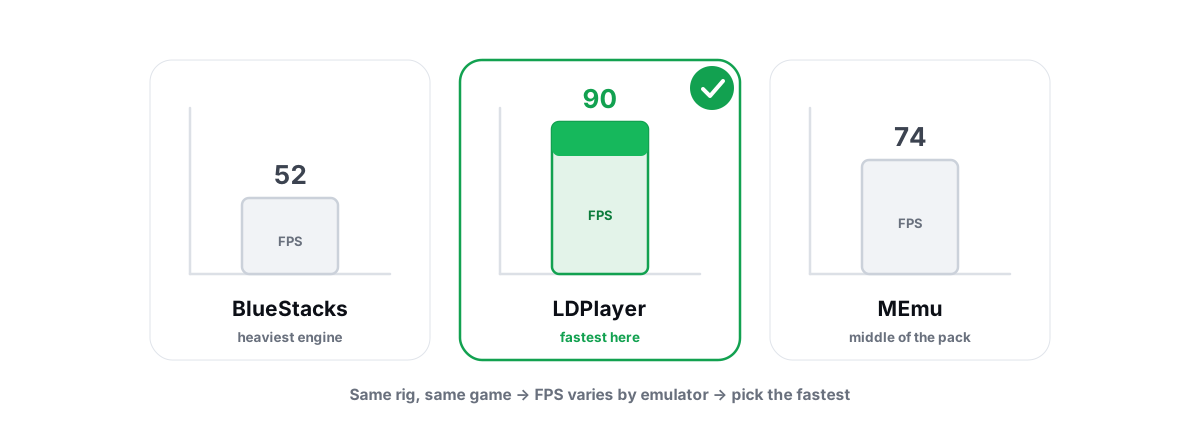
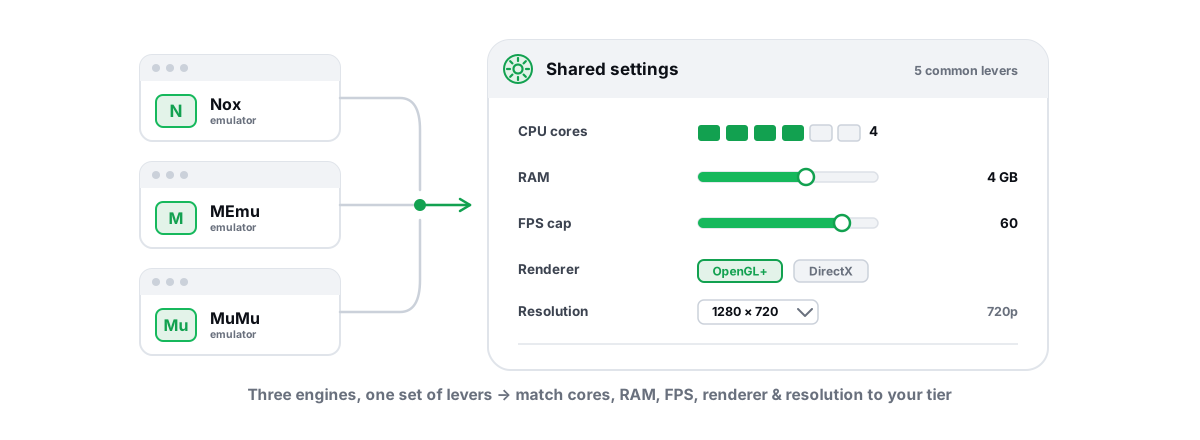
If you are cross-shopping the whole field rather than just MuMu, the head-to-head numbers in BlueStacks vs LDPlayer vs MEmu and the settings comparison in best Nox, MEmu and MuMu settings will save you installing four emulators to find out.
Our verdict vs the competition
MuMu Player 12 earns most of what it claims and oversells the rest. The Android 12/13 runtime is a real, current advantage in 2026 — it is the reason newer games run at all. The lighter idle and background footprint is genuine and is the best reason to switch from BlueStacks. Against LDPlayer 9 it is close enough that you should pick on which one runs your specific game cleanly, not on a benchmark screenshot.
The 240 FPS headline is a ceiling you will basically never reach, and frame interpolation is a smoothness-for-latency trade you should refuse in anything competitive. The anti-emulation and ban-risk pitch is the part to ignore — that is the game publisher's call, not the emulator's, and it can flip overnight.
Once your emulator is set up sanely, most remaining stutter is a Windows-side problem, not an emulator one: background services, thermal throttling, a fragmented or failing drive. BRUTAL Optimizer is an honest way to clean that up, with nothing of ours running inside the game. It is a user-mode wrapper over the same tools Windows already ships, so it runs alongside Vanguard, Easy Anti-Cheat, and BattlEye; each module that changes settings has its own Undo, and it attempts a System Restore point before anything big; and disk cleaning reports verified freed bytes instead of a fake "boost" meter. It will not make MuMu hit 240 — nothing will — but it will stop your PC from getting in MuMu's way.
BGMI is a trademark of KRAFTON, Inc.; BRUTAL Optimizer is not affiliated with or endorsed by KRAFTON. KRAFTON's terms restrict IP proxying, and BGMI's official platforms are Android and iOS.
Frequently asked questions
Is MuMu Player 12 actually lighter than BlueStacks?
At idle and on the launcher, yes. MuMu 12 generally uses less CPU and runs fewer background helper processes than BlueStacks. Inside a heavy 3D game all three major emulators converge, because the GPU and the CPU-to-GPU pipeline become the limit, not the emulator overhead.
Can MuMu Player 12 really hit 240 FPS?
The 240 FPS setting exists, but you will almost never see 240 real frames. The game has to support that rate (most cap at 60, 90 or 120), your monitor has to refresh that fast, and your GPU has to push it. On a 60Hz or 75Hz screen the number is invisible no matter what the counter says.
Should I use MuMu 12 frame interpolation in competitive games?
No. Frame interpolation inserts guessed frames between real ones, which adds input latency. It looks smoother but feels less responsive, which is the opposite of what you want in a shooter. Keep it off for competitive play and only use it in casual or single-player games.
Will playing on MuMu Player 12 get me banned?
It depends entirely on the game, not the emulator. Some publishers support emulator play, some tolerate it, and some ban for it. No emulator can promise you will not be banned. The honest claim is only not detected right now, which can change with the next game update.
Does MuMu 12 run games whose anti-cheat is hostile to emulators?
Sometimes, but it is a moving target. Some publishers run anti-cheat that is hostile to emulators, so a game can work after an emulator update and break after a game update. If a game like that is your main one and it has a native PC client, that client is the more reliable choice.
Keep reading
 Emulators
BlueStacks vs LDPlayer vs MEmu: Which Is Fastest?
A fair speed test of BlueStacks, LDPlayer and MEmu that refuses one winner and shows you how to benchmark the fastest emulator yourself.
 Emulators
Best Nox, MEmu and MuMu Settings, Compared
One guide to the best Nox, MEmu and MuMu settings: shared levers plus the per-emulator quirks that actually move FPS.
 Emulators
Enable VT-x / SVM for Emulator on Windows 11 24H2
Your emulator is stuck in slow software mode because VT-x/SVM is off or occupied. The 24H2 UEFI path, the Hyper-V/Memory Integrity gotcha, and OEM-locked cases.
Tune the emulator, not the game.
BRUTAL Optimizer tunes GameLoop, BlueStacks, LDPlayer, Nox, MEmu and MuMu with hardware-aware settings, and its free FPS overlay counts frames from outside the game. No kernel driver of our own, no game hooks.