Will a PC Optimizer Get Me Banned in Valorant or Fortnite?
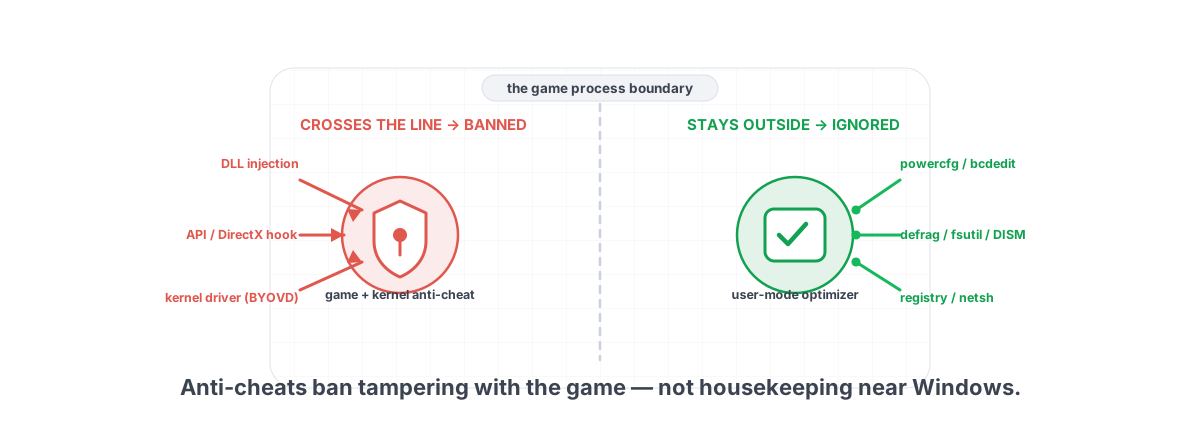
Short version: a user-mode optimizer that takes no kernel driver, hooks nothing, and injects into no process will not get you banned in Valorant or Fortnite. But "will a PC optimizer get me banned in Valorant or Fortnite" is worth the long answer, because 2026 anti-cheats are pickier than ever and the reasons they ban have nothing to do with cleaning your temp folder.
Riot's Vanguard, Epic's Easy Anti-Cheat (EAC), and BattlEye all sit in the kernel now. That sounds scary, so people assume any tool that touches Windows must be on a collision course with a ban. It isn't. The anti-cheat cares about a specific, narrow set of behaviors. Most "optimizers" never come close to those behaviors. A dishonest one does, and that distinction is the whole article.
How kernel anti-cheats actually flag software
A kernel-level anti-cheat loads a signed driver at boot. Vanguard goes further and starts that driver before you even log in, which is why it asks for a reboot on first install. From the kernel it can see things a normal program can't: which drivers are loaded, whether code is being injected into the game, whether memory is being read or written by another process, and whether the game's own functions have been tampered with.
It is not scanning your disk for "optimizer.exe" and banning by name. It watches the game process and the system around it for tampering. The questions it asks are mechanical:
- Is another process reading or writing the game's memory?
- Has the game's code been patched, or its API calls redirected (hooked)?
- Is there a foreign DLL injected into the game?
- Is an unsigned or known-bad driver loaded in the kernel?
- Is something forging input or drawing inside the game's render pipeline?
Answer "yes" to any of those and you're a suspect. A tool that changes a registry value, runs powercfg, or trims a temp folder answers "no" to all of them. It never goes near the game process at all.
Anti-cheats ban behavior near the game, not housekeeping near Windows. The line is whether your tool touches the game's memory, code, drivers, or render pipeline — not whether it "optimizes."
What gets you banned: injection, hooks, cheat drivers
Here is the concrete list of things that actually trigger detections and bans. Memorize it, because it tells you exactly what to avoid in any tool you run.
Process injection
A cheat (or a careless overlay) loads its own DLL into the game's process so its code runs inside the game's address space. Anti-cheats hunt injected modules aggressively. This is the single most common detection vector, and it's the reason many overlays that worked in 2022 get flagged now.
API hooks and code patching
Hooking means intercepting the game's calls — to DirectX, to the OS, to its own functions — by overwriting the first bytes of a function with a jump to your code. ESP and aimbot overlays do this to read game state or draw on screen. Anti-cheats checksum critical code and catch the patch.
Memory reading/writing from outside
Even without injecting, a cheat can open a handle to the game and read its memory to find enemy positions, or write to it to change values. Vanguard blocks handle access to the protected process and logs attempts.
Unsigned or vulnerable kernel drivers
This is the 2026 flashpoint. Cheaters load their own kernel driver — or abuse a legitimate-but-vulnerable signed driver (a "BYOVD" attack) — to read memory from ring 0 where user-mode anti-cheat can't see. In response, anti-cheats now maintain blocklists of vulnerable drivers and will refuse to launch, or flag you, if one is loaded. Some old motherboard, GPU-tuning, and RGB utilities ship exactly these kinds of drivers — which is how a tool you bought to make games faster ends up blocking the game from launching.
Why a user-mode optimizer isn't in that category
A user-mode optimizer runs as a normal Windows program with administrator rights. Admin lets it edit machine-wide registry keys and start/stop services — it does not let it bypass the kernel or touch a protected process. Those are different layers. Plenty of mundane apps need admin and have nothing to do with cheating.
What an honest optimizer is really doing is driving tools Windows already ships:
| What you click | What actually runs | Anti-cheat's view |
|---|---|---|
| "Set Ultimate power plan" | powercfg | Doesn't care — system setting |
| "Disable a service" | Service Control Manager / registry | Doesn't care — runs anyway |
| "Clean junk" | File deletes in allow-listed folders | Doesn't care — your files |
| "Optimize drive" | defrag.exe / fsutil | Doesn't care — in-box tool |
| "Repair system" | SFC / DISM | Doesn't care — Microsoft's own |
| "Apply DNS" | netsh | Doesn't care — network config |
None of those reach across the boundary into the game. That's why an honest optimizer can run at the same time as Vanguard, EAC, or BattlEye without a problem. We've written the full bright-line breakdown in our anti-cheat safe optimization guide, and a Valorant-specific teardown of one tool in is BRUTAL Optimizer safe with Valorant. The general "can an optimizer ban you" question is covered in can a PC optimizer get you banned in games.
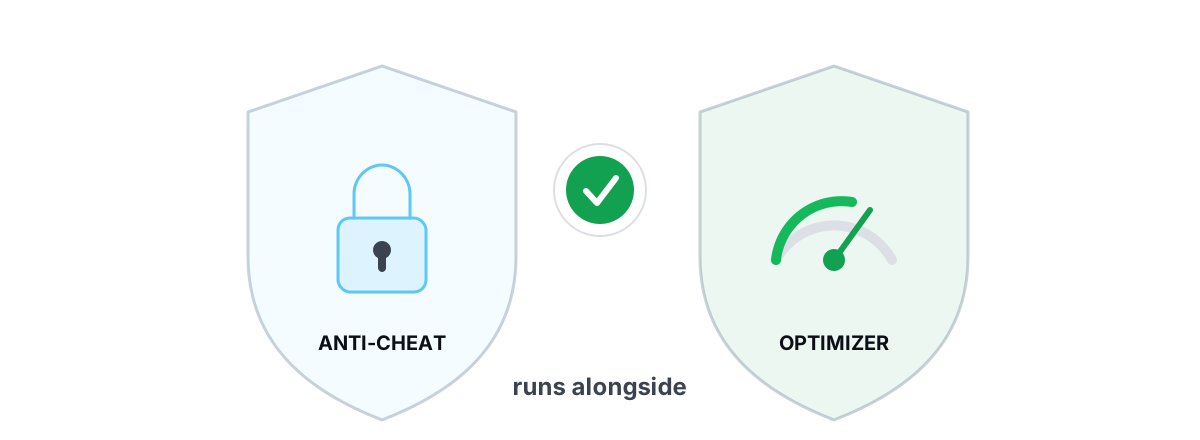
For the record, this is exactly why BRUTAL Optimizer took no kernel driver and no game hook in the first place. It's a user-mode wrapper over fsutil, defrag.exe, powercfg, bcdedit, DISM, SFC, Windows Update, netsh, and the registry — and it runs alongside all three major anti-cheats.
The 2026 crackdown on overlays and old drivers
Two things changed the conversation in 2025–2026.
First, anti-cheats got far stricter about overlays and injected utilities. Some popular overlays, macro tools, and "tweakers" that hook DirectX or inject a DLL now get you kicked or flagged in competitive titles. The anti-cheat can't always tell a friendly overlay from a malicious one, so the safe assumption from the vendor's side is: anything injecting into our game is a risk.
Second, the vulnerable-driver blocklist went mainstream. Windows 11 24H2 and 25H2 ship Microsoft's vulnerable driver blocklist on by default, and anti-cheats layer their own on top. If you've got an ancient tuning utility or RGB suite from 2018 that loads a sketchy driver, you can get blocked from launching the game — not because you cheated, but because that driver is a known ring-0 backdoor.
The takeaway isn't "avoid all tools." It's "avoid tools that inject or load drivers." Those two specific behaviors are what got swept up in the crackdown. Cleaning junk, managing startup items, and changing power plans were never part of it.
Overlays: which are safe, which aren't
Overlays are where most people get confused, because "overlay" covers two completely different techniques.
| Overlay type | How it draws | Anti-cheat risk |
|---|---|---|
| Injected / hooked overlay | Injects a DLL or hooks DirectX present to draw inside the game | Higher — this is the flagged technique |
| D3DKMT present-rate reader | Reads the Windows display present rate via the graphics API, draws in its own window | None — no injection, no hook |
| Separate borderless window | A normal topmost window on top of the game | None — it's just another window |
The classic FPS overlays from years past injected and hooked, which is why they occasionally caused issues. A modern, safe FPS counter doesn't need to touch the game at all — it reads the display's present rate from the OS and shows the number in its own window. No injection, no present hook, nothing inside the game's process.
BRUTAL Optimizer's free FPS overlay works exactly that way: it reads the Windows display present rate through the D3DKMT graphics API and renders in a separate window, so it stays anti-cheat-safe while still showing real FPS, 1% lows, and frametimes. If you want the full rundown on safe counters, see our piece on the best anti-cheat-safe FPS overlay.
The 4 bright lines an honest optimizer won't cross
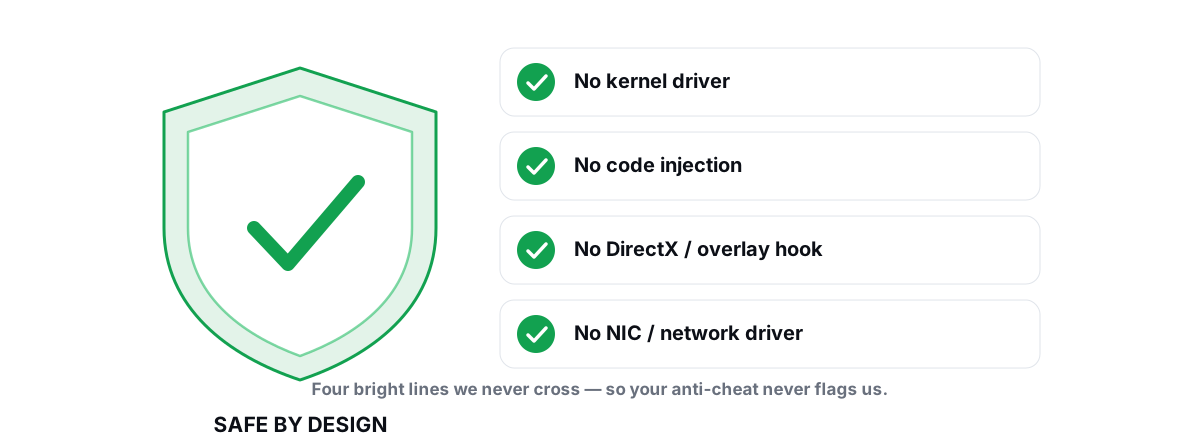
If you remember nothing else, remember these four. They're the difference between "runs next to Vanguard fine" and "gets you banned."
- No kernel driver. The tool does its job from user mode. It never loads its own ring-0 driver — the exact thing anti-cheats and Windows blocklists are tightening against.
- No DirectX or present hook. It doesn't intercept the game's render calls. Overlays read the present rate from the OS instead of hooking the pipeline.
- No process injection. It never loads a DLL into the game or any other process. It works on Windows settings, not on the game's memory.
- No network-stack or NIC driver. Network tweaks happen through
netshand registry, not by inserting a filter driver between you and the game.
A tool that holds all four lines is, by construction, invisible to the anti-cheat's detection logic. It simply isn't doing any of the things being watched for. This is the framework we apply to every feature — the same one explained in our guide to optimizing Windows without bricking it.
What to check before running anything alongside Vanguard
Vanguard is the strictest of the three because it runs at boot and watches continuously. If a tool is going to cause friction with any anti-cheat, it'll be this one. Here's your pre-flight checklist.
- Does it install a driver? Check the installer and Device Manager. A legitimate optimizer shouldn't add a kernel driver. A tuning utility that does should be on your radar.
- Does it inject or overlay into the game? If it draws inside the game rather than in its own window, find out how. Present-rate readers are fine; hookers are not.
- Is every change reversible? You want per-module undo and a System Restore point before big changes, so a tweak that hurts your game can be rolled back cleanly. Our restore point guide covers the safety net.
- Does it touch anything anti-cheat-adjacent? Be cautious with tools that disable Secure Boot, TPM, or virtualization-based security to chase a couple of FPS — Vanguard in particular can require some of those. Our take on the disable-VBS-for-gaming question spells out the trade-offs.
One more, often missed: some optimizers' "low-latency" modules turn off virtualization-based security or memory integrity. That's a legitimate, reversible Windows setting — but Valorant's Vanguard has, at times, required certain security features (like TPM 2.0 and Secure Boot on Windows 11). Disabling the wrong one can stop you from launching Valorant entirely. That's a launch problem, not a ban, but it's a real reason to keep those toggles reversible and know what each one does. If you want maximum competitive responsiveness without poking anti-cheat dependencies, our low-latency Windows settings guide sticks to the safe levers, and the Valorant FPS guide is title-specific.
What helps vs. what's a myth
Since you're here to game, not just to stay unbanned, a quick honesty pass on the tweaks people reach for.
The irony: the genuinely useful, anti-cheat-safe optimizations are the boring ones. The dangerous tweaks are the ones that promise miracle numbers and ship a kernel driver to deliver them.
Our honest safety verdict
A PC optimizer will not get you banned in Valorant or Fortnite as long as it stays in user mode, takes no kernel driver, hooks nothing, and injects into nothing. Anti-cheats ban tampering with the game — its memory, its code, its render pipeline, or the kernel beneath it. Changing a Windows power plan or cleaning a temp folder is none of those things.
The 2026 crackdown is real, but it's aimed squarely at injected overlays and vulnerable kernel drivers — not at honest housekeeping. Keep old driver-laden tuning suites updated or gone, prefer overlays that read the present rate instead of hooking, and insist on reversibility. Do that and you can tune your PC and play ranked on the same machine without a second thought.
If you want a tool that holds all four bright lines by design, BRUTAL Optimizer is built on exactly this principle: no kernel driver, no DirectX hook, no injection, no NIC driver — a user-mode wrapper over the tools Windows already ships, with every setting change reversible and a free FPS overlay that reads the display present rate instead of hooking your game. It runs alongside Vanguard, EAC, and BattlEye. You can read how we hold that line on our safety page, or just check the four lines yourself before you trust anything with a competitive account.
Frequently asked questions
Will a PC optimizer get me banned in Valorant or Fortnite?
Not if it stays in user mode. Vanguard, EAC and BattlEye ban tampering with the game itself: process injection, API hooks, external memory access, and unsigned or vulnerable kernel drivers. An optimizer that only changes Windows settings, cleans junk, or runs in-box tools like powercfg and defrag never touches the game process, so it is invisible to the anti-cheat detection logic.
What actually triggers a Vanguard or EAC ban?
Five behaviors: injecting a DLL into the game, hooking or patching the game or DirectX, reading or writing the game's memory from outside, loading an unsigned or known-vulnerable kernel driver (BYOVD), and forging input inside the render pipeline. Housekeeping like cleaning temp files or switching power plans does none of these.
Is an FPS overlay safe with anti-cheat in 2026?
It depends on the technique. Old overlays inject a DLL or hook DirectX to draw inside the game, which is the flagged method. A modern safe overlay reads the Windows display present rate through the graphics API and draws in its own separate window, so it never injects or hooks. Confirm which kind you are running before trusting it on a competitive account.
Why did some tools start getting flagged in 2026?
Two things tightened. Anti-cheats got stricter about injected overlays and utilities, and Windows 11 24H2 and 25H2 now ship a vulnerable-driver blocklist on by default. Old motherboard, GPU-tuning or RGB suites that load their own kernel driver can now block a game from launching or flag you, not for cheating but because that driver is a known ring-0 risk.
Is BRUTAL Optimizer safe to run with Vanguard?
Yes. It takes no kernel driver, no DirectX or present hook, no process injection, and no NIC driver. It is a user-mode wrapper over tools Windows already ships, every setting change is reversible, and its FPS overlay reads the display present rate instead of hooking the game. It runs alongside Vanguard, Easy Anti-Cheat and BattlEye.
Keep reading
 Anti-Cheat & Safety
Anti Cheat Safe Optimization: The 4 Bright Lines
The four bright lines that separate safe user-mode tweaks from the tools that get your game account flagged.
 Anti-Cheat & Safety
Can a PC Optimizer Get You Banned in Games?
Injection, memory writes, and signed-driver abuse can get you banned. Registry and powercfg tweaks never do. Here is the honest line.
 Anti-Cheat & Safety
Is BRUTAL Optimizer Safe With Valorant?
Why BRUTAL Optimizer runs alongside Riot Vanguard without touching Valorant: no kernel driver, no DirectX hook, no injection.
Stop guessing. Measure it.
BRUTAL Optimizer is the honest way to speed up Windows — 17 free modules, a real FPS overlay, verified disk cleanup and drive health. No kernel driver of our own, no game hooks, every setting change reversible.