The COD Mobile High Ping Fix Checklist That Respects Physics
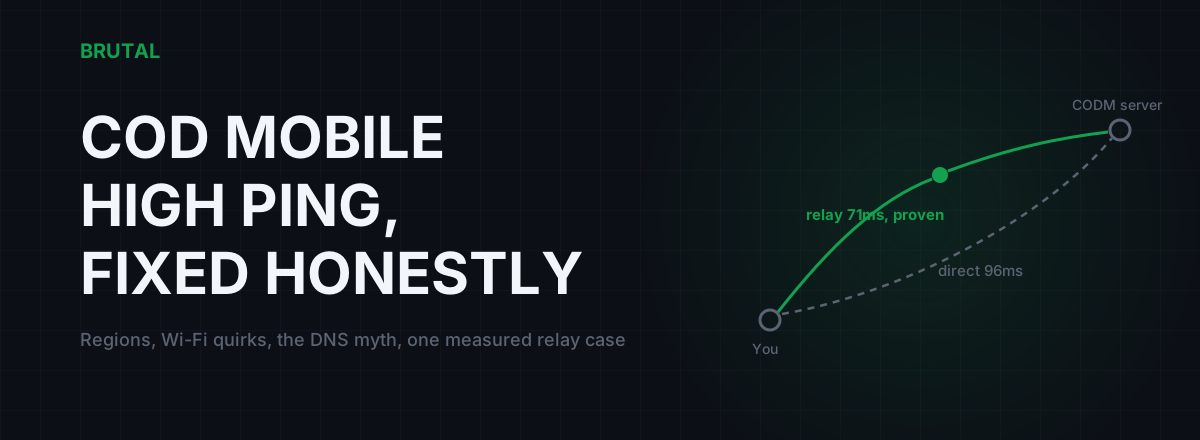
There's no COD Mobile high ping fix that beats geography. If your match is hosted 3,000 km away, roughly 60ms of your ping is light travelling through fiber, and nothing on your phone changes that. What you can fix is still worth fixing: playing on the wrong version's servers, a Wi-Fi hop that spikes because your phone keeps napping, and a home connection that queues your packets behind someone's cloud backup. Here's the checklist, in the order that actually pays off.
Read the number before you fix anything
Turn on the in-game ping display (it lives in CODM's settings, under the interface or network options depending on your version) and watch it through a full match, not one lobby screen. You're looking for one of two patterns, and they need completely different medicine.
Steady and high, say a flat 120ms that barely moves, means distance or routing. Your packets are travelling a long way, every time, reliably. Skip to the sections on regions and relays below.
Normal with spikes, say 45ms that jumps to 250 every half minute, means something local: your Wi-Fi hop, your router's queue, or your phone switching networks mid-match. The distance is fine; the path is unstable. The Wi-Fi and household sections are your problem.
For reference: under 60ms feels instant at CODM's pace. 60 to 100 is playable and you'll rarely blame it correctly. Above 100 you start losing close gunfights to it, and above 150 Search and Destroy stops being fun. These are rough bands, not laws.
Garena vs Activision: check you're on the right servers
COD Mobile isn't one game worldwide. Garena publishes the build for much of Southeast Asia. VNG runs Vietnam. Korea and Japan had their own build for years. Activision's global version covers most of everywhere else. These are separate apps with separate accounts and separate matchmaking pools, and you can't queue across them.
This matters for ping because each build matchmakes on its own infrastructure. Garena matches are commonly hosted out of Singapore, going by what players' traceroutes show. Activision doesn't publish a server map for the global build, but it assigns you a matchmaking region and keeps you there. Neither version gives you a server picker. PUBG Mobile lets you choose your server; CODM decides for you.
So the first honest check: are you on the build that serves your country? If you sideloaded an APK years ago, or created your account through a VPN for early access, you may be permanently matched a continent away, and no local tweak claws back that 100ms. Reinstalling the correct build from your local store, on a fresh account if you must, is sometimes the entire fix. Painful, but it's the only one that works.
Second check: parties. When you queue with a friend two regions over, the match lands on one region's servers and the farther players eat the distance. If your ping is only terrible when one specific friend is in the lobby, that's not a bug. That's a map.
Phone Wi-Fi quirks that add spikes
Phones are the worst Wi-Fi clients in your house, by design. Every engineering decision favors battery life over latency. Three quirks do most of the damage.
Band steering shoves you around
If your router broadcasts one network name for both 2.4GHz and 5GHz, it decides which band your phone uses, and it re-decides at bad moments. 2.4GHz reaches further but it's crowded with every neighbor, baby monitor and microwave on the street, and congestion there shows up as latency spikes, not just slow downloads. Split the bands into two SSIDs and connect the phone to the 5GHz one, within a wall or two of the router. If your building is dense, picking a cleaner Wi-Fi channel helps more than any app you can install.
Power save is a latency tax
Wi-Fi power saving lets your phone's radio sleep between packets while the router buffers anything that arrives for it. Waking up costs time, and it shows up as jitter: fine, fine, fine, 180ms, fine. Most phones exit power save when a game is actively pushing traffic, but aggressive battery savers can keep it sticky. Play plugged in or with battery saver off, and keep the signal strong. Weak signal means retransmissions, which compound everything above.
Smart switching mid-match
Features like Adaptive Connectivity, Wi-Fi Assist and dual-channel acceleration switch between Wi-Fi and mobile data, or blend them, whenever one looks weak. The switch itself is a spike, sometimes a full disconnect and reconnect. Pick one network for a ranked session and pin it: turn the assist features off, or deliberately play on mobile data if your Wi-Fi genuinely is worse.
Honest ceiling: even perfect Wi-Fi adds a few milliseconds and a little jitter over a wired connection, and for CODM's pace that residual is fine. Ethernet vs Wi-Fi has the real numbers if you're curious. USB-C Ethernet adapters for phones exist and do work, but they're a niche solution to a small remainder.
The DNS myth, CODM edition
Changing DNS does not lower your in-match ping. DNS translates names into IP addresses when the game connects to login and lobby services. Once you're in a match, your phone is firing UDP packets at a server IP it already knows, and DNS is never consulted again. There is nothing for a faster resolver to speed up.
The posts claiming DNS dropped someone's CODM ping by 30ms are matchmaking variance: they changed DNS, restarted, and got placed on a closer server the next session. It would have happened anyway. A good resolver is still worth having, because it makes login and the store snappier and routes around some flaky ISP resolvers. The DNS for gaming guide covers exactly what it does and doesn't touch. Just don't expect the match number to move.
Sometimes it's the house, not the phone
If your ping is beautiful at 7am and ugly at 9pm, stop debugging your phone. That daily rhythm is your home connection under load, and the mechanism is bufferbloat: your router accepting more traffic than the line can carry, queueing the overflow, and making your game packets wait in that queue. Uploads are the classic killer. One phone backing up photos to the cloud can add 100-300ms to everything else on the network while it runs.
Test it instead of guessing. Run the Waveform bufferbloat test once while the network is quiet, then again while someone streams and a backup runs. If latency under load balloons, you've found the disease. The bufferbloat explainer covers why it happens, and Smart Queue Management on your router, or simply scheduling backups away from your ranked hours, is the cure. This one fix routinely recovers more milliseconds than anything a phone setting can offer.
A note for emulator players
If you play CODM on GameLoop, your ping is your PC's connection, and the same physics applies with one advantage: you can plug in a cable. Do that first. Beyond the cable, ignore the registry ping-tweak folklore. CODM's match traffic is UDP, so Nagle-disabling and TCP window tricks have nothing to act on.
Also separate your lags. Emulator players constantly read frame drops as network lag. If the game stutters but the ping counter sits at 40ms, your bottleneck is rendering, not routing, and no network fix on this page will help.
The measured relay case: bad cross-region routes
Now the case that's left when everything above checks out: your ping is steady and high, you're on the right build for your country, and your local network is clean. What remains is the route your ISP takes to the game's region, and some routes are genuinely bad. Traffic from the Gulf to Singapore that detours through Europe. An ISP that hands off at a congested exchange every evening. You can see it yourself: run a traceroute toward the region you play on, at the hour you actually play, and look where the latency jumps.
A relay can fix this specific problem, because a relay is a different road. Your traffic rides a tunnel to a well-connected relay server, which hands it to the game server over better-peered paths. When your ISP's road is bad and the relay's road is good, you win real milliseconds: 10-40ms on a genuinely broken route, occasionally more. When your ISP's road is already good, the relay adds a hop and loses. On decent ISPs, direct wins most sessions. Be suspicious of any tool that claims otherwise.
A relay is just a different road. Usually the direct road wins, and the only honest move is to measure both and show you the receipt.
That's the design behind Smart Route: it detects which server your live match is using (read-only, no injection, no hooks, no kernel driver), measures the direct path against its relays for your actual connection, and engages only when the relay provably wins. Otherwise it stays direct and records "Direct won" on the session's Route Receipt. Smart Route runs inside BRUTAL Optimizer for Windows, so it routes CODM when you play it on a PC through an emulator. For CODM players, the relevant PoPs are Singapore, Chennai, Jakarta and Bahrain, which cover most of the bad-route geographies this game produces. How it decides between relay and direct is documented, and the measurement tools, ping test, traceroute and bufferbloat grade, are all in the free download. Expect the relay to earn its keep maybe one session in ten on a decent ISP, more if your evening routes are ugly, and near zero if you live next to the servers. That isn't the product failing. That's physics being respected.
The COD Mobile high ping fix checklist
| Fix | Typical effect | Verdict |
|---|---|---|
| Right build and region for your country | The biggest single factor; 100ms or more if you're wrong | Check first, always |
| Split SSIDs, force 5GHz, strong signal | Fewer spikes, jitter drops noticeably | Do it if you're on Wi-Fi |
| Disable Wi-Fi/data smart switching | Removes mid-match spikes and reconnects | Do it |
| Stop household uploads, fix bufferbloat | 50-300ms recovered under evening load | Do it if evenings are worse |
| Change DNS | Faster login screens, zero in match | Fine, but not a ping fix |
| "Ping booster" apps, RAM cleaners | Roughly nothing | Skip |
| Measured relay on a bad cross-region route | 10-40ms, maybe one session in ten | Test it, keep only proven wins |
Work the table top to bottom and measure after every change, because the order matters: region questions dwarf Wi-Fi questions, Wi-Fi questions dwarf DNS questions, and nothing below the line you've already fixed will show up until the bigger problem is gone.
Most players will be done after the first four rows without spending anything. If you're the steady-120ms cross-region case, measure a relay before you pay for one, and keep it only if the receipt says it won.
Frequently asked questions
What is a good ping for COD Mobile?
Under 60ms feels effectively instant at CODM's pace. 60-100ms is playable, and above 100ms you'll start losing close gunfights to it, especially in Search and Destroy and Ranked. Stability matters as much as the average: a steady 80 beats a 50 that spikes to 250.
Why is my COD Mobile ping suddenly high?
The usual suspects are matchmaking (you queued with a cross-region friend, or got placed on a farther server), evening congestion on your home line, or your phone silently switching between Wi-Fi and mobile data. Check whether the number is steady-high or spiky first; those have different causes and different fixes.
Does changing DNS lower ping in COD Mobile?
No. In-match traffic is UDP sent to a server IP the game already knows, so DNS isn't in the loop at all. A good resolver can make login and the store snappier, which is worth having, but your match ping won't move.
Does a VPN lower ping in COD Mobile?
Usually it adds a hop and raises ping. It only helps when your ISP's route to the game region is genuinely bad and the VPN's path is shorter, which you can only know by measuring both. A GPN like Smart Route does that measurement automatically and stays direct when direct wins.
Why is my ping high only in COD Mobile and not in other games?
Different games host in different places. CODM assigns your matchmaking region and doesn't offer a server picker, so it may be hosting you farther away than your other games do. A multi-region ping test will show whether the problem is distance or your route to one specific region.
Keep reading
 Gaming & FPS
PUBG Mobile High Ping Fix: What Actually Works
Most PUBG Mobile high ping comes from server distance and your own Wi-Fi, not the game. What actually lowers it, what's placebo, and when a measured relay earns its keep.
 Network & Latency
How Do Ping Reducers Work? Relay vs Direct, With Receipts
A ping reducer only helps when a relay path genuinely beats your ISP's route. Here's how Smart Route detects the server, measures both paths, and decides, with a receipt either way.
 Gaming & FPS
Free Fire MAX High Ping: Honest Fixes for Low-End Setups
High ping in Free Fire MAX is mostly server distance and a weak WiFi or 4G radio. What actually helps on a budget phone, what's placebo, and how to test both in 60 seconds.
Stop guessing. Measure it.
BRUTAL Optimizer is the honest way to speed up Windows — 17 free modules, a real FPS overlay, verified disk cleanup and drive health. No kernel driver of our own, no game hooks, every setting change reversible.