Best DNS for Gaming: Does It Lower Ping?
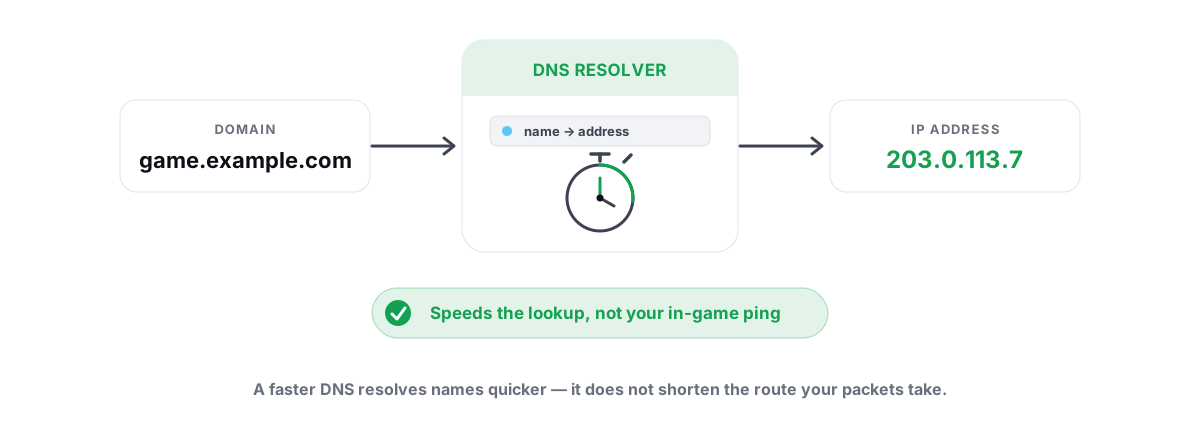
Picking the best DNS for gaming makes pages, launchers, and menus load faster. It does not lower your in-game ping. Here's the real mechanism, how to find the genuinely fastest resolver for your line, and how to apply it without breaking anything.
What DNS Actually Does (and Doesn't) for Games
DNS is the phone book of the internet. When something on your PC needs to reach matchmaking.riotgames.com, it first asks a DNS resolver to turn that name into an IP address. The resolver answers, your PC caches it, and then the actual connection happens — directly to that IP, over routes DNS has no say in.
That's the whole job. DNS resolves names to numbers. It runs at the start of a connection and almost never during the connection. Once your game has the server's IP, your DNS resolver is out of the loop entirely.
So the question "does a faster DNS lower ping?" runs into a wall: your in-game ping is the round trip between your PC and the game server, hop by hop across the network. DNS isn't on that path. A different resolver changes who answers the name-lookup, not how fast packets travel once the match starts.
DNS speed affects how fast you start talking to a server. Ping is how fast you keep talking to it once connected. Different stages, different fixes. A faster resolver helps the first; it does nothing for the second.
The Best DNS for Gaming Won't Lower Your Ping
Search "best DNS for gaming" and you'll find videos promising lower ping, less lag, and more FPS from a DNS change, often with before/after numbers that look convincing. The claim is wrong, and it's worth knowing why so you don't waste an afternoon chasing it.
Your ping is set by physics and routing: the distance to the server, the number of hops, the quality of each link, and whether any of them are congested. None of that is decided by which resolver translated the hostname. Changing DNS can't move a data center closer or shorten the path your packets take.
When people show "lower ping after changing DNS," one of a few things is usually going on. The before and after were measured at different times, so normal variance got credited to DNS. The matchmaker picked a closer server that session — luck, not DNS. A faster menu got mistaken for a faster match. Or the router got rebooted as part of the change and that cleared a real problem.
There is one narrow exception, and even it isn't really "lower ping." Some games and CDNs return different server IPs depending on where your DNS query appears to come from. A resolver that supports EDNS Client Subnet (which Google and OpenDNS do) can give the CDN a better idea of your location and hand back a closer edge. That can shave latency to downloads and patch servers, and occasionally to a CDN-fronted login. It rarely changes the actual game-match server, and the effect is inconsistent. Don't build your expectations on it.
Where Faster DNS Genuinely Helps
None of this means DNS is pointless. A fast, reliable resolver makes a real difference you can feel — just not where the myth says. Here's where you'll actually notice it.
- First connect to a server. Logging into a launcher, hitting matchmaking, loading a server browser — each fires DNS lookups. A resolver that answers in 10 ms instead of 80 ms makes that snappier. You feel it as menus and logins that resolve instantly instead of hanging for a beat.
- Web browsing and storefronts. A modern web page pulls from dozens of hostnames. Faster lookups across all of them is the single most noticeable everyday win from changing DNS — pages just feel quicker to start loading.
- Cold-cache moments. The first visit to any new domain after a reboot or cache flush is pure DNS latency. A faster resolver makes those first hits sharper.
- Reliability and uptime. Some ISP resolvers are slow, overloaded at peak, or occasionally drop queries — which shows up as random "can't connect" hiccups that aren't really the game's fault. A solid public resolver is steadier.
- Fewer hijacks and injected errors. Some ISP DNS redirects failed lookups to ad pages or blocks domains clumsily. A clean resolver returns honest answers.
Cloudflare vs. Google vs. Quad9 vs. Your ISP
The big public resolvers are all fast and free. Which one is fastest depends on which has a server closest to you and how your ISP peers with them — so the "best" answer is regional, not universal. Here's the honest rundown.
| Resolver | Primary / Secondary | Notable traits |
|---|---|---|
| Cloudflare | 1.1.1.1 / 1.0.0.1 | Consistently among the lowest median lookup times; privacy-focused, no logging of personal data. No EDNS Client Subnet by design. |
8.8.8.8 / 8.8.4.4 | Huge global footprint, very reliable; supports EDNS Client Subnet, which can help CDN/download routing. | |
| Quad9 | 9.9.9.9 / 149.112.112.112 | Blocks known-malicious domains at the resolver. Slightly slower in some regions because of the security filtering, but safer. |
| OpenDNS | 208.67.222.222 / 208.67.220.220 | Optional content filtering, EDNS Client Subnet support; reliable but not always the fastest. |
| Your ISP | (auto) | Often the closest physically, sometimes the fastest — or overloaded and slow. The only way to know is to measure. |
A few honest points the comparison videos skip. Your ISP's resolver is sometimes the fastest one, because it sits inside their network, physically close to you. Don't assume a public resolver wins until you've tested. Cloudflare usually posts the lowest raw lookup times in independent measurements, but "usually" isn't "at your house." And the differences are milliseconds on lookups, which matters for snappiness but is invisible during a match.
Security and privacy are the more meaningful differentiators than raw speed once you're inside the fast tier. Quad9 blocks malware domains. Cloudflare commits to not logging your browsing. Pick on those grounds when two resolvers are within a few milliseconds of each other — which they often are.
How to Benchmark DNS From Your Own PC
The only DNS recommendation worth trusting is the one measured from your own connection. A resolver that's fastest in a benchmark video filmed in another country tells you nothing. Here's how to test properly.
The principle: query a name not already cached
If a hostname is sitting in your resolver's or your PC's cache, the "lookup" returns in under a millisecond and the test is meaningless. Real DNS benchmarking forces a cold lookup — a fresh, uncached domain — so you measure the resolver actually doing work. Run several queries and take the median, not a single number, because any one query can be a fluke.
Manual method with built-in tools
You can test by hand. Flush your local cache first with ipconfig /flushdns in an elevated Command Prompt, then time lookups against each resolver. The Resolve-DnsName PowerShell cmdlet lets you target a specific server, for example Resolve-DnsName example.com -Server 1.1.1.1. Repeat against 8.8.8.8, 9.9.9.9, and your ISP's default, using a domain you haven't visited recently each time.
This works but it's fiddly, and timing it precisely by hand is awkward. The value is conceptual: you're comparing cold-lookup latency across resolvers, from your line, several times each.
The easier path: a DNS benchmark that does it for you
A proper benchmark queries every candidate resolver with a list of uncached domains, repeats, and reports the median latency per server so you can see the winner at a glance. BRUTAL Optimizer's network lab does exactly this — it times the major public resolvers plus your current one from your PC, then lets you apply the fastest in one click. The benchmark is free, runs in user mode, and touches nothing an anti-cheat cares about. However you test it, the point stands: measure from your connection instead of trusting a generic "best DNS" list.
Changing DNS in Windows Safely
Once you know which resolver wins on your line, applying it is quick and fully reversible. You can do it in the GUI or from the command line.
Through Settings (GUI)
- Open Settings → Network & Internet, pick your active connection (Wi-Fi or Ethernet).
- Find DNS server assignment and switch it to Manual.
- Turn on IPv4, enter your chosen primary and secondary (for example
1.1.1.1and1.0.0.1). If your connection uses IPv6, set those too or leave it automatic. - Save, then run
ipconfig /flushdnsso old cached answers don't linger.
From the command line
For a wired adapter named "Ethernet," an elevated prompt does it: netsh interface ip set dns name="Ethernet" static 1.1.1.1 then netsh interface ip add dns name="Ethernet" 1.0.0.1 index=2. Adjust the adapter name to match yours (check with ipconfig).
Any tool that "applies DNS" for you, including BRUTAL Optimizer, is running this same Windows command underneath — it's just netsh, no driver and nothing exotic, which is why a DNS change is safe alongside any anti-cheat.
Set it once at the router instead
If you'd rather every device benefit without per-PC changes, set the DNS at your router. Same resolvers, applied network-wide. The trade-off is that it's one more place to remember when you're troubleshooting. For a single gaming PC, the adapter is simplest.
Picking and Applying the Fastest Resolver
Here's the whole decision, compressed. Benchmark from your own PC. If a public resolver clearly beats your ISP's, switch to it on your adapter or router and flush the cache. If your ISP's resolver is already fast and reliable, leave it — there's no prize for using 1.1.1.1 when your ISP's DNS answers just as quickly.
Then set your expectations honestly. You bought yourself faster name lookups: snappier menus, quicker logins, web pages that start loading sooner. You did not buy lower in-game ping, more FPS, or less rubber-banding. Those come from elsewhere.
| Symptom | Is DNS the fix? | What actually helps |
|---|---|---|
| Menus/launcher slow to connect | Often yes | Faster resolver, flush cache |
| Web pages slow to start loading | Yes | Faster resolver |
| High in-game ping | No | Route to server, server choice, ISP |
| Lag spikes when others use the net | No | Fix bufferbloat (QoS / SQM) |
| Rubber-banding, teleporting | No | Fix packet loss and jitter |
| Random "can't connect" hiccups | Sometimes | More reliable resolver |
If your real complaint is latency during the match, skip the DNS rabbit hole and go straight to the network that's actually carrying your packets. A traceroute shows you which hop is adding the lag, a bufferbloat test catches the lag that only appears under load, and fixing packet loss and jitter kills the spikes that DNS never could. If the whole PC feels sluggish rather than just the network, that's a different chain again — start with the real causes of a slow PC.
You don't need any software to do this — Windows resolves DNS, lets you change it, and flushes the cache on its own. If you'd rather measure resolvers from your own line and apply the winner in one click, BRUTAL Optimizer's free network lab benchmarks the major DNS providers plus your current one and sets the fastest via Windows' own netsh — reversible, no kernel driver, fine to run next to Vanguard or EAC. Honest tool, honest expectation: it speeds up lookups, not ping.
Frequently asked questions
Does changing DNS lower my ping in games?
No. DNS only translates a server name into an IP address at the start of a connection. Your in-game ping is the round trip between your PC and the game server, hop by hop, and DNS is not on that path. A faster resolver makes connects and menus snappier but does not change match latency.
What is the best DNS server for gaming?
Whichever one is fastest and most reliable from your own connection. Cloudflare (1.1.1.1), Google (8.8.8.8) and Quad9 (9.9.9.9) are all strong, but the winner is regional. Benchmark them plus your ISP from your PC and pick the lowest median lookup time, then decide on privacy or filtering if two are close.
Is Cloudflare or Google DNS faster?
Cloudflare usually posts the lowest raw lookup times in independent tests, but Google has a larger footprint and supports EDNS Client Subnet, which can help CDN and download routing. The real difference depends on which has a server closer to you, so measure both from your own line rather than trusting a generic ranking.
Will a faster DNS give me more FPS?
No. FPS is set by your GPU, CPU and game settings, none of which DNS touches. Any FPS claim tied to a DNS change is coincidence or marketing. DNS only affects how fast hostnames resolve, which shows up as quicker logins and page loads.
How do I change DNS in Windows and undo it?
Go to Settings, Network and Internet, your active connection, set DNS to Manual and enter your chosen servers, then run ipconfig /flushdns. To revert, set DNS assignment back to Automatic. It is fully reversible, so changing it cannot permanently break anything.
Keep reading
 Network & Latency
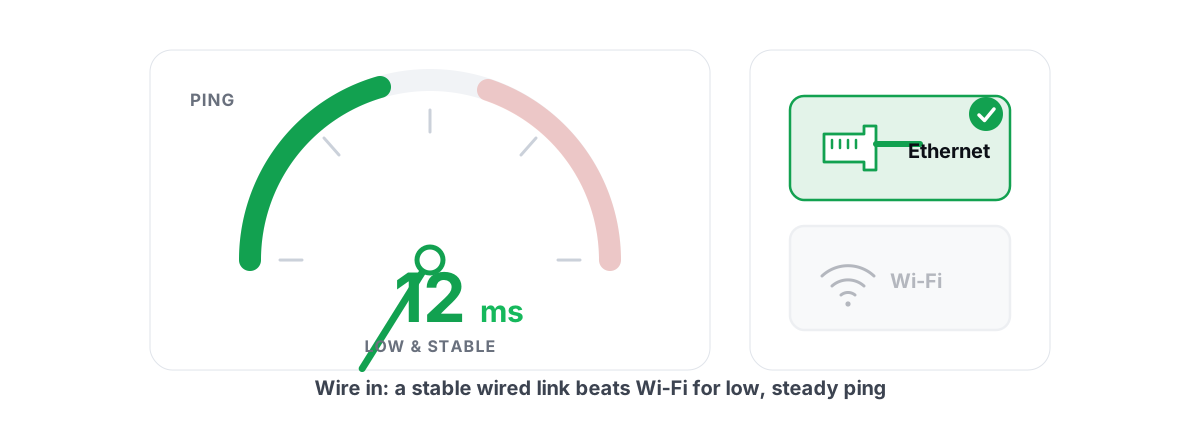
How to Reduce Ping in Online Games (Real Fixes)
Sort the ping you can fix - server, bufferbloat, Wi-Fi, routing - from the ping you can't, and skip the ping-booster snake oil.
 Network & Latency
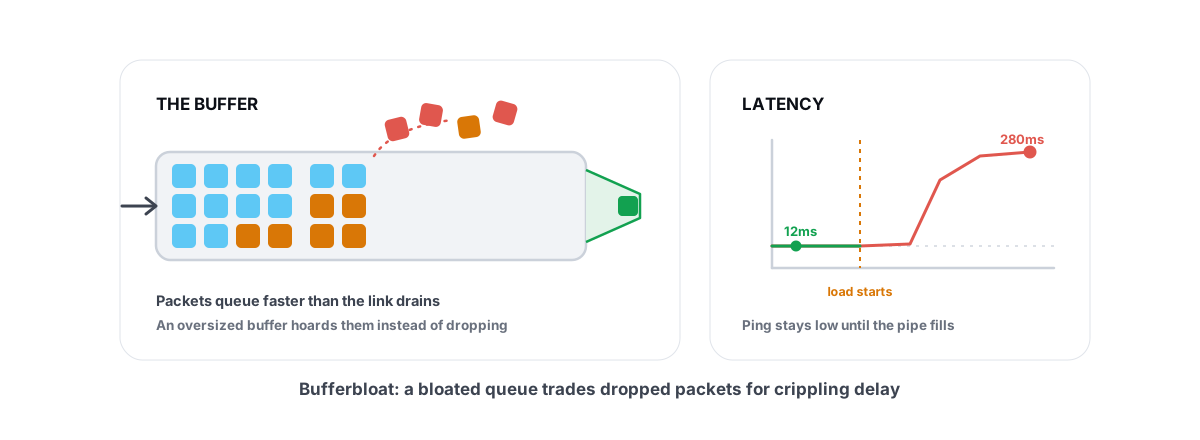
What Is Bufferbloat? The Hidden Lag in Your Net
Why your ping spikes the moment anything downloads, how to grade it A-F, and the one router-side fix (SQM) that actually works.
 Network & Latency
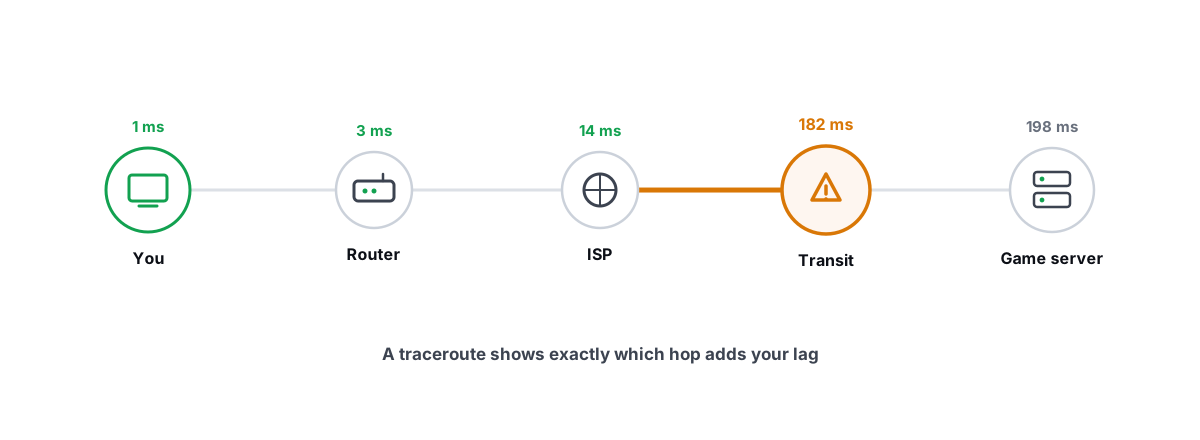
How to Read a Traceroute: Find Your Lag's Real Source
Read a real ICMP traceroute and classify every hop so you know whether the lag is your router, your ISP, or the game server.
Stop guessing. Measure it.
BRUTAL Optimizer is the honest way to speed up Windows — 17 free modules, a real FPS overlay, verified disk cleanup and drive health. No kernel driver of our own, no game hooks, every setting change reversible.