What Is Bufferbloat? The Hidden Lag in Your Net
Your speed test says 300 Mbps. Your game still spikes to 200ms the second someone in the house starts a download. That gap has a name — bufferbloat — and once you understand what is bufferbloat doing to your connection, you can't unsee it.
The symptom: great speed test, terrible game lag
Here's the scene every gamer knows. You run a speed test, it screams 300 down, 20 up, 12ms ping. The numbers are gorgeous. Then you load into a match, your roommate fires up a 4K stream or Steam starts a 60GB update, and your ping graph turns into a heart monitor. Teleporting enemies, rubber-banding, shots that don't register.
So you blame the game server. Then your ISP. Then you buy a "gaming router." None of it helps, because none of it is the actual problem. The speed test measured the wrong thing.
A speed test measures throughput on an empty road. Your game cares about latency on a busy one. The disease that lives in the gap between those two numbers is bufferbloat, and it's the single most common cause of lag spikes that nobody bothers to name.
If your ping is fine until something else uses the connection, then jumps to 5-10x, you don't have a speed problem. You have a bufferbloat problem.
What bufferbloat is, in plain English
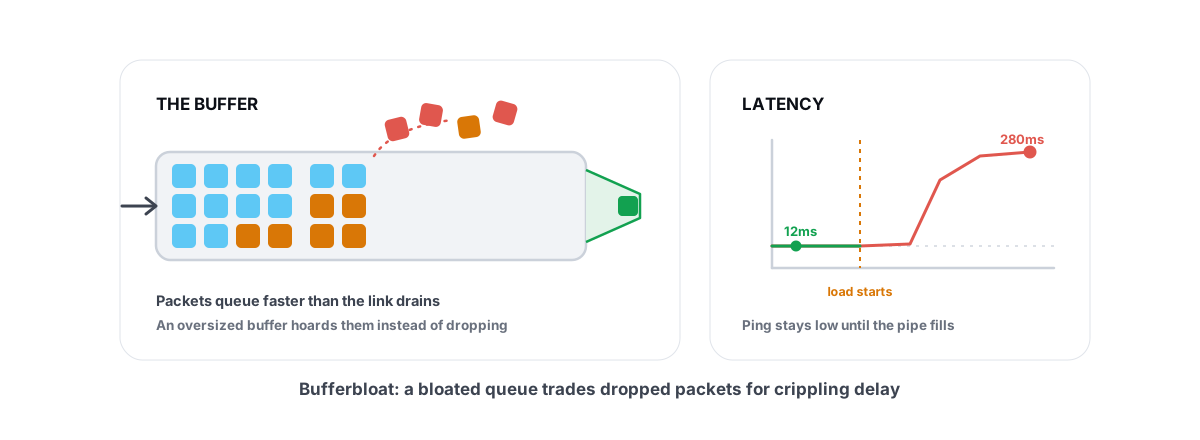
Every device that moves data — your router, your modem, the gear at your ISP — has a memory buffer. When packets arrive faster than the link can send them out, they wait in that buffer instead of being dropped. Think of it as a line at a checkout counter.
A small buffer is healthy. It smooths out brief bursts. The problem is that hardware makers, terrified of dropping a single packet, build these buffers far too large. Megabytes too large. So when your upload or download saturates the link, the buffer fills with thousands of queued packets and stays full.
Now picture your game's tiny "where am I, where are my shots" packet arriving at that counter. It gets no priority. It joins the back of a line hundreds of packets deep. By the time it reaches the front and gets sent, 100, 200, sometimes 1000 milliseconds have passed. That delay is bufferbloat: latency manufactured by oversized buffers that won't drain.
The cruel part is TCP, the protocol behind most downloads, is built to keep pushing until it sees packet loss. A giant buffer hides the loss, so TCP keeps shoving more data in and the buffer stays permanently jammed. The buffer meant to prevent loss ends up producing latency instead.
Idle ping vs. ping under load
This is the whole concept in two numbers, and it's why a normal speed test misses it.
- Idle ping — your latency when the connection is doing nothing else. This is the number speed tests show, and it usually looks great: 10-30ms to a nearby server.
- Loaded ping — your latency while the connection is saturated up and down at the same time. This is the number that decides whether your games feel good. On a bloated connection it can be 5x, 10x, even 20x your idle ping.
A connection with 15ms idle ping that climbs to 250ms under load is broken for gaming, even if it downloads at gigabit speeds. A connection with 30ms idle that only rises to 45ms under load is excellent, even on a cheap plan. Latency under load predicts how a game feels far better than raw Mbps or even idle ping.
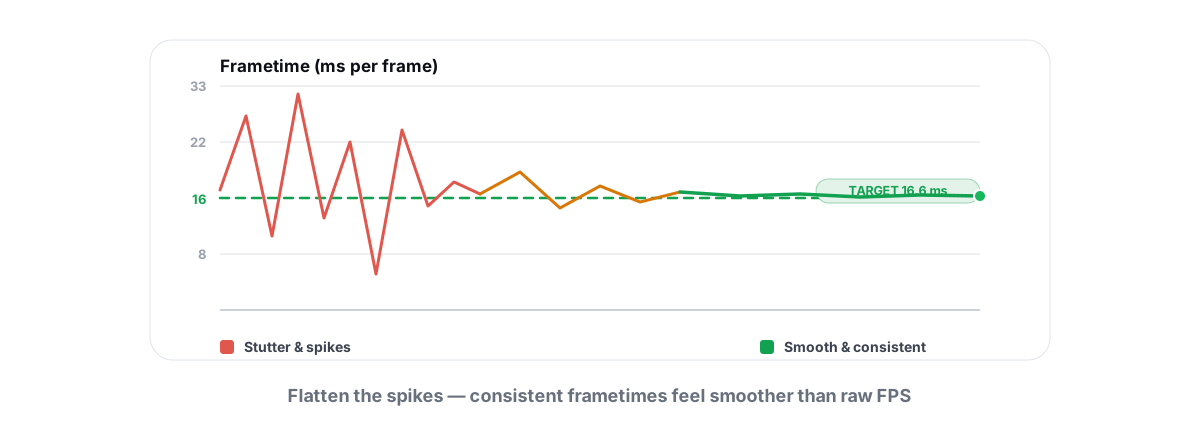
It's the same trap as judging a PC by one benchmark number. A high average framerate with brutal stutter feels worse than a lower, steady one — which is why you measure frametime spikes, not just average FPS. Bufferbloat is the network version of a stutter: the average looks fine, the spikes ruin you.
Grading bufferbloat from A to F
Because bufferbloat is just "how much does my ping rise under load," it grades cleanly. The widely used method — popularized by Waveform and the Bufferbloat.net project — saturates your line in both directions while pinging, then assigns a letter based on how far latency climbs above its idle baseline.
| Grade | Latency increase under load | What it feels like in-game |
|---|---|---|
| A+ | Under ~5ms | Rock solid. SQM is clearly working. |
| A | ~5-30ms | Great. You won't notice downloads happening. |
| B | ~30-60ms | Mostly fine. Occasional soft spikes. |
| C | ~60-200ms | Noticeable lag when the line is busy. |
| D | ~200-400ms | Bad. Rubber-banding during any background traffic. |
| F | 400ms+ | Unplayable the moment anything downloads. |
The exact millisecond cutoffs vary slightly between tools, but the shape is always the same: A means your latency barely moves under load, F means it explodes. You want A or B. Anything C or worse is fixable — and the fix is not on your PC.
Why your speed tier doesn't fix it
The most expensive mistake here is upgrading your plan. People with a C grade call their ISP, pay for double the speed, and get the exact same lag spikes. Here's why.
Bufferbloat is a queue management problem, not a capacity problem. A faster pipe drains a bit quicker, but the oversized buffer is still oversized, and saturating a 600 Mbps link fills it just as solidly as a 300 Mbps one. A bigger truck doesn't fix a traffic light that holds cars too long.
The other dead ends people chase:
- A new "gaming" router — only helps if it actually runs smart queue management and you turn it on. Most ship with it off, or with a useless "game mode" that just prioritizes a hardcoded port list.
- A VPN — adds a hop and usually adds latency. It can occasionally route around a bad ISP path, but it does nothing for the buffer sitting in your own house.
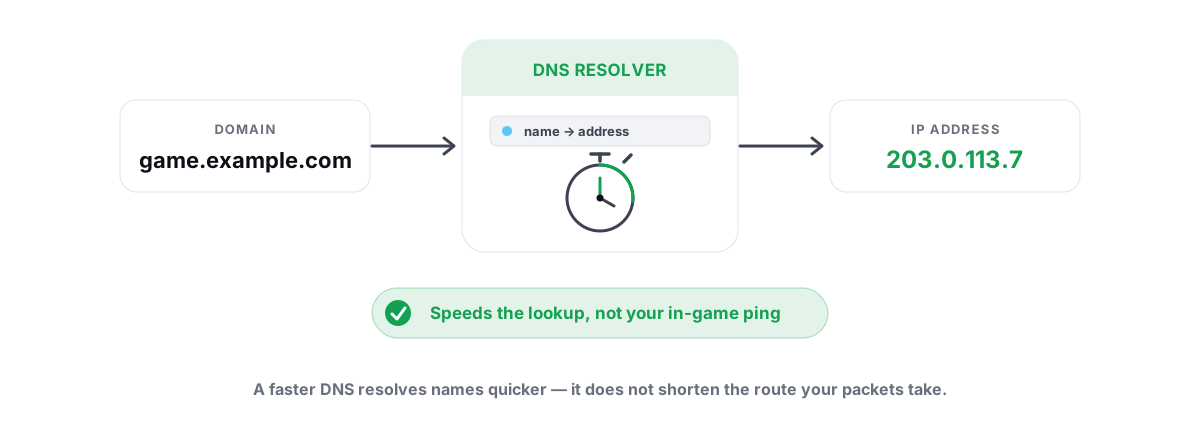
- Changing DNS — speeds up how fast names resolve, full stop. Good DNS choices have their place, but DNS has zero effect on packets stuck in a queue. If someone sells you DNS as a bufferbloat cure, walk away.
- Tweaking Windows — your PC's network stack isn't the bottleneck. The buffer that's bloating sits in your router or modem, downstream of your machine entirely.
The real fix: SQM and smart queue management
The fix lives on the device that owns the bottleneck — almost always your router. It's called SQM (Smart Queue Management), and the modern algorithms are fq_codel and cake. Some routers label it "QoS," "Adaptive QoS," or "Bufferbloat" in their settings.
SQM takes control of the queue away from the dumb, oversized hardware buffer. Instead of letting packets pile up unmanaged, it:
- Caps your throughput slightly below your real line speed (say 90-95%), so the bottleneck moves into the router where smart software controls it, instead of an unmanaged buffer upstream.
- Drops or marks packets early when a queue starts growing, signaling TCP to back off before the buffer ever bloats.
- Fairly interleaves flows, so your tiny game packets slip between the big download chunks instead of waiting behind all of them.
How to actually set it up
- Check whether your router supports SQM. Look in the QoS or traffic-shaping section for "SQM," "fq_codel," "cake," or "Adaptive QoS." OpenWrt, many ASUS (Merlin), and recent Ubiquiti and eero devices have it.
- Enter your real upload and download speeds. Run a few speed tests, then set the SQM caps to roughly 90-95% of the lower honest result.
- Enable
cakeif offered, otherwisefq_codel. Save and reboot if prompted. - Re-run your bufferbloat test. A connection that graded D or F should now sit at A or B. If it didn't improve, your cap is too high — lower it 5% and test again.
If your ISP-provided modem/router combo can't do SQM (many can't), the standard move is to put it in bridge mode and run your own router behind it that can. That one change has rescued more gaming connections than any "gaming" product ever sold.
Testing your own connection honestly
Before you change anything, get a real baseline — and be honest about the conditions. A bufferbloat test is only meaningful if it's actually saturating the link and measuring latency at the same time.
A few rules so you don't fool yourself:
- Test wired, not Wi-Fi, first. Wi-Fi adds its own latency and variance. If you test over wireless and see spikes, you can't tell whether it's bufferbloat or just the air. Plug in for the baseline.
- Test both directions. Upload saturation often causes worse bloat than download, and it's the one people forget. A test that only loads download can hand you a false A.
- Make sure nothing else is hammering the line during your idle reading, or your baseline is already inflated.
- Test more than once. One run can be a fluke. Three runs tell you the real shape.
For the part you run on your own PC — idle ping, jitter, and packet loss to the servers you actually play on — you want a tool that tests honestly instead of guessing. BRUTAL Optimizer's network lab does a real ICMP traceroute with hop classification, a ping/jitter/packet-loss measurement, and a bufferbloat A-F grade, so you can see where your latency comes from and whether it climbs under load. It's a user-mode tool reading the network data Windows already exposes — no kernel driver, no NIC driver, nothing that touches anti-cheat.
Once you know your grade, the path is clear. If your loaded ping is good, your remaining lag lives somewhere else — the route, the game server, or packet loss on a specific hop. If your packets are being lost or jittering, that's a separate fight. And for the full picture of where in-game lag actually comes from, the broader guide to reducing ping in online games walks every layer from your PC to the server.
Bufferbloat is one of the few networking problems with a clean, verifiable fix. You measure a number, change one setting on the right device, measure again, and the number is better. No placebo, no faith required. If you want a single tool that grades your connection and audits the rest of your latency chain in one place, the free network lab in BRUTAL Optimizer does exactly that — but the test and the SQM fix above work whether or not you ever install a thing.
Frequently asked questions
How do I know if I have bufferbloat?
Run a bufferbloat test that pings while saturating your upload and download at the same time. If your latency stays close to its idle value, you're fine. If it jumps to 5-10x idle under load, you have bufferbloat.
Will a faster internet plan fix bufferbloat?
Almost never. Bufferbloat is a queue management problem, not a bandwidth problem. Saturating a faster link fills the same oversized buffer just as solidly. The fix is SQM on your router, not more Mbps.
What is SQM and which algorithm should I use?
SQM stands for Smart Queue Management. It controls the queue so packets don't pile up. Use cake if your router offers it, otherwise fq_codel, and set the throughput cap to about 90-95 percent of your real line speed.
Does changing DNS or using a VPN fix bufferbloat?
No. DNS only affects how fast names resolve and has zero effect on queued packets. A VPN usually adds latency and does nothing for the buffer inside your own house. Both are common false cures.
Why does my ping spike only when someone is downloading?
That is the textbook bufferbloat symptom. The download saturates your link, the router's oversized buffer fills with queued packets, and your tiny game packets wait behind them. Idle ping looks fine because nothing is filling the buffer yet.
Keep reading
 Gaming & FPS
How to Fix Stuttering in Games (Frametime Spikes)
Stutter is a frametime problem, not an average-FPS one — isolate the real causes and confirm each fix with 1% lows.
 Network & Latency
Best DNS for Gaming: Does It Lower Ping?
A faster DNS speeds up connects, menus and browsing, not in-game ping. How to find and apply the genuinely fastest resolver for your line.
 Network & Latency
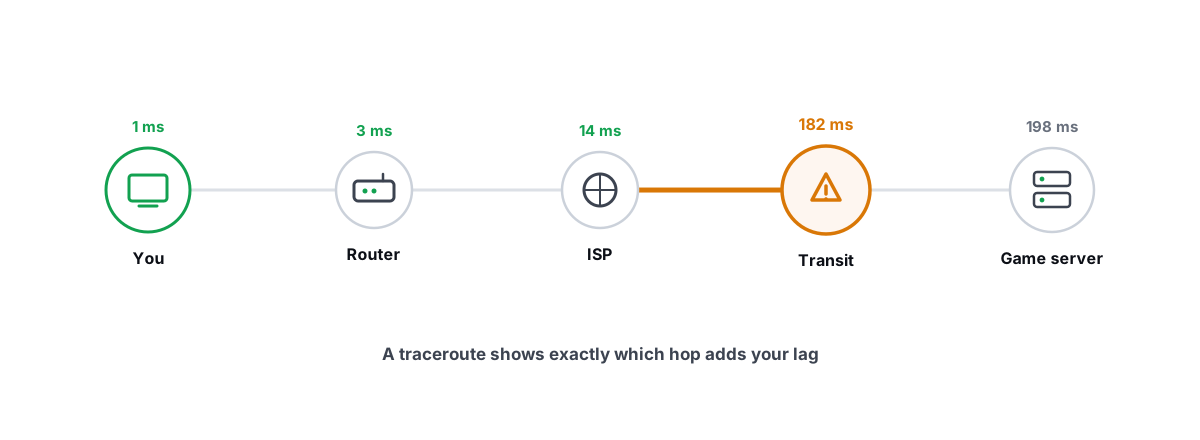
How to Read a Traceroute: Find Your Lag's Real Source
Read a real ICMP traceroute and classify every hop so you know whether the lag is your router, your ISP, or the game server.
Stop guessing. Measure it.
BRUTAL Optimizer is the honest way to speed up Windows — 17 free modules, a real FPS overlay, verified disk cleanup and drive health. No kernel driver of our own, no game hooks, every setting change reversible.