Does a Gaming VPN Lower Ping? The Honest Answer
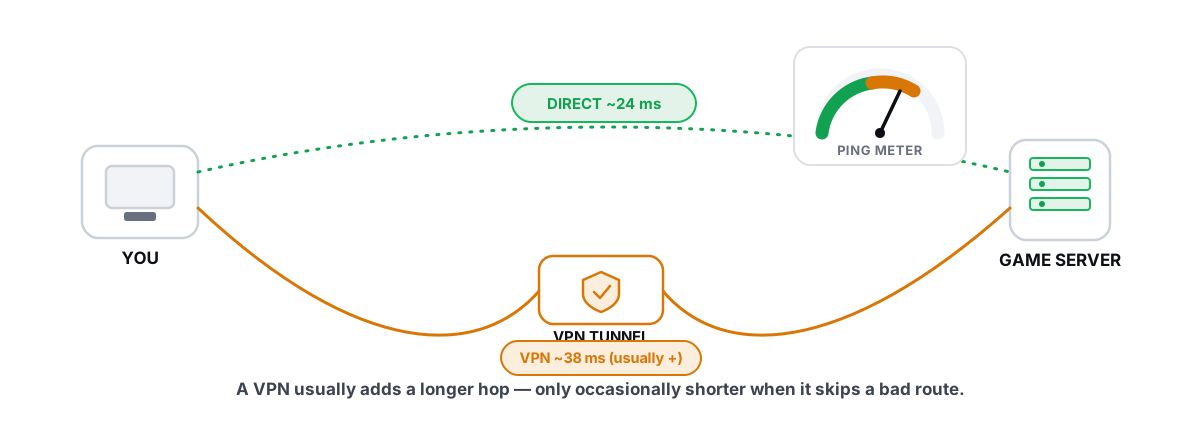
Does a VPN lower ping for gaming? It can. It usually doesn't. The honest answer depends entirely on one thing: whether your default route to the game server is bad, and you can check that for free before you pay a cent.
The marketing says a VPN gives you a "faster, more direct route to the game." That's true in maybe one case out of ten, and false in the rest. A VPN adds a hop. Adding a hop normally adds latency. The exception is real but narrow, and it's worth understanding precisely so you don't pay a monthly fee for slower games.
Does a VPN lower ping, or just add latency?
Ping is round-trip time: how long a packet takes to reach the game server and come back. Lower is better. Without a VPN, your packets go straight from your router to your ISP to the game server over whatever path the internet's routing protocols pick.
A VPN inserts a detour. Your packets now travel to the VPN server first, get decrypted, then go on to the game. The return trip retraces that path. You've added physical distance and an extra processing step, and both cost milliseconds.
Three things work against you:
- Extra distance. If the VPN server isn't directly between you and the game, you're going out of your way. A packet that took a 20 ms straight line now does a triangle.
- Encryption overhead. The VPN encrypts every packet and decrypts it at the other end. On modern hardware this is small, but it's not zero, and it adds processing time at both ends.
- An extra server under load. The VPN's exit node is shared. If it's busy, your packets queue. Congestion there shows up as jitter, the thing that actually ruins fast-paced games.
For most people on a competent ISP, the default route to a nearby game server is already close to a straight line. There's no shorter path to find, so a VPN can only add to the number. You'll typically see ping go up by 5 to 40 ms, sometimes more.
If your ISP already routes you efficiently to the game server, a VPN has no shortcut to offer. It can only add distance, encryption, and a shared server in the middle.
The one real case: routing around a bad ISP path
Here's where the honest answer gets interesting. The internet doesn't route by geography. It routes by business agreements between networks (peering and transit). Sometimes those agreements produce a route that's absurd.
You're in one country, the game server is a few hundred miles away, but your ISP hands your traffic to a transit provider that drags it through a distant exchange before it comes back. This is real, and it's common with smaller or budget ISPs, mobile carriers, and some regions where local peering is poor.
When that happens, your default route is the long way around. A VPN whose exit server sits closer to the efficient path can, by accident or design, give your packets a shorter physical route to the game. In that specific situation, ping drops. I've seen it take a 90 ms route down to 45 ms.
The mechanism isn't magic. The VPN didn't "optimize" anything. It just gave your traffic a different entry point into the internet's core, one that your ISP's routing wasn't using. If your ISP's route was already sane, this does nothing for you.
How to know if you're in that case (traceroute)
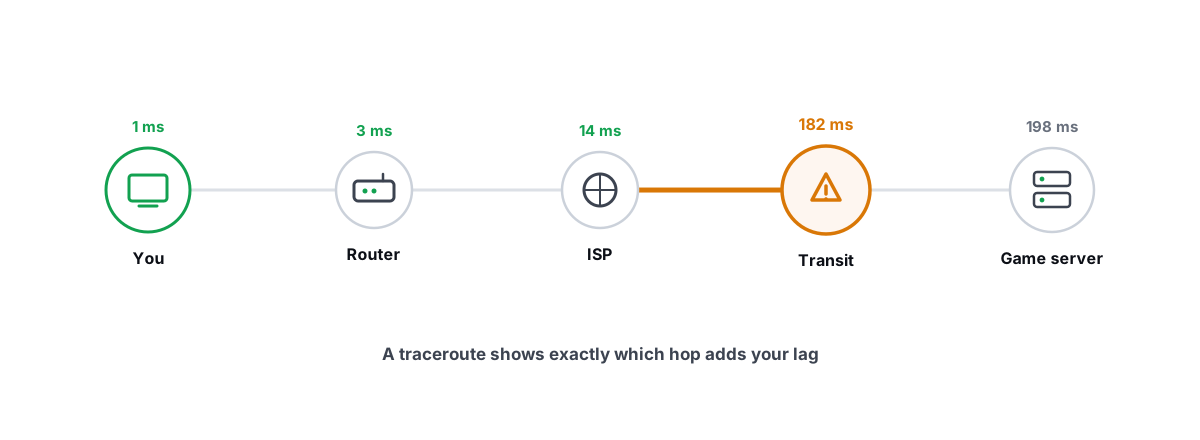
You don't have to guess. A traceroute shows every hop your packets take to a destination and the latency to each one. It's the single best tool for telling "my route is fine" apart from "my route is insane."
Run one against the game server's IP (or a server in the right region). On Windows:
tracert -d 1.2.3.4
The -d skips reverse-DNS lookups so it runs faster. Read the output like this:
- Hops 1 to 3 are usually your router and your ISP's local network. Latency here should be tiny, single digits.
- Middle hops are your ISP's backbone and transit. Watch where the latency makes a big jump and stays high.
- Geography in the hostnames. If a hop's name contains an airport code or city far from both you and the server, your traffic is taking a detour. That's the smoking gun.
What you're looking for is a single hop where latency jumps disproportionately, or a route that clearly leaves your region and comes back. A clean route climbs gently and lands at the destination. A bad route spikes early and stays inflated, or visibly wanders. If you want a deeper walkthrough of reading the output hop by hop, see how to read a traceroute and find your lag's real source.
BRUTAL Optimizer's network lab runs a real ICMP traceroute and classifies each hop as your local network, ISP backbone, or international transit, so you can see at a glance whether the bottleneck is in your house, your ISP, or far out in the internet's core. That distinction tells you whether a VPN could even help: a VPN can only fix problems out past your ISP, never one in your own router or Wi-Fi.
Anti-cheat and ToS risks of gaming VPNs
A VPN changes the IP address the game sees. That has consequences beyond latency.
Some games and anti-cheat systems flag VPN and datacenter IP ranges. The reasoning is that cheaters and ban-evaders hide behind them, so a flagged IP can mean extra scrutiny, a soft ban, or being dumped into a worse matchmaking pool. You're not cheating, but you can inherit a shared exit IP's bad reputation.
Region issues stack on top. Connecting through a server in another country can route you to that region's servers, away from your friends, or trip terms-of-service rules about accessing region-locked content or stores. Some publishers explicitly prohibit VPNs in their terms. Bans for this are rare, but they exist, and "I was just trying to lower my ping" won't get your account back.
A VPN sits at the network layer, so this is a different risk category from PC optimizers, which raises a question people often confuse. If you're worried about software getting you banned in general, the line that matters is whether something touches the game process or the network stack at the driver level. We covered exactly where that line is in the four bright lines of anti-cheat-safe optimization and the broader question in whether a PC optimizer can get you banned.
Server distance and the speed-of-light limit
There's a hard floor under every ping number, and no software beats it: the speed of light in fiber.
Light in glass travels about 200,000 km/s, roughly two-thirds of its speed in a vacuum. That's a real, fixed limit. A round trip to a server 1,000 km away can't be faster than about 10 ms no matter what you do, and real-world routing, switching, and queuing push it higher.
This is why server distance dominates ping. If the nearest official game server is 2,000 km from you, your floor is around 20 ms before anything else is counted, and a VPN can't shorten the physical distance to that server. It can only change the path your packets take to reach it.
So the honest framing is: a VPN can sometimes straighten a crooked path, but it can never make a far server close. If your high ping is just distance to the only server in your region, no VPN, DNS change, or optimizer fixes that. The fix is a closer server, which you usually can't choose.
Marketing claims vs measured reality
Gaming-VPN ads lean on a few claims. Here's what holds up when you measure.
| The claim | The reality |
|---|---|
| "Faster, more direct route to game servers" | True only if your ISP's route was bad to begin with. On a good route, the VPN's path is longer, not shorter. |
| "Reduces lag and ping" | Mostly false. It usually raises ping. It reduces lag only in the bad-route case, which a traceroute reveals in two minutes. |
| "DDoS protection for gamers" | Genuinely useful, but it's a security benefit, not a latency one. It hides your home IP. Different problem. |
| "Anti-throttling / bypass ISP traffic shaping" | Occasionally real if your ISP throttles game traffic specifically. Rare on most consumer plans. Test before you trust it. |
| "Lower ping in every game" | Impossible. Ping is per-route. A VPN that helps one game's servers will hurt another's whose servers sit elsewhere. |
The only claim that survives unconditionally is DDoS protection, and that has nothing to do with ping. Everything latency-related comes back to the same condition: is your default route bad? Measure first.
Free, no-VPN fixes to try first
Before you spend money to maybe straighten a route, rule out the cheaper causes of bad ping and lag. Most "high ping" complaints aren't a routing problem at all, they're something in your own house.
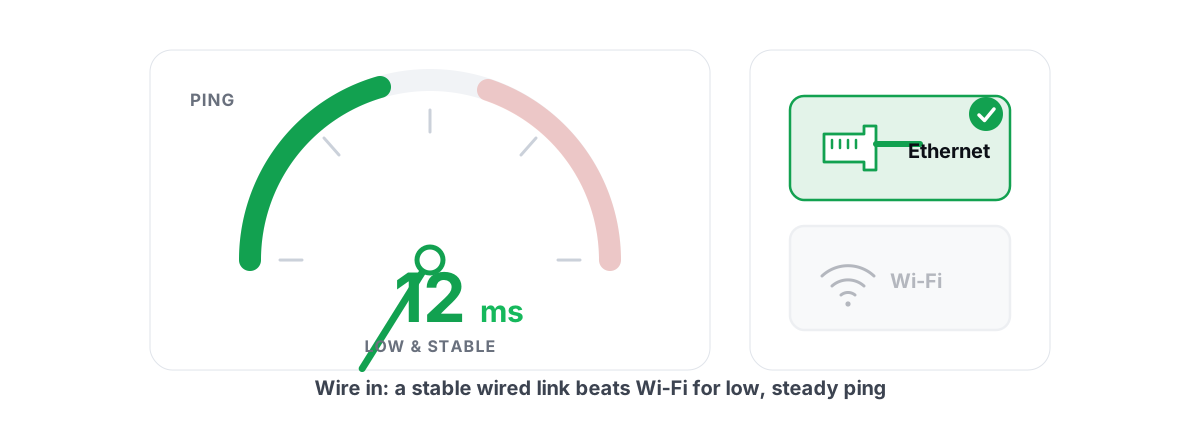
- Use a wired connection. Wi-Fi adds latency and jitter, and the gap is bigger than people expect. If you game competitively on Wi-Fi, fix that first. Here's the honest comparison of Ethernet versus Wi-Fi for gaming.
- Kill bufferbloat. If your ping is fine when idle but spikes when someone streams or uploads, that's bufferbloat, a queue problem in your router, not a route problem. It's fixable for free and explained in what bufferbloat is and how to find it.
- Check for packet loss and jitter. Stable 60 ms beats a jumpy 30 ms every time. Loss and jitter cause the rubber-banding you feel as "lag." See how to track down packet loss and jitter.
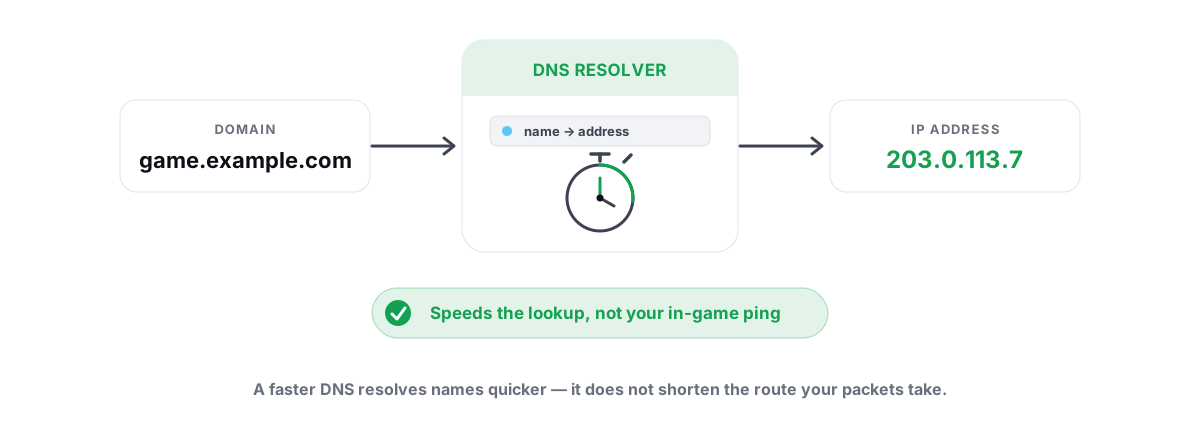
- Pick a faster DNS, but know its limits. A good DNS resolver speeds up finding a server, not your ping to it once connected. It's worth doing and it's free, just don't expect a lower in-game ping from it. The honest take is in whether a gaming DNS actually lowers ping.
- Run the full diagnostic. The complete, real-fixes-first checklist lives in how to reduce ping in online games.
BRUTAL Optimizer's network lab covers most of this in one place: a real ICMP traceroute with hop classification, a bufferbloat A-to-F grade using the loaded-vs-idle ping method, ping/jitter/packet-loss measurement, and a DNS benchmark you can apply with one click. It's free, it uses the same tools Windows already ships, and it tells you which of these problems you actually have before you change anything.
The honest decision framework
Put it together into a clear order of operations. Don't buy a VPN until you've ruled out the free stuff and confirmed your route is the actual problem.
- Fix your own network first. Wired connection, bufferbloat, packet loss. If the problem is in your house, no VPN touches it.
- Run a traceroute to the game server. Clean, gently-climbing route to a nearby server? Stop. A VPN will only make it worse. Save your money.
- See a clear detour? A hop that leaves your region, or a big unexplained latency jump that stays high? Now a VPN is a candidate, not a guarantee.
- Test, don't assume. Use a reputable VPN's free trial. Measure ping to the same server with the VPN off, then on, several times. Keep it only if the number genuinely drops and stays stable.
- Weigh the trade-offs. Even if ping improves, factor in the anti-cheat flag risk, the monthly cost, and the chance the VPN's own server gets congested at peak hours.
The short version: a gaming VPN is a fix for one specific, uncommon problem (a genuinely bad ISP route), not a general ping-lowering tool. For most players it adds latency. The only way to know which group you're in is to measure your route, and that costs nothing.
If you'd rather see your route, jitter, and bufferbloat laid out plainly before deciding, the network lab in BRUTAL Optimizer does it with the same diagnostics a network engineer would use, no kernel driver, nothing injected into your game, and free. It won't sell you a VPN. It'll just show you whether you need one.
Frequently asked questions
Does a VPN lower ping for gaming?
Usually not. A VPN adds a hop, extra distance, and encryption, so it normally raises ping by 5 to 40 ms. It only lowers ping in the rare case where your ISP's default route to the game server is genuinely bad and the VPN gives your traffic a shorter path.
How do I know if a VPN will actually help my ping?
Run a traceroute to the game server with tracert. If the route climbs gently and lands at a nearby server, it is fine and a VPN will only make it worse. If you see a hop that leaves your region or a big latency jump that stays high, your route is detouring and a VPN is worth testing.
Can a gaming VPN get me banned?
It is uncommon but possible. Some games flag VPN and datacenter IP ranges, which can mean extra scrutiny or worse matchmaking, and some publishers prohibit VPNs in their terms. You can also inherit a shared exit IP's bad reputation even though you did nothing wrong.
Why does server distance set a floor on ping?
Light in fiber travels about 200,000 km per second, a fixed limit. A round trip to a server 1,000 km away cannot beat roughly 10 ms, and real routing adds more. A VPN cannot shorten the physical distance to a server, only change the path packets take to reach it.
What should I try before buying a gaming VPN?
Fix your own network first: use a wired connection, check for bufferbloat, and measure packet loss and jitter. Most high-ping complaints come from inside your house, not from routing. A faster DNS speeds up finding a server but does not lower your ping to it.
Keep reading
 Network & Latency
How to Read a Traceroute: Find Your Lag's Real Source
Read a real ICMP traceroute and classify every hop so you know whether the lag is your router, your ISP, or the game server.
 Network & Latency
How to Reduce Ping in Online Games (Real Fixes)
Sort the ping you can fix - server, bufferbloat, Wi-Fi, routing - from the ping you can't, and skip the ping-booster snake oil.
 Network & Latency
Best DNS for Gaming: Does It Lower Ping?
A faster DNS speeds up connects, menus and browsing, not in-game ping. How to find and apply the genuinely fastest resolver for your line.
Stop guessing. Measure it.
BRUTAL Optimizer is the honest way to speed up Windows — 17 free modules, a real FPS overlay, verified disk cleanup and drive health. No kernel driver of our own, no game hooks, every setting change reversible.