DLSS 4 vs FSR 4 vs XeSS: Best Upscaler in 2026
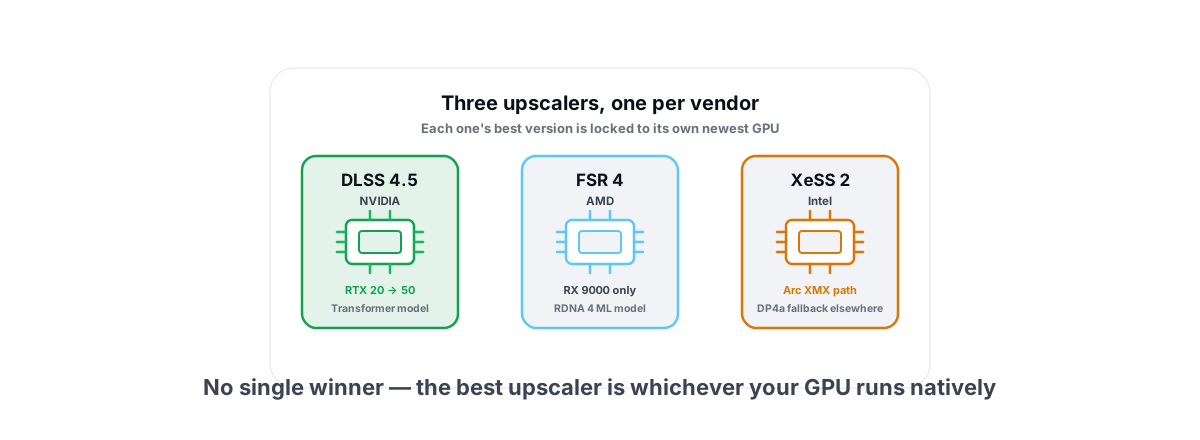
DLSS 4 vs FSR 4 vs XeSS in 2026, and which upscaler is best comes down to one thing most comparisons skip: each one's good version is locked to its own vendor's newest hardware. Three real contestants now, one per GPU maker, and they are not interchangeable. Here is the plain comparison of image quality and FPS so you pick the right one for the card you own.
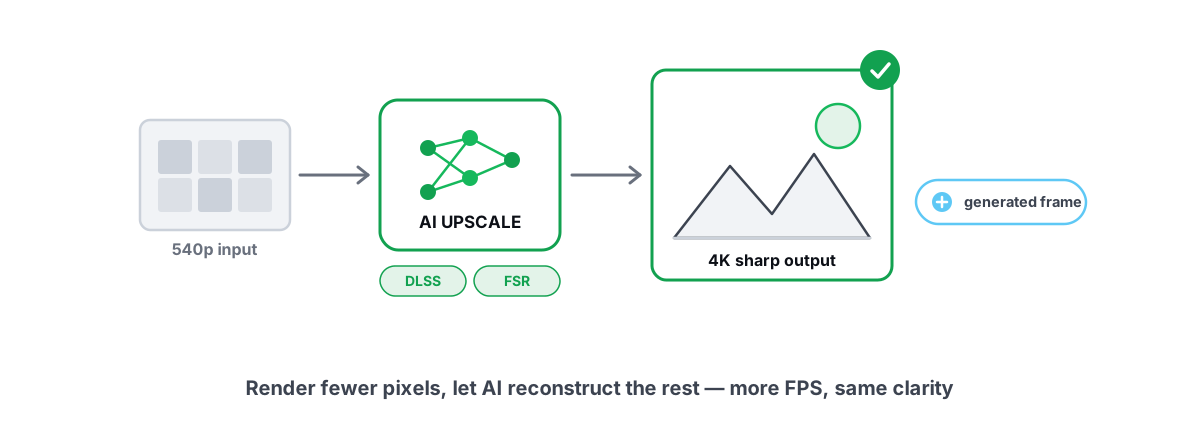
Upscaling is the single biggest free FPS lever on a modern GPU. You render the game at a lower internal resolution and a reconstruction model rebuilds it to your display resolution. Done well, you barely see the difference and gain 30-80% more frames. Done badly, you get shimmer, ghosting, and smeared text.
The catch in 2026 is that the three big upscalers run on fundamentally different hardware, and the gap between "best case" and "your case" is wide. Here is how to sort it without the vendor slides.
The three upscalers in 2026, briefly
DLSS 4.5 is NVIDIA's. Since the DLSS 4 generation it uses a transformer-based model instead of the older convolutional one, and it runs on the Tensor cores in RTX cards. The transformer model is the real story: it cut shimmer and ghosting noticeably versus DLSS 3, and it backports to every RTX card from the 20-series up through the 50-series. Multi-Frame Generation (2x/3x/4x) is the part locked to RTX 50.
FSR 4 is AMD's, and 2026 is the year it grew up. FSR 1-3 were spatial/temporal techniques with no AI model, which is why they always trailed on image quality. FSR 4 switched to a machine-learning model that runs on the dedicated AI accelerators in RDNA 4 (the RX 9000 series). The quality leap from FSR 3.1 to FSR 4 is the largest single jump any of these made. Later FSR 4 point releases refined ghosting handling and widened the supported-game list.
XeSS 2 is Intel's, and it has a split personality. On Intel Arc GPUs it runs the high-quality path on the XMX AI units; on non-Intel cards it falls back to a DP4a path that works everywhere but looks a notch worse. XeSS 2 added its own frame generation and a low-latency mode. On Arc B-series (Battlemage) cards the XMX path is genuinely competitive; the DP4a fallback is the "better than FSR 3, not as good as DLSS" middle option for everyone else.
One sentence to remember: each upscaler's best version is locked to its own vendor's newest hardware. The cross-vendor fallbacks are real but second-tier.
Image quality compared at Quality and Performance
Image quality depends on the preset. The preset sets the internal render resolution: Quality renders at ~67% of each axis, Balanced ~58%, Performance ~50%, Ultra Performance ~33%. Lower internal resolution means more frames and more reconstruction artifacts.
At Quality preset (1440p / 4K output)
At Quality, all three are good enough that most people won't see problems in motion. The differences show up in the hard cases: fine wires and fences, particle effects, transparent surfaces, and text on moving HUD elements.
- DLSS 4.5 (transformer) is the cleanest on shimmer and the most stable on thin geometry. It also resolves text and distant detail best.
- FSR 4 closed almost the entire gap. At Quality it's hard to separate from DLSS without pixel-peeping a still frame. Its remaining weakness is occasional ghosting behind fast-moving particles.
- XeSS 2 on XMX (Arc) sits just behind DLSS, ahead of the DP4a fallback. The DP4a version on a non-Intel card is visibly softer and shimmers more.
At Performance preset
This is where the models separate. Performance renders at half resolution per axis, so reconstruction does the heavy lifting and the AI model's quality matters most.
| Upscaler | Quality preset | Performance preset | Main weakness |
|---|---|---|---|
| DLSS 4.5 (transformer) | Excellent | Excellent, holds detail | None major; slight oversharpen if forced |
| FSR 4 | Excellent | Very good, minor ghosting | Particle trails, fast transparencies |
| XeSS 2 (XMX, Arc) | Very good | Good | Slight softness vs DLSS |
| XeSS 2 (DP4a, other GPUs) | Good | Soft, more shimmer | Noticeably behind the XMX path |
Practical takeaway: at Quality, pick whatever your GPU runs natively and you'll be fine. At Performance and below, DLSS 4.5 and FSR 4 stay usable while the XeSS DP4a fallback starts to look soft. If you're on Arc, the XMX path keeps XeSS in the fight.
FPS uplift per vendor and tier
The frame gains from upscaling alone (no frame generation) are roughly the same across vendors at the same preset, because they all render at the same internal resolution. What differs is overhead: the AI model itself costs a little GPU time, and that cost scales with how fast the card is.
Rough, honest numbers for upscaling from a Quality preset, native versus upscaled, on a heavy game at 1440p or 4K:
| Preset | Typical FPS uplift over native |
|---|---|
| Quality | +30% to +45% |
| Balanced | +45% to +60% |
| Performance | +60% to +90% |
| Ultra Performance | +90% to +130% (4K only, image quality drops) |
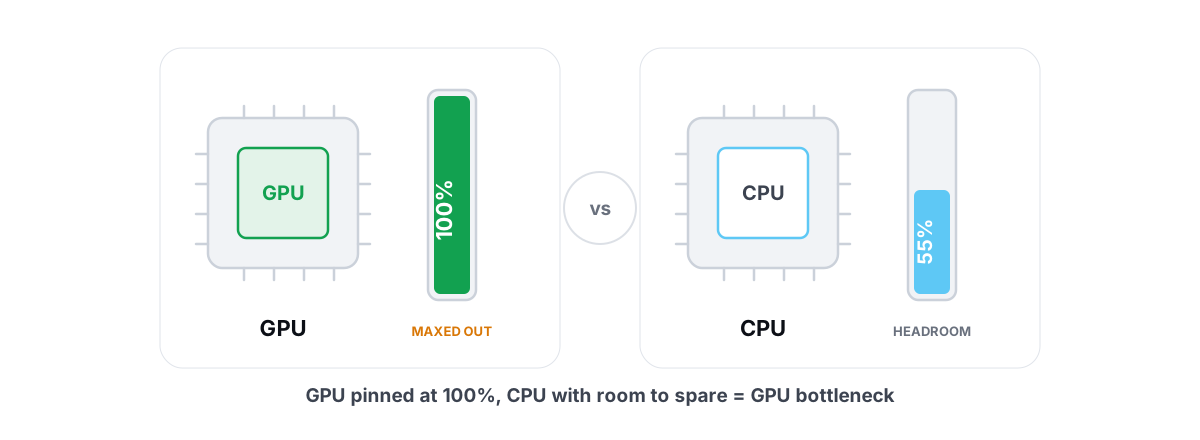
Those are realistic ranges, not best-case marketing. The actual number depends on whether you're GPU-bound. If your CPU is the limit, upscaling does almost nothing because you're not waiting on the GPU. That's the most common reason people enable an upscaler and see no FPS change. If you suspect it, read our guide on telling a GPU vs CPU bottleneck first, and check why your GPU usage is low if frames feel capped.
Which GPUs support which (and the fallbacks)
This is the part that trips people up, because "supports XeSS" can mean two very different experiences.
| Your GPU | Best native upscaler | Frame gen | Cross-vendor fallback |
|---|---|---|---|
| RTX 50 (Blackwell) | DLSS 4.5 transformer | Multi-Frame Gen (up to 4x) | FSR / XeSS DP4a if no DLSS in-game |
| RTX 40 | DLSS 4.5 transformer | Frame Gen (2x) | FSR / XeSS DP4a |
| RTX 20 / 30 | DLSS 4.5 transformer (no frame gen) | None native; use FSR 3/4 frame gen | FSR / XeSS DP4a |
| RX 9000 (RDNA 4) | FSR 4 (ML model) | FSR Frame Gen | XeSS DP4a |
| RX 7000 / 6000 | FSR 3.1 (no ML model) | FSR Frame Gen | XeSS DP4a |
| Arc B-series (Battlemage) | XeSS 2 on XMX | XeSS Frame Gen | FSR; DLSS not available |
| Arc A-series (Alchemist) | XeSS 2 on XMX | XeSS Frame Gen | FSR |
The big asterisks:
- FSR 4 is RX 9000 only. If you have an RX 7000 or 6000, you're on FSR 3.1, which has no AI model and looks meaningfully worse. The jump to FSR 4 is a hardware jump, not a driver update.
- DLSS works on all RTX cards, frame gen does not. The transformer model runs on a 20-series. Multi-Frame Gen needs the RTX 50. If you want frame gen on an older RTX card, you can use FSR's frame generation on top of DLSS upscaling in supported games.
- XeSS runs everywhere via DP4a, but the good version (XMX) only runs on Arc. On an NVIDIA or AMD card, XeSS is the fallback, not the headliner.
Per-game support and how to swap DLLs safely
Game support is uneven. A title might ship with an older DLSS or FSR version than what's current. You can often update the upscaler yourself by swapping the DLL the game loads, because these are versioned files dropped in the game folder.
- DLSS upscaling lives in
nvngx_dlss.dll. Frame gen isnvngx_dlssg.dll. - FSR ships as
amd_fidelityfx_*.dllorffx_*.dlldepending on integration. - XeSS uses
libxess.dll.
For DLSS specifically, the cleanest path is NVIDIA's own app: it has a DLSS override that forces the newest transformer model and the latest preset per game, with no manual file copying. That's safer than hand-swapping because the app validates the version.
If you do swap a DLL by hand, the rules are simple:
- Back up the original file first. Copy it somewhere, don't just overwrite.
- Match the integration. Don't drop an FSR 4 DLL into a game that only integrated FSR 3 — the API changed and it can crash or fall back silently.
- Verify the game still launches and the upscaler still appears in settings. If it vanishes, the swap failed; restore your backup.
Frame gen on top: how each handles it
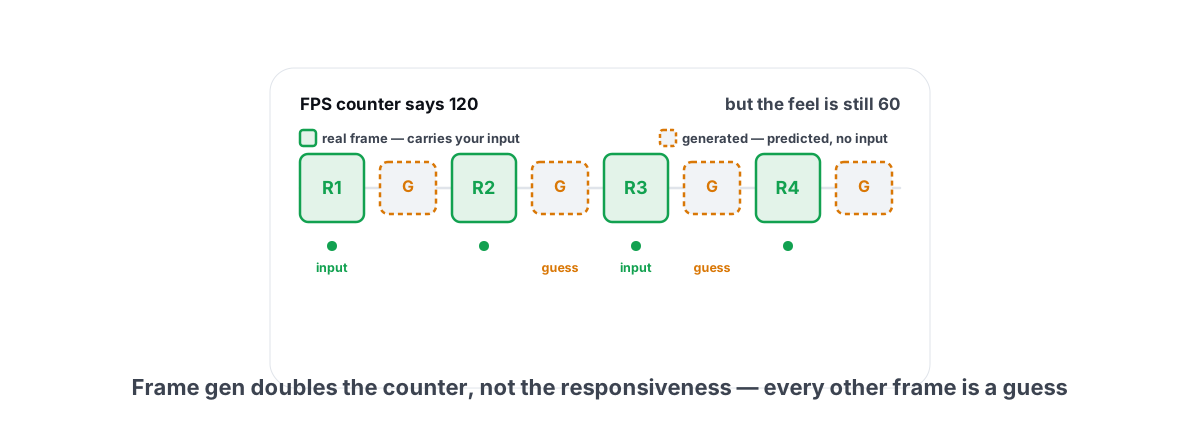
Frame generation is separate from upscaling. Upscaling renders fewer pixels; frame gen inserts entirely AI-generated frames between rendered ones. It can roughly double or quadruple your displayed frame counter, but those inserted frames don't respond to your input, so latency does not improve the way the FPS number suggests.
- DLSS Multi-Frame Gen (RTX 50) can insert up to three generated frames per rendered frame (4x mode). It pairs with NVIDIA Reflex to keep latency in check. The 2x mode on RTX 40 is the more conservative, lower-latency option.
- FSR Frame Gen is 2x and, helpfully, is fairly decoupled — you can use it on top of DLSS or XeSS upscaling in many games, and it works on a broad GPU range including older NVIDIA cards.
- XeSS Frame Gen is newer and 2x, with Intel's low-latency mode as the Reflex equivalent on Arc.
The honest rule for all three: frame gen feels great when your base (pre-frame-gen) frame rate is already 60+ and you have a high-refresh monitor. Below ~50 base FPS it adds visible artifacts and the input lag becomes obvious. We go deeper in whether frame generation is worth it and the mechanics in DLSS vs FSR and frame gen explained.
Picking by your exact GPU
Here's the decision rule with no vendor loyalty involved.
- RTX 50: DLSS 4.5 with the transformer model, and Multi-Frame Gen if you have the high-refresh monitor to feed. This is the strongest combination available in 2026. If your card is brand-new and you've hit driver weirdness, see our RTX 50 black screen fix and the DLSS 4.5 Multi-Frame Gen setup guide.
- RTX 40: DLSS 4.5 transformer plus 2x Frame Gen. Functionally excellent; you're only missing the 3x/4x modes.
- RTX 20 / 30: DLSS 4.5 upscaling still applies and looks great. No native frame gen, but you can layer FSR Frame Gen if you want it.
- RX 9000: FSR 4. This is now a top-tier upscaler. Pair it with your Adrenalin settings dialed in.
- RX 7000 / 6000: FSR 3.1 natively, but try XeSS DP4a in games where it looks cleaner to your eye — it sometimes does, because it has an AI model and FSR 3.1 doesn't.
- Arc B-series / A-series: XeSS 2 on XMX. On Arc it's the right call and competitive with the big two at Quality.
What helps vs what is a myth
One more practical point: upscaling and frame gen only matter if the rest of your system isn't choking. If you're getting frametime spikes, an upscaler won't fix them — they usually come from shader compilation or background load, not pixel count. A clean Windows baseline does more for smoothness than any preset toggle. Our safe Windows optimization guide covers the parts that actually move frametimes without bricking anything.
The honest verdict
There's no single "best upscaler" in 2026 — there's the best one for your card. DLSS 4.5 is the overall image-quality leader and the only one with 4x frame gen, but it's NVIDIA-only. FSR 4 finally reached the same tier with its ML model, but only on RX 9000. XeSS 2 is excellent on Arc and a solid universal fallback everywhere else.
So the answer to "which is best" is: run whatever your GPU does natively at the lightest preset that still looks clean, force the newest model version, and only add frame gen when your base frame rate is already high. That gets you most of the benefit with none of the hype.
To see whether an upscaler actually changed anything on your machine, you need a frame counter you can trust. BRUTAL Optimizer ships a free FPS overlay that counts the game's own frames on Windows 11 and, on Windows 10 and for emulators it doesn't measure yet, shows the display's rate, labelled DISPLAY (DISPLAY CAP at your refresh rate) — no injection, no hook, so it runs alongside Vanguard and Easy Anti-Cheat — and it shows your 1% lows and frametimes, which is where upscaling and frame gen actually show their costs. It's the honest way to confirm a preset helped instead of trusting the in-game number, and it's free with the 17 other free modules. No fake booster, ever.
Frequently asked questions
Which upscaler is best in 2026?
There is no single winner. DLSS 4.5 leads overall image quality and is the only one with up-to-4x frame gen, but it is NVIDIA-only. FSR 4 reached the same tier on RX 9000 cards. XeSS 2 is excellent on Intel Arc and a solid universal fallback elsewhere. The best one is whichever your GPU runs natively.
Does FSR 4 work on my RX 6000 or 7000 card?
No. FSR 4 uses a machine-learning model that runs on the AI accelerators in RDNA 4, which means the RX 9000 series only. RX 6000 and 7000 cards are limited to FSR 3.1, which has no AI model and looks meaningfully worse. The jump to FSR 4 is a hardware upgrade, not a driver update.
Is it safe to swap an upscaler DLL in a game?
In single-player games it is generally fine if you back up the original file first and match the integration version. Avoid swapping DLLs in competitive games with kernel-level anti-cheat, because modifying game files can trip integrity checks. For DLSS, the NVIDIA app override is the safer route since it works at driver level instead of editing files.
Does upscaling lower input lag?
Upscaling itself improves responsiveness only because it raises your real frame rate. Frame generation does not lower input lag, even though it doubles or quadruples the FPS counter, because the inserted frames are visual only and do not respond to your input. Use the FPS number for smoothness, not responsiveness.
Why did I enable an upscaler and gain no FPS?
You are probably CPU-bound. Upscaling reduces GPU work, so it only helps when the GPU is the limit. If your CPU is the bottleneck, rendering fewer pixels changes nothing because you were never waiting on the GPU. Check your GPU usage in a game; if it sits well below 95 percent, the CPU is your cap.
Keep reading
 Gaming & FPS
DLSS vs FSR & Frame Gen: Free FPS or Fake Frames?
Upscaling gives real FPS by rendering fewer pixels; frame generation adds smoothness but costs latency. Here is when each is worth it.
 Gaming & FPS
Is Frame Generation Worth It? Input Lag Explained
Frame gen raises your FPS counter but not your responsiveness. Where it genuinely helps, where it hurts, and how Reflex 2 Frame Warp changes the math.
 Hardware & Drivers
GPU vs. CPU Bottleneck: How to Tell in Gaming
Read GPU and CPU utilization to find which part is capping your frames — then tweak or upgrade the right one instead of guessing.
Stop guessing. Measure it.
BRUTAL Optimizer is the honest gaming optimizer for Windows — 17 free modules, a real FPS overlay, verified disk cleanup and drive health. No kernel driver of our own, no game hooks, and per-module undo for the settings it changes.