Is a Ping Reducer Worth It? Measure First, Then Decide
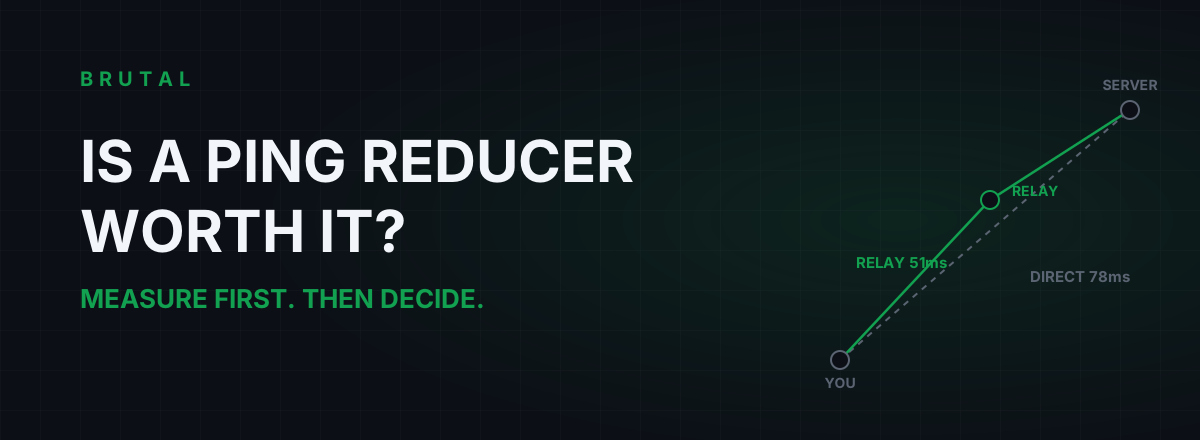
Is a ping reducer worth it? For most players, honestly, no. If the route between you and the game server is already clean, a relay can't make light travel faster, so the tool either does nothing or quietly adds a couple of milliseconds. But maybe one player in ten is sitting on a genuinely bad route, and for that player a good relay is worth 20 to 60ms every single match. The whole question is which player you are, and you can answer it for free in about ten minutes.
When is a ping reducer worth it? The short answer
A ping reducer is worth paying for in exactly one situation: your ISP hands your game traffic to a slow or congested path somewhere in the middle of the internet, and a relay network happens to have a cleaner path to the same server. That's the entire product. Everything else on the marketing page is decoration.
It's not worth it when your route is already good, because there's nothing left to fix. And it's the wrong purchase entirely when the problem lives inside your own house, because your packets hit your Wi-Fi and your router before any relay ever sees them.
Three situations, three verdicts:
| Your situation | What a ping reducer does | Verdict |
|---|---|---|
| Clean route, ping near the distance floor | Nothing, or adds 2-5ms of overhead | Skip it |
| Bad mid-route peering, or a visible detour | Can genuinely save 20-60ms | Worth a measured trial |
| Wi-Fi jitter, bufferbloat, in-home congestion | Nothing, the damage happens before the relay | Fix the house first, it's cheaper |
The rest of this article is about working out which row you're in, using tools that cost nothing.
What a ping reducer actually does
Your packets don't travel "the internet". They travel one specific path that your ISP picked, and that path is shaped by business agreements, not by what's fastest for you. Sometimes it's direct. Sometimes it's a detour through another city or another country, because that's where your ISP has a cheap handoff to the next network.
A ping reducer runs relay servers in well-connected datacenters. Instead of letting your ISP route your game traffic wherever its contracts point, the tool sends it to a nearby relay first, and the relay forwards it over better backbone links toward the server. If the relay's path is shorter or less congested than your ISP's path, your ping drops. If it isn't, your ping goes up, because you just added a stop.
That's the whole mechanism. No compression, no "packet optimization", no magic. It's a different road, and a different road only helps if your current road is bad.
One hard limit worth internalizing before you spend anything: distance sets a floor. Data in fiber covers roughly 100km per millisecond of round trip, so a server 2,000km away can never answer in less than about 20ms no matter what you install. A relay can strip away detours and congestion. It cannot strip away geography.
Measure your route before you pay
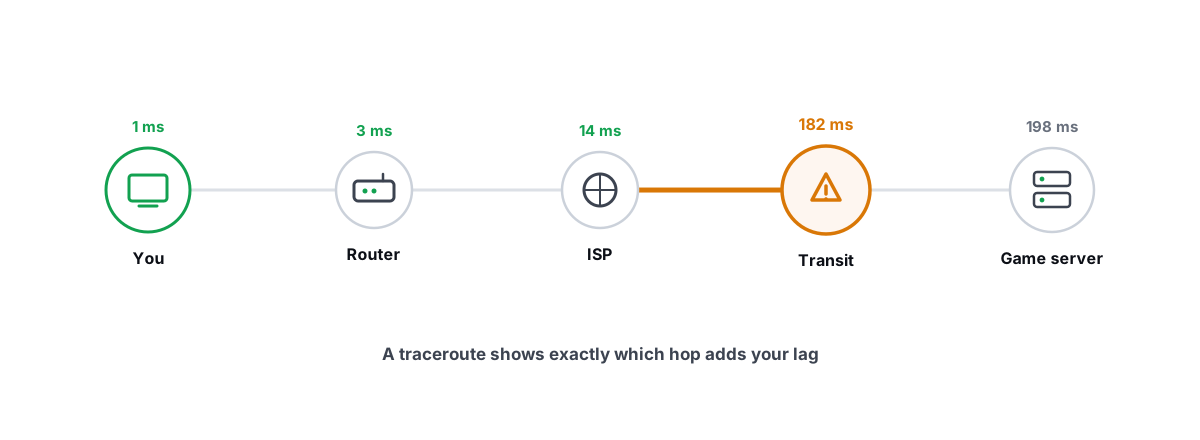
You can't tell whether a ping reducer is worth it until you know where your ping is being spent. The tool for that job is traceroute, and it takes two minutes. It lists every hop between you and the server with the latency at each one, so the slow stretch of the path has nowhere to hide. If you've never read one, our traceroute guide for gamers walks through it hop by hop.
The one-line version: hops 1 and 2 are your house, hops 3 through roughly 8 are your ISP and its regional network, and everything past that is transit toward the server. Find the hop where the latency jumps and stays high, and you know whose problem it is.
Two more measurements complete the picture. Ping the server region at your normal play time and again early in the morning; a route that's fine at 7am and 40ms worse at 9pm isn't long, it's congested. And run a bufferbloat test while someone else uses the connection, because bufferbloat produces exactly the "my ping spikes out of nowhere" symptom people buy reducers to cure.
You don't need to buy anything to run these tests. Every operating system ships traceroute, and the free BRUTAL Optimizer download bundles a ping test, traceroute, a bufferbloat grade and a DNS benchmark into one place if you'd rather not live in a terminal window. The measurement tools are free forever, deliberately, because the measurement is the honest part.
Case 1: your route is already clean. Skip the reducer.
Say you're in Frankfurt playing on a Frankfurt server and your ping is 12ms with barely any jitter. The physics floor for that distance is in the single digits. There are maybe 5ms of theoretical improvement on the table, and no relay will find them, because the relay adds a hop of its own before it can subtract anything.
This is the majority case, probably six or seven players out of ten on decent fiber or cable. If your ping is steady and within 10 to 15ms of the distance floor, a ping reducer has nothing to sell you. The honest verdict is "you're done", and very few products in this market are built to say it out loud.
Case 2: your ISP's routing is bad. This is the case that pays.
The signs are specific. Your ping sits far above the distance floor: 130ms to a server 1,500km away, where the floor is about 15. A traceroute shows one hop where latency leaps by 50ms and never comes back down. Or the route itself is a visible detour, with hop names sending your Chennai-to-Mumbai traffic through Singapore first.
Evening-only lag is the other signature. If you hold 45ms at dawn and 95ms after dinner, every day like clockwork, you're queuing at a congested interconnect between two networks. Peering congestion is invisible in speed tests and brutal in games, and it's the single most common problem a relay genuinely fixes, because the relay enters the wider internet through a different, less crowded door.
In this case a good relay with an entry point near you can realistically save 20 to 60ms, occasionally more on truly broken international routes. It's still not guaranteed. The relay needs a nearby PoP and an actually cleaner path to your specific server, which is why you trial it and read the numbers instead of trusting the banner. But this is the player the product is real for, and depending on your region and ISP that's somewhere between one in ten and three in ten of us. Players in India, Southeast Asia, South America and the Middle East hit bad routing far more often than players in Western Europe sitting next to an exchange point.
Case 3: the problem is inside your house. Fix that instead.
A reducer only touches your traffic after it leaves your router. Everything before that point gets inherited at full strength. Wi-Fi retransmissions, a microwave stomping on your 2.4GHz channel, a housemate's 4K stream filling your router's buffers: the relay carries all of it, faithfully, to the server.
The tells: the latency jump is at hop 1 or 2, your ping swings wildly instead of sitting high and steady, and the lag correlates with what other people in the house are doing. The fixes cost less than any subscription. A cable instead of Wi-Fi removes the biggest single source of home jitter for the price of lunch. Turning on SQM or smart-queue QoS on your router kills bufferbloat outright. Grade yourself before and after with the vendor-neutral Waveform bufferbloat test; it takes about a minute per run.
Buying a ping reducer for a last-mile problem is hiring a courier to fix your broken driveway. The courier's fine. Your packets still have to crawl out of the house first.
Demand receipts from any tool you trial
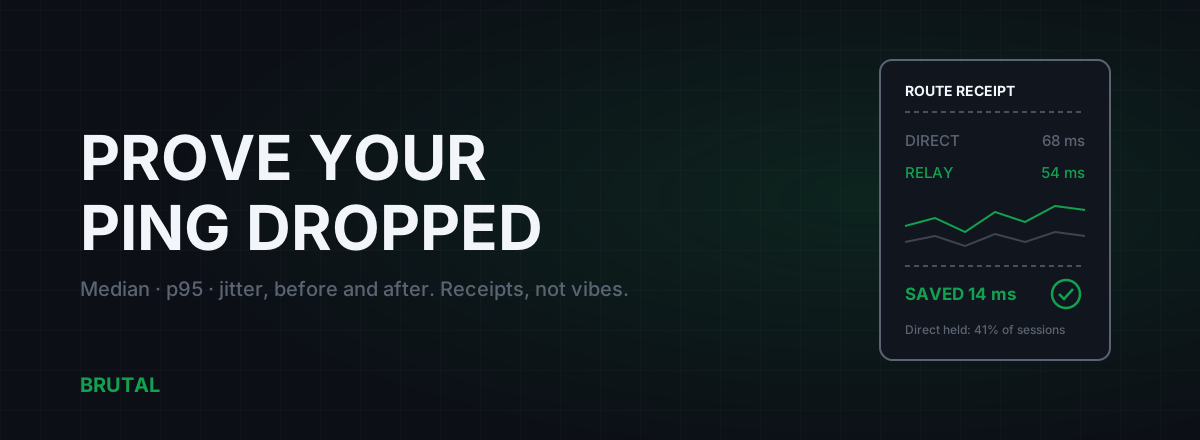
Here's the standard to hold every product to, ours included. An honest ping reducer measures the direct route and the relay route for your connection, in this session, and shows you both numbers. Direct 78ms, relay 51ms, saved 27. Or direct 31ms, relay 36ms, so it stayed on the direct route and told you so. Every session leaves a receipt.
If a tool shows you a shield animation and the word "Optimized" with no baseline, no comparison and no per-session numbers, you're not buying routing. You're buying a feeling. We wrote a whole piece on why your ping reducer should tell you no, because a tool that never says "the direct route won today" isn't measuring anything at all.
A ping reducer that can't show you the number it beat isn't reducing your ping. It's reducing your bank balance.
This is the standard we built Smart Route against: it measures direct versus relay for your actual connection, engages the relay only when it provably wins, and logs every session as a Route Receipt, including the ones that read "Direct won". Judge us by that standard. Judge everyone by it.
The free ten-minute test, start to finish
Here's the full sequence, condensed. Nothing on this list costs money.
- Find your server's region. Most games show it in the server picker or on the scoreboard. You don't need the exact IP; a traceroute to any well-known endpoint in that region tells the same story about the path.
- Traceroute at your normal play time. Note the hop where latency jumps and stays up. Hops 1-2 mean your house. Mid-route means the ISP or its peers.
- Traceroute again off-peak. Early morning, same target. If the evening run is 30-50ms worse, you've found congestion, not distance.
- Run a bufferbloat test under load. Start a big download or a 4K stream, then test. A grade of C or worse explains ping spikes that no relay can fix.
- Compare against the floor. Rough rule: distance in km divided by 100 is the minimum possible round trip in ms. At 500km, 5ms is perfect, 25ms is fine, 90ms means the path is broken somewhere.
- Read your verdict. House problem: fix the house. Mid-route problem: trial a reducer that shows receipts. Already near the floor: close the wallet.
The honest bottom line
So, is a ping reducer worth it? If the measurements put you in case 2, yes, genuinely: trial one with per-session receipts and expect somewhere between 20 and 60ms back on a bad route. That's a different game, especially in shooters, where 40ms is the difference between trading a fight and watching your own death replay.
If you're in case 1 or case 3, no. Skip the subscription, spend the ten minutes, and put the money toward a cable or a better router if the tests point at your house. The measurement is free either way, and it doesn't care what anyone is selling.
Frequently asked questions
Do ping reducers actually work?
Yes, but only in one situation: when your ISP routes your game traffic down a congested or indirect path and the reducer's relay network has a cleaner one. On an already-good route they change nothing, or add a few milliseconds. Roughly one player in ten has a route bad enough to fix, more in regions with poor peering.
How much ping can a ping reducer save?
On a genuinely bad route, 20-60ms is realistic, occasionally more on broken international paths. On a clean route the honest answer is zero. No tool can go below the physical distance floor of roughly 1ms per 100km of round trip.
Can a ping reducer make my ping worse?
Yes. A relay is an extra stop, so if your direct route was already fine, routing through it adds latency. That's why a trustworthy tool measures both paths and stays direct when direct wins, instead of routing everything all the time.
Should I try a free ping booster app first?
Free measurement tools, yes. Free booster apps, no. Most just flush DNS or close background apps, which does nothing measurable for route latency. Run a traceroute and a bufferbloat check first; they're free and they tell you whether any paid tool has something to fix.
Is a VPN the same thing as a ping reducer?
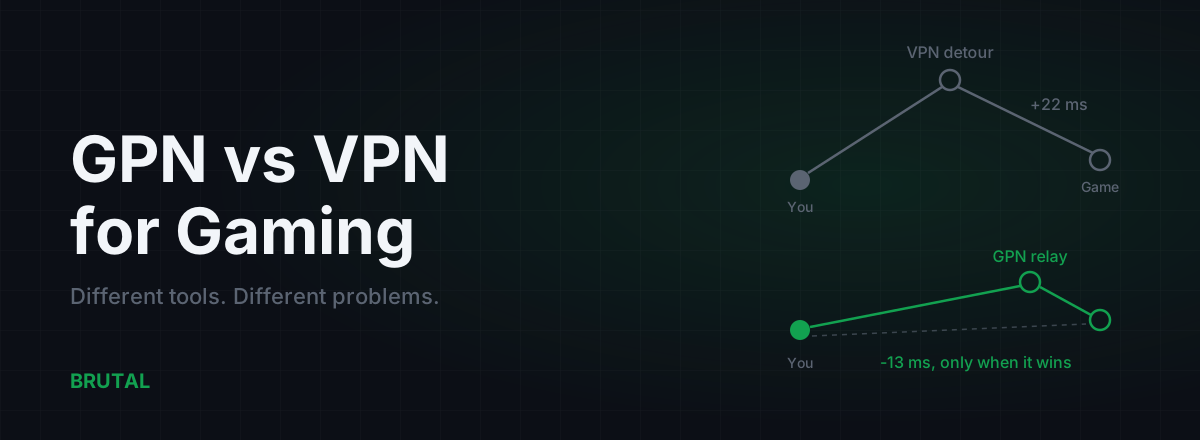
Mechanically similar, since both relay your traffic, but VPNs pick servers for privacy and content access, not latency. A VPN occasionally lowers ping by accident when your ISP's route is terrible. A purpose-built gaming relay picks entry and exit points specifically to beat your direct route, and a good one proves it with measurements.
Are ping reducers safe with anti-cheat?
Reputable ones route traffic at the network level without touching the game's process, so there's no injection or hooking for anti-cheat to flag. Smart Route, for example, detects the game's server connection read-only. Policies still vary by game, so check your title's rules before a tournament.
Keep reading
 Network & Latency
How to Read a Traceroute: Find Your Lag's Real Source
Read a real ICMP traceroute and classify every hop so you know whether the lag is your router, your ISP, or the game server.
 Network & Latency
GPN vs VPN for Gaming: They Solve Different Problems
A VPN encrypts all your traffic for privacy and usually adds ping. A GPN reroutes only your game traffic, and only when a measurement says it helps. Here's when each makes sense.
 Network & Latency
How to Measure Ping Improvement: Route Receipts, Not Vibes
Single pings lie. Here's the honest way to measure ping improvement: idle vs loaded, median vs p95, jitter, and the per-session receipt any tool worth paying for should show you.
Stop guessing. Measure it.
BRUTAL Optimizer is the honest way to speed up Windows — 17 free modules, a real FPS overlay, verified disk cleanup and drive health. No kernel driver of our own, no game hooks, every setting change reversible.