Roblox Lag Fix: Which of the Three Lags Do You Have?
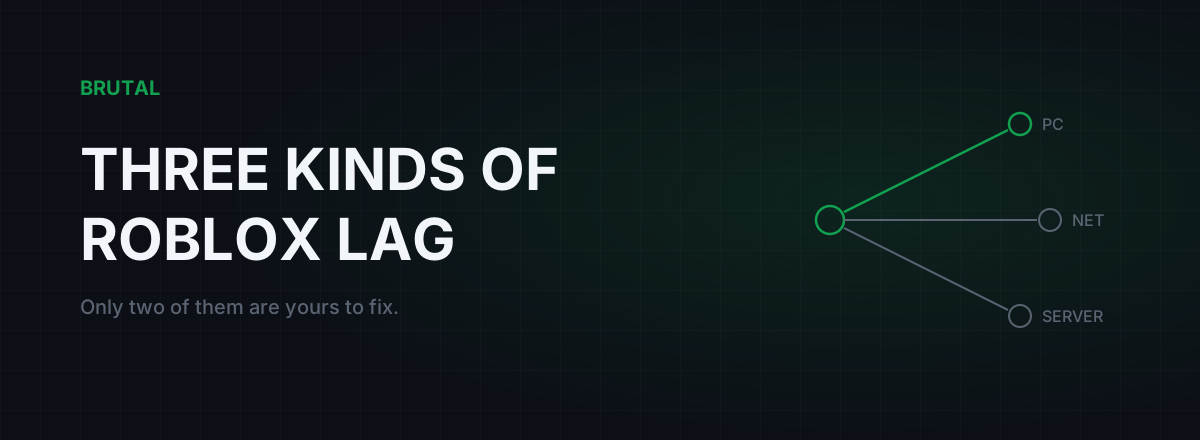
Roblox lag is three different problems wearing the same name, and the right Roblox lag fix depends entirely on which one you've got. It's either your PC (frames dropping), your connection (ping high or unstable), or the experience's own server drowning in work, and that last one can't be fixed from your side no matter what you change. Most guides hand you the same twelve tweaks for all three. Read two numbers first and you can skip about ninety percent of the advice out there.
The three kinds of Roblox lag
Render lag is your computer failing to draw frames fast enough. Everything looks choppy, including the menus and the chat window. Your character reacts late because the picture updates late, not because the network is slow. This is the most common kind on older laptops, school machines, and anything running Roblox on integrated graphics with six Chrome tabs open behind it.
Network lag is your connection delivering game updates late or unevenly. The picture stays smooth, but other players teleport around, your hits land a beat after you swing, and items take a moment to respond when you grab them. The frame rate is fine. The information inside those frames is stale.
Server lag is the experience itself running slow on Roblox's hardware. Roblox owns the servers, but the code running on them is written by whoever built the experience, and plenty of popular experiences are held together with tape. When a server's simulation falls behind, every player in it rubber-bands at once, doors take three seconds to open, and nothing you change on your machine matters at all.
The fastest tell for that third one: ask in chat whether it's lagging for everyone. If ten people say yes, it's the server. If it's just you, it's your PC or your connection, and the stats overlay will tell you which in about ten seconds.
Read two numbers before you change anything
Press Shift+F5 in-game to bring up Roblox's stats summary, or flip on Performance Stats in the Escape-menu settings. Either way, you're after two numbers: FPS and ping.
FPS is how many frames your PC draws per second. Sixty is the default target and feels smooth. Under 40 feels rough, under 25 feels broken. If FPS is low while ping looks normal, you have render lag and your PC is the suspect.
Ping is the round trip to the server in milliseconds. Roblox isn't a tick-obsessed esport, so you don't need the single-digit numbers competitive shooter players chase. Under 100 ms plays fine in most experiences. Trouble starts around 150 ms, and gets serious when the number won't sit still. A ping that swings between 40 and 300 feels far worse than one parked at 120, because your brain adjusts to consistent delay and never adjusts to random delay.
| What you feel | What the overlay shows | Whose problem | What actually works |
|---|---|---|---|
| Everything choppy, menus included | FPS under 40, ping normal | Your PC | Graphics slider down, frame cap, close background apps |
| Smooth picture, players teleport, late hits | FPS fine, ping 150 ms+ or swinging | Your connection | Ethernet, bufferbloat fix, pause other streams |
| Rubber-banding for everyone at once | FPS fine, ping fine | The experience's server | Rejoin for a fresh server, play off-peak |
If both numbers look healthy and the game still stutters and rubber-bands, skip everything below about PCs and routers. No Roblox lag fix aimed at your own hardware can work when the problem lives on the server, and there's a short section for that case further down. It's short because your options are short.
Fixing render lag: your PC is the bottleneck
Open the Escape menu, go to Settings, switch Graphics Mode from Automatic to Manual, and pull the quality slider down. This is the single biggest render-lag lever in Roblox. Levels 1 through 3 strip shadows, draw distance, and material detail; the game looks flatter and runs dramatically better. Automatic mode tries to balance this for you and often guesses wrong in heavy experiences.
Roblox looks like a light game and usually isn't. A busy experience with forty players and tens of thousands of physics parts hammers one or two CPU cores, which is why a decent graphics card doesn't save an old processor. If your FPS tanks only in crowded servers, that's the CPU talking, and the quality slider plus a less crowded server is the honest fix.
Check the frame cap too. Roblox shipped with a 60 FPS cap for years; newer clients have a Maximum Frame Rate setting that goes higher. Raising it only helps if your hardware has headroom. On a weak machine, leave it at 60 and aim for a steady 60 rather than a bouncy 90, because consistency feels better than peaks.
Then close what's running behind the game: Chrome with video tabs, Discord screen shares, a launcher quietly downloading a 40 GB update. On laptops, plug the charger in. Most laptops cut clock speeds hard on battery, and Roblox pays the price.
One honest limit: some experiences run at 25 FPS on mid-range hardware because the developer never optimized their scripts. If the slider is at 1 and the FPS didn't move, the problem is the experience itself, and there is no client setting for that.
Fixing network lag: the family WiFi reality
Roblox network lag rarely comes from Roblox. It comes from what the rest of the household is doing to your connection while you play. A single 4K stream pulls 20 to 25 Mbps, and when the line gets busy, a cheap router queues packets instead of delivering them on time. Your ping doesn't just rise, it spikes: 25 ms one second, 350 the next. That queue problem has a name, bufferbloat, and it's the most common reason Roblox feels fine at 2pm and terrible at 9pm.
Test it instead of guessing. Run the Waveform bufferbloat test while someone else in the house streams. If your grade comes back C or worse, your router is the culprit, and the fix is QoS or Smart Queues in its admin page (look for fq_codel or cake), or simply asking the household to pause big downloads while you play. If your ping only misbehaves at certain hours, ping spikes only when gaming walks through catching the culprit in the act.
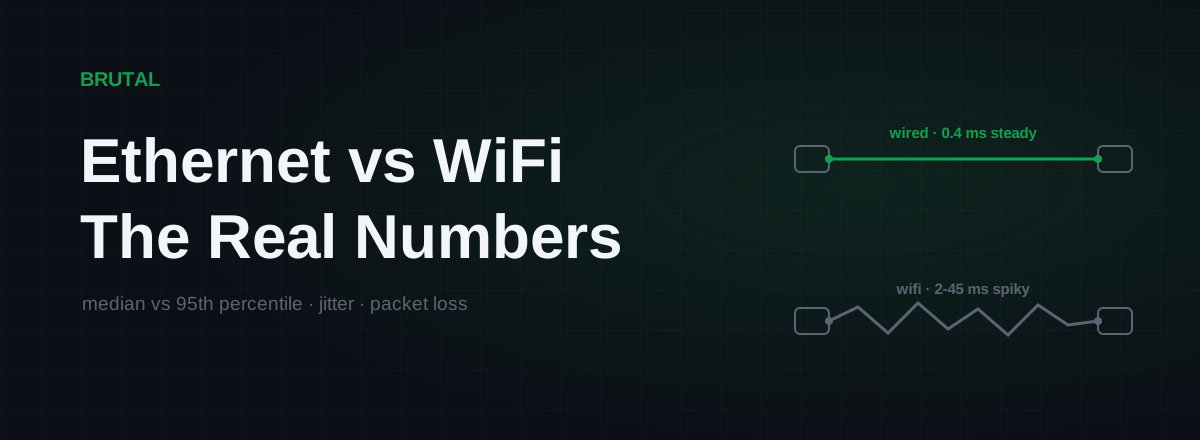
Before any of that, though: run a cable. Ethernet beats WiFi not because it's faster on paper but because WiFi retransmits. Every wall, neighbor's network, and running microwave forces packets to be sent again, and those retries show up as jitter, the swinging ping that Roblox handles badly. A cable is boring and consistent, which is exactly what you want. If a cable genuinely can't happen, use the 5 GHz band and get closer to the router.
You can measure all of this without spending anything. The free download includes a ping test, traceroute, and a bufferbloat grade. Measuring is the whole game here; a network fix you never verified is a ritual, not a fix.
Server lag: the one you can't fix
Every Roblox experience runs on Roblox's servers, but the scripts running there belong to the developer. Inefficient loops, thousands of physics parts nobody cleaned up, memory that leaks a little more each hour; a server instance that's been alive all day often runs visibly worse than a fresh one. When the simulation falls behind, you get rubber-banding on a clean ping, pickups that respond seconds late, and timers that freeze and jump.
Three things genuinely help. Rejoin: you'll usually land on a different, younger server instance, and it's remarkable how often "Roblox lag" evaporates on rejoin. Play off-peak: evening and weekend servers run fuller and hotter. And where an experience offers a server list, pick one with fewer players in it.
If your FPS is fine and your ping is fine and it still lags, stop tuning your PC. The problem is the server, and it isn't your server.
Nothing else in this article touches server lag. Not a router, not a graphics setting, not a paid product, including ours. Anyone selling you a fix for an overloaded Roblox server is selling you a story.
Why VPNs and ping reducers rarely help Roblox
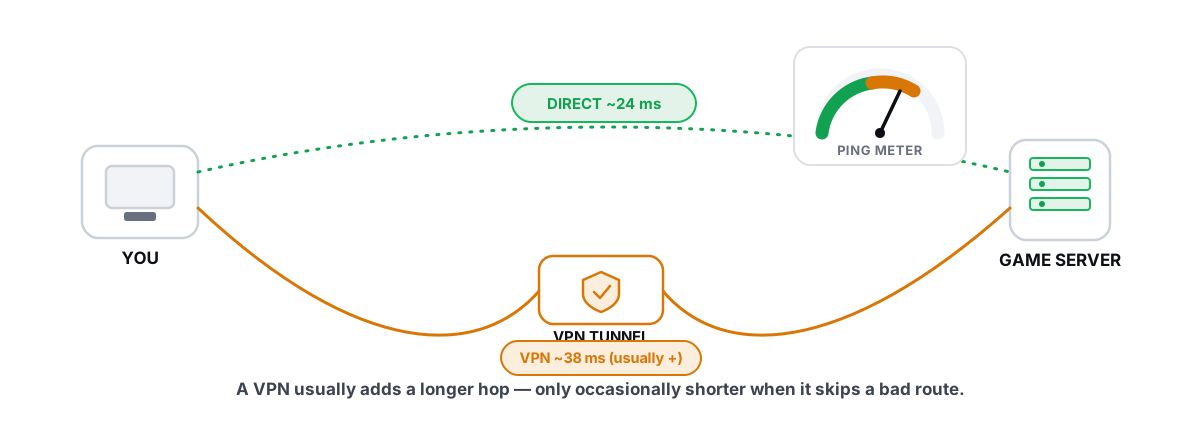
Roblox runs game servers in datacenters across North America, Europe, Asia, and beyond, and it normally places you on one close to your region. For most players that means a baseline ping of 20 to 80 ms over a short, sane route. There isn't much for a relay to shortcut when the road is already short. This is a different situation from games that host one server per continent, where a long route gives a relay something to work with; does a VPN lower ping covers when that math works and when it doesn't.
The bigger reason sits in the chart above. A relay can't add frames to a struggling laptop and can't speed up an overloaded server script. Since a large share of Roblox lag is render or server-side, a routing product is irrelevant to those cases even in principle. Selling routing as a universal Roblox lag fix means selling it to people whose problem it cannot touch, which is exactly the kind of thing this blog exists to say out loud.
The honest exception where routing can help
Two real cases exist.
First, cross-region play. Joining a friend puts you in their server instance. If they're in Frankfurt and you're in Mumbai, you're now playing on a European server, and most of that ping is distance, which no product beats. But a bad ISP path stacked on top of the distance is fixable. International routes detour more often than domestic ones, and a well-placed relay can claw back maybe 20 to 60 ms depending on how ugly the detour is. Why your ISP's path can be bad explains where those detours come from.
Second, a genuinely bad route to a nearby Roblox site: an ISP that hands traffic off in the wrong city, or evening congestion on one specific path. This is real but uncommon. Maybe one case in ten, being generous.
This is the one place our product earns a mention. Smart Route reads which server your game is talking to (read-only, no injection, no kernel driver), measures the direct route against its relays for your actual session, and only reroutes when the measurement proves a win. For Roblox, expect it to report "Direct won" most of the time. That's not the tool failing. That's the tool telling you the truth about a game whose servers are usually already close.
Every Roblox lag fix worth trying, in order
- Press Shift+F5 and read FPS and ping. Diagnose before you touch anything.
- FPS low: Graphics Mode to Manual, slider down, cap at 60, close background apps, plug the laptop in. Re-read the overlay.
- Ping high or swinging: run an ethernet cable, pause the household's streams, run a bufferbloat test, turn on QoS if your router has it.
- Both numbers fine: rejoin for a fresh server, ask in chat, play off-peak. This one belongs to the developer, not to you.
- Playing cross-region regularly: measure a relay against your direct route and keep it only if it proves a win on your connection.
The order matters because each step is a measurement, not a ritual. Change one thing, look at the overlay, and keep only what moved a number. Most Roblox lag surrenders to step 2 or 3, a decent chunk of it was never yours to fix in the first place, and almost none of it needs your money.
Frequently asked questions
How do I see my ping and FPS in Roblox?
Press Shift+F5 in-game for the stats summary, or turn on Performance Stats in the Escape-menu settings. You want two numbers: FPS (how fast your PC draws) and ping in milliseconds (how far away the server feels). Those two numbers tell you which kind of lag you have before you change anything.
What is a good ping for Roblox?
Under 100 ms feels fine in most experiences, and under 50 ms is great. Roblox isn't as latency-critical as a tick-based competitive shooter, so don't chase single digits. Stability matters more than the average: a steady 80 ms plays better than 30 ms that spikes to 300.
Why is Roblox laggy when my internet is fine?
Because two of the three kinds of Roblox lag have nothing to do with your internet. Low FPS means your PC can't draw frames fast enough, and rubber-banding with a clean ping means the experience's server is overloaded. Check the Shift+F5 overlay, then ask in chat whether everyone is lagging; if they are, it's the server.
Does a VPN or ping reducer fix Roblox lag?
Usually not. Roblox normally connects you to a server near your region, so there's little route left to improve, and no relay can fix low FPS or an overloaded server. The honest exception is cross-region play, like joining a friend on another continent, with a bad ISP route on top. Even then, only trust a tool that measures your route and proves the win.
Does clearing the Roblox cache fix lag?
Almost never. The cache rebuilds itself and has no meaningful effect on FPS or ping. If a tweak doesn't move the numbers in the stats overlay, it didn't fix anything. Use the overlay as your lie detector.
Keep reading
 Network & Latency
Does a Gaming VPN Lower Ping? The Honest Answer
A gaming VPN usually adds latency, but a bad ISP route is the rare case where it helps. Here is how to tell which you are in.
 Network & Latency
Ping Spikes Only When Gaming but Internet Is Fine
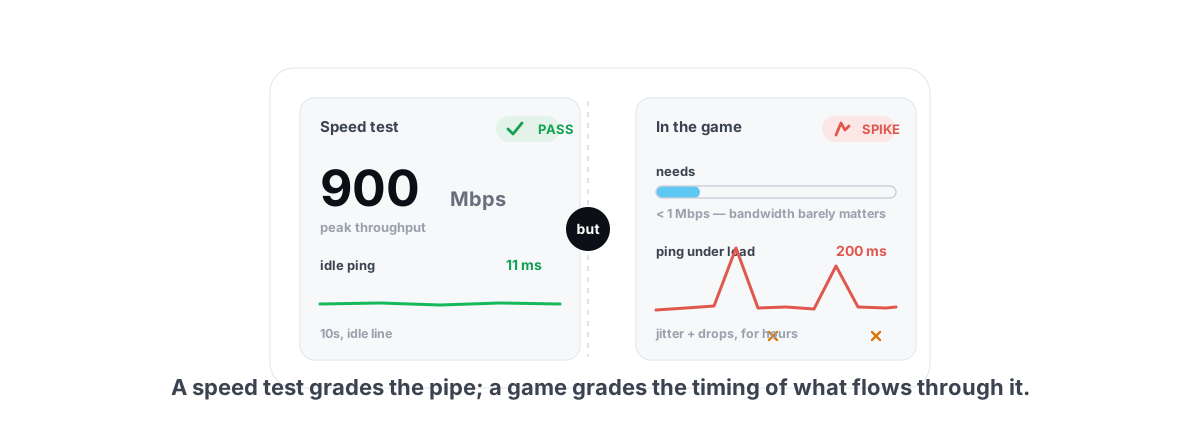
Speed test passes but games spike? The real causes are background apps, adapter power saving, Wi-Fi and bufferbloat - all verifiable, none placebo.
 Network & Latency
Ethernet vs WiFi for Gaming: The Real Latency Numbers
A cable saves maybe 1-3ms of average latency. The real win is jitter and packet loss. Here's when WiFi 6 close to the router is genuinely fine, and when wireless silently ruins your games.
Stop guessing. Measure it.
BRUTAL Optimizer is the honest way to speed up Windows — 17 free modules, a real FPS overlay, verified disk cleanup and drive health. No kernel driver of our own, no game hooks, every setting change reversible.