What Is Jitter in Gaming? Why a Stable 40ms Beats a Spiky 25ms
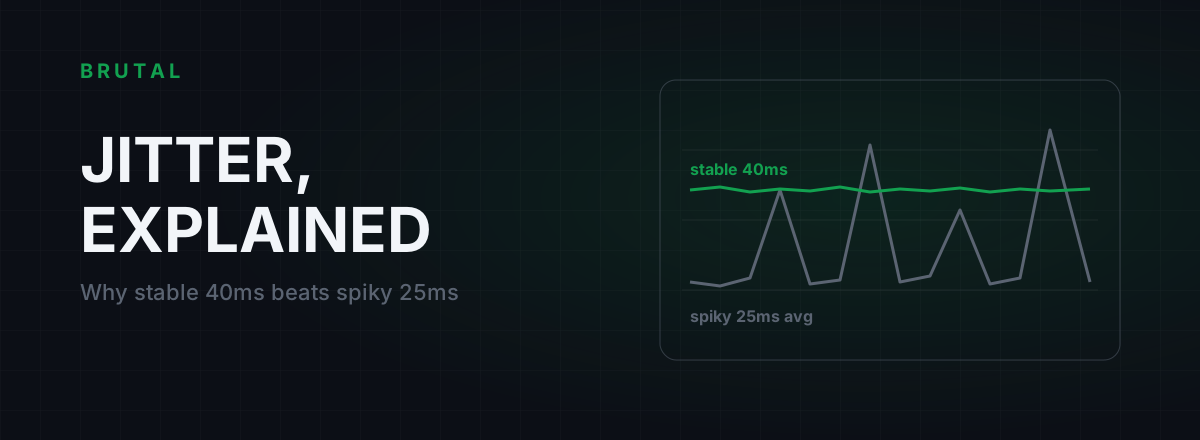
Jitter in gaming is the variation in your ping from one moment to the next. A connection that holds a steady 40ms almost always feels better in-game than one that averages 25ms but swings between 15ms and 90ms, because games are built to compensate for constant delay and they cope badly with unpredictable delay.
If you've ever had a match where the ping counter looked fine but your shots didn't register and enemies skipped around corners, jitter is the usual suspect. This guide covers what jitter actually is, why stability beats raw speed, where the wobble comes from, how to measure yours, and the fixes that work, in the order you should try them.
What is jitter in gaming, exactly?
Ping measures how long one round trip to the server takes. Jitter measures how much that number moves around. If ten pings come back at 40, 41, 39, 42 and 40ms, your ping is 40 and your jitter is a millisecond or two. If they come back at 22, 19, 71, 24 and 88, your average still looks decent on paper, but your jitter is enormous, and the jitter is what you feel.
Different tools compute it differently. Some report the average gap between consecutive pings, some report standard deviation, some show a p95 spread. The exact math matters less than the idea: ping is the delay, jitter is the wobble in the delay.
It matters because an online game is a stream of small UDP packets on a strict schedule. Your client sends inputs somewhere between 30 and 128 times a second depending on the game, and the server sends world updates back at its own tick rate. Each packet is only useful if it arrives roughly on time. A packet that shows up 50ms late is often worse than one that never arrives, because the game has already moved on and guessed without it.
Why a stable 40ms beats a spiky 25ms
This is the part that surprises people. A constant 40ms is a known quantity. The server's lag compensation rewinds the world by your latency when it checks your shots. Your client renders other players slightly in the past and smooths their movement using your measured delay. Every piece of that machinery is calibrated on one assumption: that your delay stays roughly the same from packet to packet.
Break the assumption and everything downstream breaks with it. The server rewinds by the wrong amount, so shots that were on target get rejected. The client's smoothing runs out of data, so it guesses, and when the real data arrives the guess gets corrected in a visible snap. You experience it as bad hit registration, rubber banding and enemies who seem to move in bursts.
A stable 40ms player has none of that. Their delay is higher, but it's the same delay every frame, so the compensation is correct every frame. Human reaction time is 150 to 250ms; a consistent extra 15ms of latency is almost invisible. A 60ms swing mid-firefight is not.
Your aim doesn't need the fastest connection in the lobby. It needs the most predictable one.
How games hide jitter, until they can't
Games are not naive about the internet. Every serious netcode ships with an interpolation buffer: your client deliberately renders remote players a little in the past, typically one or two server updates behind, which works out to somewhere around 40 to 100ms of world state depending on the game. Packets that arrive slightly early or slightly late all land inside that buffer, get reordered, and play back smoothly. Small jitter simply vanishes.
The trouble starts when a packet arrives later than the buffer can cover. The game has to draw something, so it extrapolates: it assumes every player kept moving the way they were moving. When the late packet finally lands and reality disagrees, positions correct instantly. That correction is rubber banding. The enemy who "teleported" behind cover was walking there the whole time; your client just found out late.
Hit registration suffers the same way. Lag compensation rewinds using an estimate of your latency, and jitter makes that estimate wrong at precisely the moments that matter. You shot at a model your screen drew from stale data, the server rewound by an average that didn't match this particular packet, and the hit becomes a miss. Nobody cheated. The timing was just wrong.
Rollback netcode in fighting games tolerates jitter more gracefully than tick-based shooters, up to a point. Nothing tolerates 60ms swings gracefully.
Where jitter comes from
Nearly all gaming jitter traces back to a queue somewhere: your packets waiting behind other traffic. The question is which queue.
Wi-Fi
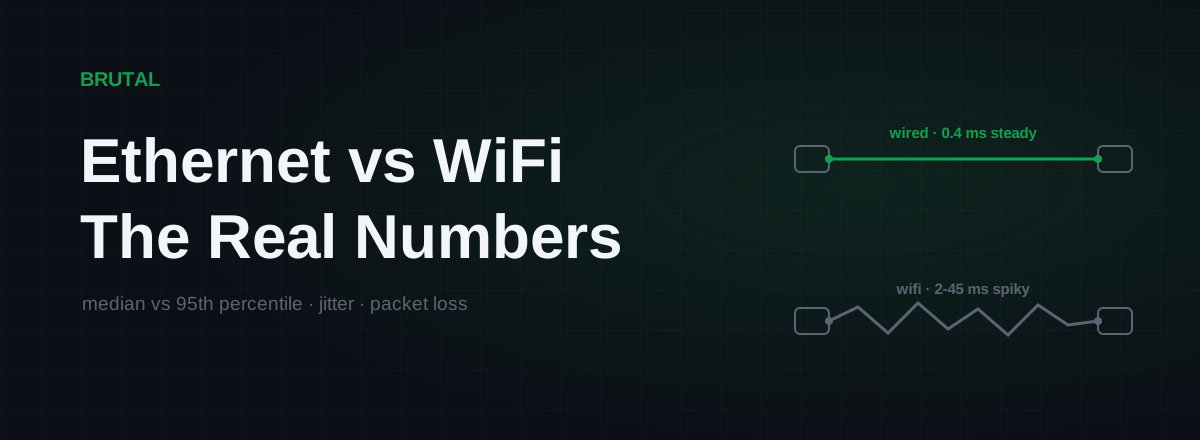
The most common source by far. Wi-Fi is a shared radio channel, so your packets wait for airtime behind every other device on the network and every neighbor on the same channel, then get retransmitted whenever interference corrupts them. A strong signal does not mean stable timing: a healthy-looking Wi-Fi link can wander 5 to 30ms while a cable on the same router holds 1 to 5. The measured numbers are in our Ethernet vs Wi-Fi latency comparison.
Bufferbloat
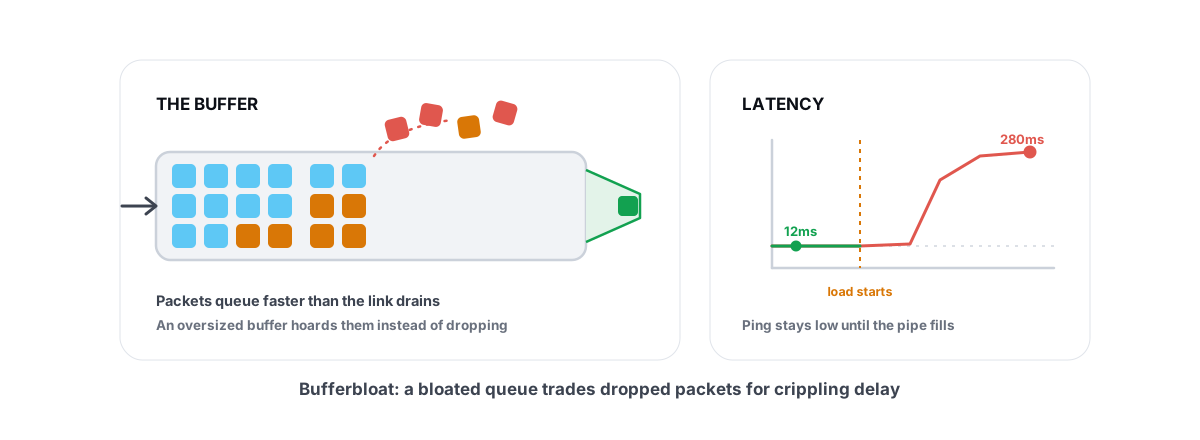
The second most common, and the sneakiest. When someone on your connection uploads or streams, your router's oversized buffers fill up, and every packet, including your game traffic, waits in that queue. Ping that sits at 20ms idle can hit 200ms under load. The full mechanics are in our bufferbloat explainer, and if your ping only spikes while you're actually playing, or whenever the household is busy, this is the prime suspect.
Congestion beyond your house
Sometimes the queue lives on your ISP's side: an overloaded link between your ISP and the game's network that backs up every evening when the whole city gets home. The signature is jitter on a schedule, roughly 7pm to midnight, with a clean connection at 10am. You can't configure your way out of this one; the path itself is the problem.
Your own gear
Cheap router CPUs choke when many devices are active. Cloud backups and game updates on another PC saturate the uplink without anyone noticing. Powerline adapters add their own noise-dependent wobble. None of these are exotic; all of them show up in a measurement.
| Source | Signature | First fix |
|---|---|---|
| Wi-Fi | Jitter at all hours, even on an idle line | Ethernet cable |
| Bufferbloat | Ping climbs whenever anyone uploads or streams | SQM / smart queue on the router |
| Evening congestion | Clean at 10am, spiky 7pm to midnight | Measure, then consider a relay |
| Overloaded router | Spikes when many devices are connected | QoS, fewer active devices, better router |
| The game server | Whole lobby lags, other games are fine | Nothing on your end |
How to measure your jitter
Before fixing anything, get a number. Open a terminal and run a continuous ping to a stable target, then watch the spread rather than the average for a few minutes. A connection printing 20, 21, 20, 22 is healthy. One printing 18, 19, 74, 20, 91 has a jitter problem no average will show.
Then test under load, because idle tests lie. The Waveform bufferbloat test measures your latency while saturating the line in both directions and grades the result A to F. A connection that's clean idle and terrible loaded has bufferbloat, and that's very fixable.
Most competitive games also ship a network graph in settings that shows live jitter or a latency graph while you play. Turn it on for a session; it measures the exact path that matters, your machine to that game's server.
The free BRUTAL Optimizer download includes a ping test that reports median, p95 and jitter per region, plus a bufferbloat grade. The measurement tools are free outright; you don't need to buy anything to find out what's wrong.
Rough scale, with the caveat that games differ: under 5ms of jitter you'll never notice. 5 to 15ms is fine for nearly everyone. Past 15 to 20ms you'll start feeling it in shooters. Past 30ms most games show visible rubber banding. These are rules of thumb, not physics.
The jitter fix ladder
Work top to bottom. Each step is ordered by how often it works divided by what it costs.
1. Run a cable. If you're on Wi-Fi, this is the fix. Ethernet removes airtime contention and radio retransmits entirely, and typically takes local jitter from tens of milliseconds to low single digits. A flat cable under the carpet is ugly for a day and better forever.
2. Fix bufferbloat. Turn on SQM, sometimes called smart queue management, fq_codel or CAKE, in your router settings, set it to roughly 85 to 95 percent of your measured speeds, and re-run the loaded test. Our router-by-router bufferbloat guide walks through it, and if your router only offers old-style priority rules, here's what router QoS actually does and where it falls short.
3. Quiet the line. Pause cloud backups, game library updates and big uploads during sessions. This only helps if those things are actually running, which is exactly why you measure first instead of ritually closing apps.
4. If you're stuck on Wi-Fi, make it the best Wi-Fi you can. Use 5GHz or 6GHz, get line of sight to the router, pick a channel your neighbors aren't on, and move chatty smart-home devices to the 2.4GHz band so they stop competing with your game.
5. If the path itself is congested, reroute it. When the jitter lives beyond your house, on an evening-congested peering link, no router setting reaches it. A relay through a different network path sometimes does. Smart Route measures your direct route against a relay for your specific connection and game, switches only when the relay measurably wins, and records the session either way. Honest expectation: on clean fiber close to the server it will mostly report "Direct won" and stay out of the way. It earns its keep on messy evening routes, not good ones.
What doesn't fix jitter
Changing DNS servers does nothing for in-match jitter. DNS translates names to addresses before you connect; once the match starts, not a single DNS query is on the timing path. A faster resolver can shave a moment off server browsing. That's the whole benefit.
TCP tweaks, including the endlessly recycled Nagle registry edits, mostly miss too, because game traffic is UDP. The tweaks alter a protocol your match isn't using.
A faster internet plan usually doesn't help either, because bandwidth is capacity and jitter is timing. The honest exception: if your uplink is slow enough that normal household use saturates it constantly, more headroom reduces the queueing that causes bufferbloat. More on that in whether internet speed lowers ping.
RAM cleaners and "boost" buttons that kill background processes don't touch network timing at all, unless the app they closed was mid-upload, in which case pausing that upload was the fix and the booster was theater.
When the jitter isn't yours
Sometimes every test on your side comes back clean and one specific game still stutters. Overloaded game servers drop ticks, and when they do, the whole lobby lags identically, which is the tell: your graph spikes at the same moment everyone starts complaining in voice.
Cross-check by playing something else on a server in the same region. Steady there means the problem is the game, not your connection, and no amount of tuning on your side will fix a struggling server. Report it, requeue to a different server, or wait for the studio to fix capacity.
That's the uncomfortable truth about jitter in gaming: it's always a queue somewhere, and you can only fix the queues you own or route around the ones you don't. Measure first, fix what the measurement points at, and be suspicious of anything that promises more than that.
Frequently asked questions
What is a good jitter for gaming?
Under 5ms you'll never notice it. 5 to 15ms is fine for almost everyone. Past 15 to 20ms you'll start feeling it in shooters, and past 30ms most games show visible rubber banding. These are rules of thumb, not hard limits; sensitivity varies by game and netcode.
Is jitter worse than high ping?
Within reason, yes. Games compensate well for a constant delay and badly for a variable one, so a steady 40ms usually feels better than a spiky 25ms. Very high ping is still bad on its own; the point is that stability matters more than most players think.
How do I fix jitter on Wi-Fi?
The honest answer is a cable. Ethernet removes the airtime contention and radio retransmits that cause most Wi-Fi jitter. If a cable is impossible, use 5GHz or 6GHz, sit closer to the router, pick a quieter channel, and move busy devices off your band. Wi-Fi jitter can be reduced but rarely eliminated.
Can a VPN or ping reducer fix jitter?
Sometimes, when the jitter comes from a congested route between your ISP and the game server. A relay through a cleaner path can smooth it out. It's a maybe, not a promise, which is why you should measure before and after instead of trusting marketing.
Why does my jitter get worse in the evening?
Evening is peak internet hours, and the links between your ISP and game networks get congested when everyone comes home. Test at 10am and again at 9pm; if the difference is large, the problem is congestion on the path, not your gear.
Keep reading
 Network & Latency
Ping Spikes Only When Gaming but Internet Is Fine
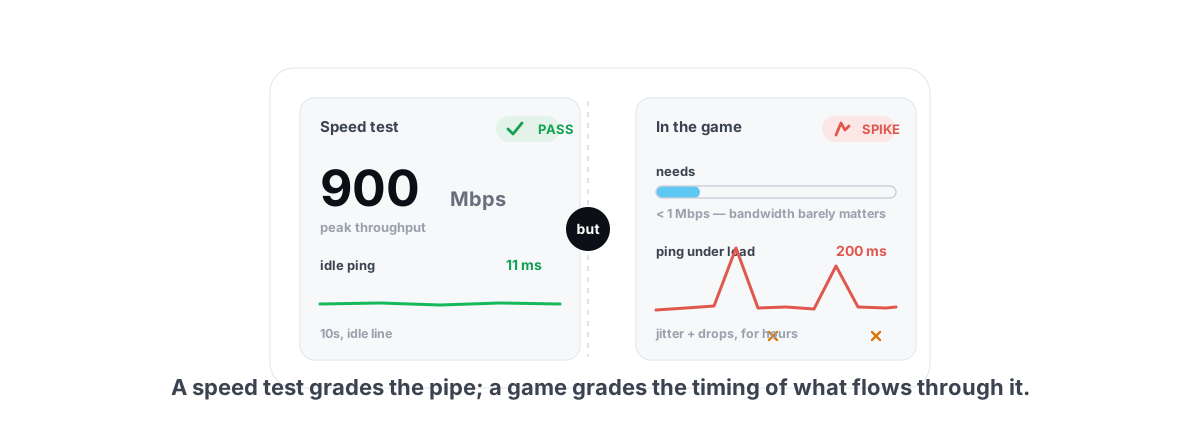
Speed test passes but games spike? The real causes are background apps, adapter power saving, Wi-Fi and bufferbloat - all verifiable, none placebo.
 Network & Latency
What Is Bufferbloat? The Hidden Lag in Your Net
Why your ping spikes the moment anything downloads, how to grade it A-F, and the one router-side fix (SQM) that actually works.
 Network & Latency
Ethernet vs WiFi for Gaming: The Real Latency Numbers
A cable saves maybe 1-3ms of average latency. The real win is jitter and packet loss. Here's when WiFi 6 close to the router is genuinely fine, and when wireless silently ruins your games.
Stop guessing. Measure it.
BRUTAL Optimizer is the honest way to speed up Windows — 17 free modules, a real FPS overlay, verified disk cleanup and drive health. No kernel driver of our own, no game hooks, every setting change reversible.