Best MTU for Gaming: Mostly a Myth, Occasionally a Real Fix
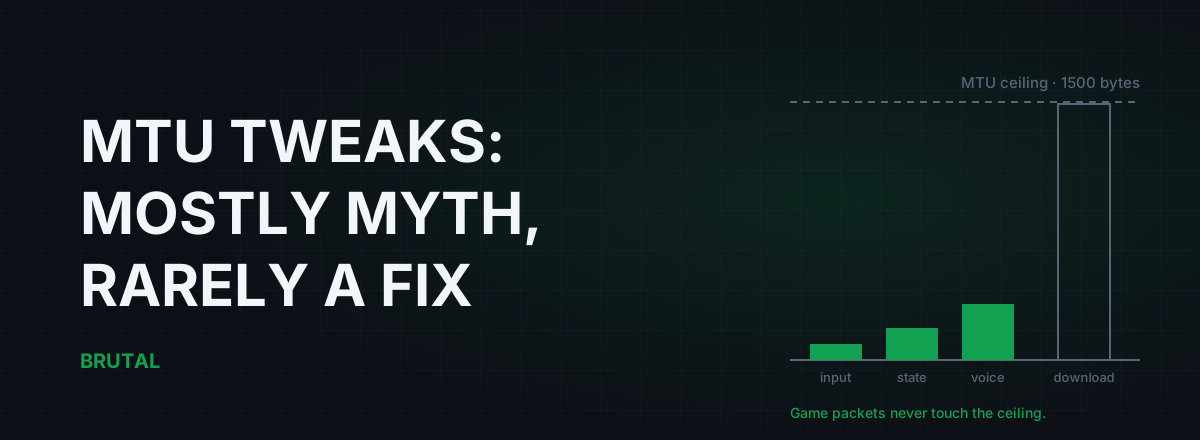
The best MTU for gaming is almost always the one your connection already uses: 1500 on a normal home line, 1492 on PPPoE, or whatever your VPN app picked if you're tunneling. Changing it won't touch your ping in the overwhelming majority of cases, because game packets are tiny and never come near the limit in the first place.
That's the short answer, and it's the one most MTU guides won't give you, because "leave it alone" doesn't get clicks. But there are a few real cases where a wrong MTU genuinely breaks things, and they're worth knowing. So here's the whole picture: what MTU actually is, why the default is right for nearly everyone, the handful of honest exceptions, and how to test yours properly in about two minutes.
What MTU actually is
MTU stands for Maximum Transmission Unit. It's the largest packet, in bytes, that a network link will carry in one piece. On Ethernet that number has been 1500 since the 1980s, and most of the internet is built around it.
Everything your PC sends gets chopped into packets. Each packet carries headers, the addressing information, which cost about 28 bytes for the usual IP-plus-UDP combination, and a payload, the actual data. MTU is the ceiling on the whole thing, headers included.
Here's the part every tweak guide skips: MTU is a ceiling, not a speed. Packets don't travel faster because the ceiling is lower. A 100-byte packet moves through a 1500-MTU link exactly as fast as through a 1400-MTU link. The only thing a smaller MTU changes is how big packets are allowed to get. That matters for bulk downloads. It matters almost not at all for games.
Why your game's packets don't care
Multiplayer games send small packets on purpose. Your inputs going up to the server are typically 30 to 100 bytes. State updates coming back usually run 100 to 500 bytes, occasionally more in a chaotic teamfight. Many netcodes hard-cap their packets around 1200 bytes precisely so they never risk fragmentation on an unusual path. The engine developers solved this problem for you years ago.
So picture the tweak honestly. Your game sends a 120-byte packet. The doorway is 1500 bytes wide. You shrink the doorway to 1473. The packet is still 120 bytes. It takes the same route, through the same routers, at the same speed. Nothing about that interaction changed, and nothing could have.
Your game sends 120-byte packets through a 1500-byte doorway. Making the doorway smaller doesn't make small packets walk faster.
Games also run almost entirely over UDP, which doesn't negotiate segment sizes the way TCP does, so most of the TCP-era logic behind MTU tuning doesn't even apply to the traffic you care about. There's more on that distinction in UDP vs TCP and why loss matters more than speed.
Fragmentation and PMTUD, in plain words
What happens when a packet is bigger than some link's limit along the way? Two things can happen. The router can fragment it: chop it into pieces that get reassembled at the far end. That works, but it's slow and fragile, and if one fragment is lost the whole packet is lost. Or, if the packet carries the "don't fragment" flag, and modern operating systems set that flag on nearly everything, the router drops the packet and sends back an ICMP message that says, roughly, "too big, the limit here is X".
Your PC listens for those messages and shrinks its packets for that destination automatically. The mechanism is called Path MTU Discovery, PMTUD for short, and it's been standard for decades. When it works, MTU is a solved problem you never think about. It works for almost everyone, almost all the time.
When it breaks, it breaks in a specific and recognizable way. Some overzealous firewall along the path drops the ICMP "too big" replies. Now large packets vanish silently: your PC keeps sending 1500-byte packets into a path that can only carry, say, 1460, no error ever comes back, and the connection just hangs. That's a PMTUD black hole. The symptoms are web pages that half-load, downloads that stall at zero, launchers that log in fine but never fetch content.
Notice what's missing from that list: high ping in game. Your small game packets sail through a black-holed path untouched. If your actual problem is packets disappearing mid-match, MTU is almost certainly not the cause, and you should start with fixing packet loss properly instead.
The best MTU for gaming is almost always the default
Different connection types have different correct values, and in nearly every case something already set the right one for you.
| Connection type | Correct MTU | Do you need to set it? |
|---|---|---|
| Ethernet, fiber, cable (DHCP) | 1500 | No. It's already the default. |
| PPPoE (DSL, many fiber ISPs) | 1492 | Your router sets it automatically in nearly all cases. |
| WireGuard tunnel | 1420 (typical) | No. The app configures the tunnel interface. |
| OpenVPN tunnel | Roughly 1400 to 1500 | No. The client handles it. |
| 4G/5G and mobile hotspots | Usually 1400 to 1500 | No. The carrier and phone negotiate it. |
| "1473 from a YouTube video" | Not a real thing | It's a misread ping test. More on that below. |
The PPPoE row deserves a sentence. PPPoE wraps your traffic in an extra 8-byte header, which drops the usable ceiling from 1500 to 1492. It's common on DSL and on plenty of fiber ISPs, especially across India, Europe, and South America. Any router made in the last decade knows this and configures itself. Many ISPs also support a standard (RFC 4638) that restores the full 1500 anyway. On top of that, routers do something called MSS clamping, which quietly tells TCP connections to use smaller segments so the problem never surfaces.
In other words, three separate safety nets exist before you ever need to touch a setting. The correct MTU is a fact about your line, not a preference, and definitely not a per-game tuning knob.
The rare cases where MTU genuinely matters
Honesty cuts both ways, so here's when an MTU problem is real:
- A misconfigured PPPoE setup. Someone set the router's WAN MTU to 1500 manually, or a cheap ISP-supplied box shipped broken, and MSS clamping is off. Big transfers stall, some sites hang, gaming mostly works. The fix is setting 1492, the correct value, not a magic lower one.
- Stacked tunnels. A VPN over PPPoE, or a corporate VPN over a home tunnel. Each layer eats header bytes, and if the innermost layer doesn't know, you get the black-hole behavior above. Decent VPN clients handle this; WireGuard defaults to 1420 for exactly this reason.
- Carrier-grade translation layers. Some 4G/5G home internet and DS-Lite setups encapsulate your traffic and shave the usable ceiling. Usually the carrier handles it. Occasionally they don't.
- A genuine PMTUD black hole on the path. Rare, and usually not yours to fix, but lowering your MTU can work around someone else's broken firewall.
Add all that up and maybe one gamer in ten or twenty ever meets a real MTU problem. When they do, the symptom is stalled downloads and half-loading pages, not high ping. If your ping is fine and your downloads are fine, you're done. There's nothing here for you.
How to test your MTU properly (two minutes)
Windows can answer this definitively with one built-in command. Open a terminal and run:
ping -f -l 1472 1.1.1.1
The -f flag sets don't-fragment, and -l 1472 sets the payload size. A 1472-byte payload plus 8 bytes of ICMP header plus 20 bytes of IP header comes to exactly 1500 bytes on the wire.
- If you get normal replies, your path carries full 1500-byte packets. Your MTU is 1500. Stop here. There is nothing to fix, and lowering it can only add overhead.
- If you see "Packet needs to be fragmented but DF set", lower the payload and retry. Try 1464, then 1452, then 1444, narrowing until you find the largest payload that gets replies.
- Add 28 to that largest working payload. That's your real path MTU. On PPPoE you'll almost always land on 1464 + 28 = 1492.
- Set that value on the router's WAN interface, not in Windows, so every device on the network benefits.
The add-28 step is where most guides fall down, and it matters. The payload number and the MTU are different things, 28 bytes apart, and confusing them is the origin story of an entire genre of bad advice.
Where "MTU 1473 pro settings" comes from
Search YouTube for the best MTU for gaming and you'll find videos, some with millions of views, telling you to set 1473, or 1452, or some other oddly specific number. Here's the actual origin of 1473: on a healthy 1500-byte path, 1472 is the largest ping payload that passes the don't-fragment test, so 1473 is the first one that fails. The video maker ran the test, watched 1473 fail, and concluded the failure point was the setting. It's the measurement equivalent of reading the fuel gauge upside down.
The other variant forgets the 28 header bytes and tells you to set MTU to the payload number itself. Either way you end up with a value below your real path MTU, which changes nothing for your 120-byte game packets and makes every download split into slightly more, slightly less efficient packets.
Why does the myth survive? The same way they all do. You change the setting, you queue into a match, normal ping variance hands you a good game, and the tweak takes the credit. Nobody makes a follow-up video the night the same tweak coincides with a bad game. It's the same lifecycle as the registry-level Nagle and TCP tweak myths, which target a protocol most games don't even use for gameplay traffic.
What actually moves your ping
MTU isn't on the list. The things that are:
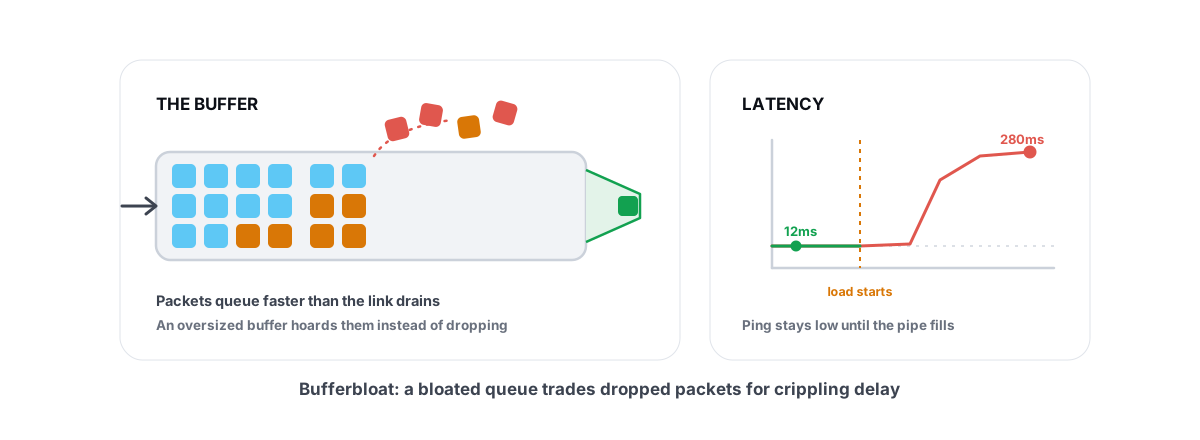
Bufferbloat. If your ping spikes whenever someone in the house streams or downloads, your router is queuing packets badly under load. This is the single most fixable cause of in-game lag on otherwise decent connections, and you can test and fix bufferbloat in an evening. The vendor-neutral Waveform bufferbloat test gives you a letter grade in about a minute.
Wi-Fi. A cable is worth more than every registry and MTU tweak combined, usually 5 to 20ms of jitter reduction on a congested network. The numbers are in Ethernet vs Wi-Fi for gaming.
Distance and routing. Your ping floor is set by physics and by the path your ISP hands your packets. You can't tweak your way past geography. Occasionally, though, the ISP's route really is the problem, and a relay through a better path wins by 20 to 60ms depending on how bad the detour was. That's the one thing Smart Route does: it measures your direct route against a relay for your specific connection and only switches when the numbers prove a win. When direct wins, it says so and stays out of the way. The measurement tools, ping test, traceroute, and the bufferbloat grade, are all in the free download, no purchase needed to find out which problem you actually have.
The honest hierarchy: fix Wi-Fi, fix bufferbloat, verify loss, and only then think about routes. MTU sits at the bottom, a repair for one specific rare fault, not a tuning knob. The best MTU for gaming was configured before you ever opened the settings page. The best thing you can do with it is check it once, confirm it's right, and never think about it again.
Frequently asked questions
What is the best MTU for gaming?
1500 on most home connections, 1492 on PPPoE lines, and whatever your VPN client set if you're tunneling. It's a property of your line, not a preference. Only change it if a don't-fragment ping test proves your path carries less than 1500 bytes.
Does lowering MTU reduce ping?
No. Game packets are roughly 30 to 500 bytes and never come near the MTU ceiling, so lowering it changes nothing about how they travel. The only measurable effect is making downloads split into slightly more, slightly less efficient packets.
How do I find the correct MTU for my connection?
On Windows, run ping -f -l 1472 1.1.1.1. If you get replies, your path MTU is 1500 and you're done. If you see a fragmentation error, lower the payload until replies pass, then add 28 bytes of headers to get your real path MTU.
Should I set my MTU to 1473?
No. On a healthy 1500-byte path, 1472 is the largest ping payload that passes the don't-fragment test, so 1473 is simply the first one that fails. Videos that recommend it misread the measurement. It's not a valid setting for anything.
What MTU should I use for PPPoE?
Usually 1492, because PPPoE adds an 8-byte header inside the 1500-byte Ethernet frame. Almost every router sets this automatically, and some ISPs support RFC 4638 to keep the full 1500. Only set it manually if a ping test shows your router got it wrong.
Can a wrong MTU cause packet loss in games?
Rarely. MTU mismatches drop large packets, and gameplay traffic is small, so it usually sails through untouched. The real symptoms are stalled downloads, half-loading web pages, and launchers that log in but never fetch content.
Keep reading
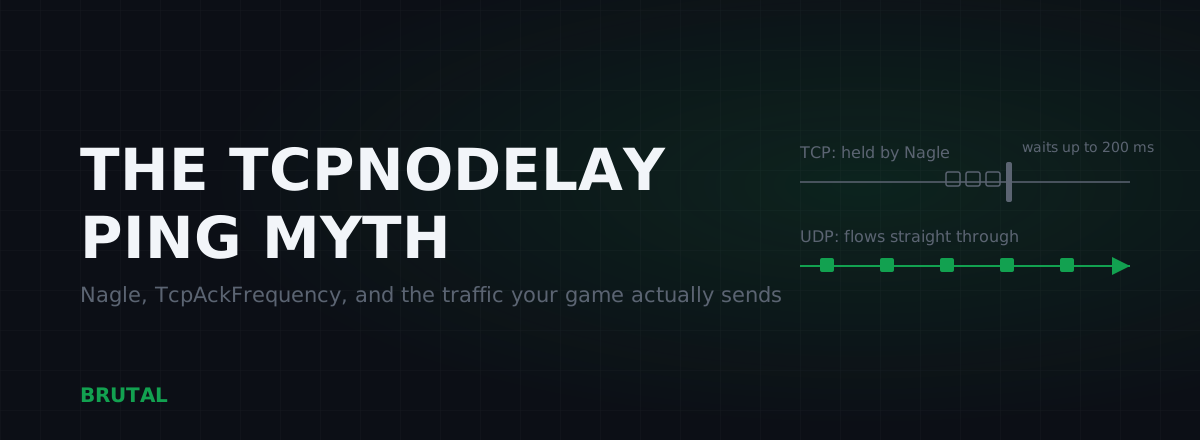 Myths & Honest Truths
TcpNoDelay Gaming Fix: The Truth About Nagle Registry Tweaks
Nagle's algorithm, TcpAckFrequency, ThrottlingIndex: what the classic registry ping tweaks actually do, why most games never touch TCP, and the rare cases where they mattered.
 Network & Latency
What Is Bufferbloat? The Hidden Lag in Your Net
Why your ping spikes the moment anything downloads, how to grade it A-F, and the one router-side fix (SQM) that actually works.
 Network & Latency
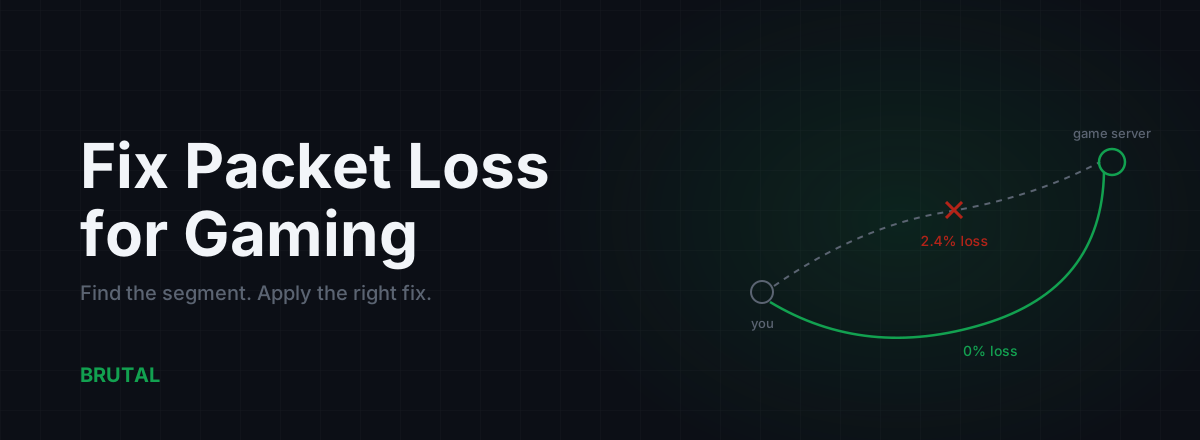
How to Fix Packet Loss for Gaming, Step by Step
Packet loss ruins games faster than high ping. Here's how to find which segment is dropping packets and fix it: cable, Wi-Fi, router, ISP escalation, and when a relay can route around it.
Stop guessing. Measure it.
BRUTAL Optimizer is the honest way to speed up Windows — 17 free modules, a real FPS overlay, verified disk cleanup and drive health. No kernel driver of our own, no game hooks, and per-module undo for the settings it changes.