More RAM vs Faster RAM: What Actually Helps Gaming
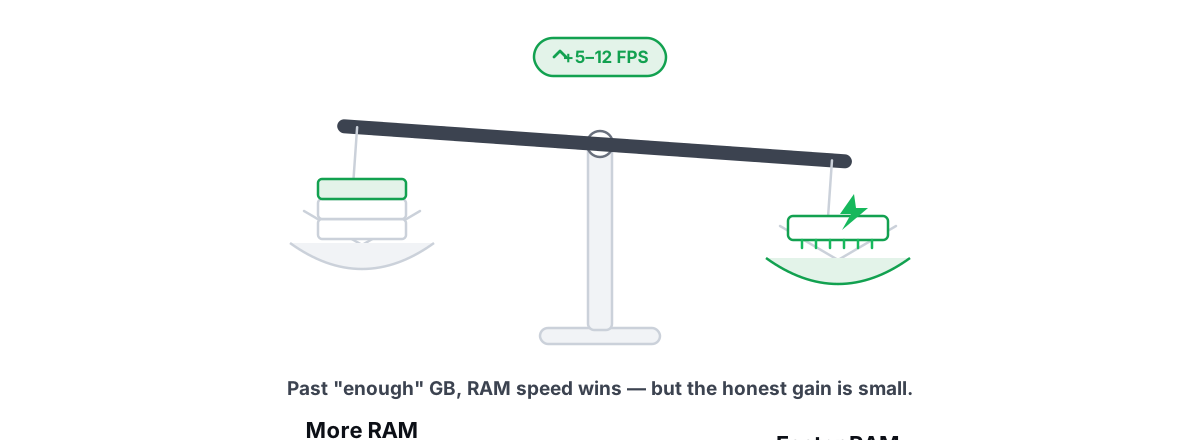
"Just add more RAM" is the most repeated upgrade advice in gaming, and for most people it's the wrong one. Past a point that's lower than you think, extra gigabytes do nothing for your frame rate — while RAM speed quietly leaves real frames on the table.
The myth: more gigabytes equals more frames
The logic feels airtight. Games use RAM, more RAM means more headroom, so 32 GB must run games better than 16 GB. Storefronts and pre-built listings lean on it hard because "double the RAM" is an easy sell.
It falls apart the moment you separate two things that get lumped together: capacity (how many gigabytes you have) and speed (how fast those gigabytes feed the CPU). They're different specs that fix different problems.
Capacity is a floor. Below it you get stutter and crashes; above it, the extra does nothing for FPS. Speed and latency are a slope — faster memory keeps feeding more frames, especially when the CPU is the thing holding you back.
RAM capacity is a yes/no question: do you have enough? Once the answer is yes, more capacity buys zero extra FPS. RAM speed is where the actual gaming gains hide — and most people never touch it.
Capacity: how much you actually need in 2026
Here's the honest breakdown for gaming, not productivity workloads like video editing or running VMs.
| Capacity | Reality for gaming in 2026 |
|---|---|
| 8 GB | The squeeze. Modern titles plus Windows, a browser, and Discord will exhaust it, forcing the game to page assets off the SSD. Expect stutter and texture pop-in. Not enough anymore. |
| 16 GB | The sane floor and the sweet spot for most gamers. Comfortable for the large majority of titles at typical settings with normal background apps open. |
| 32 GB | Genuinely useful if you keep dozens of browser tabs open, stream, run a few demanding games that are RAM-hungry, or also do creative work. For pure gaming, it's headroom and future-proofing, not free FPS. |
| 64 GB+ | A waste for gaming alone. This is workstation territory — large renders, VMs, heavy data work. |
So is 16 GB enough for gaming? For most people, yes — in 2026 it's still the right target. A handful of the most demanding new releases, plus a heavy multitasking habit, are the cases that push you to 32 GB. If you have to ask whether 16 is enough, it almost certainly is for your library.
One real caveat: "16 GB" should mean two matched 8 GB sticks, not a single 16 GB stick. That's a speed issue dressed up as a capacity one, and it's covered below.
Why past 'enough', extra capacity does nothing for FPS
A game only renders frames using the data it actually loaded — textures, geometry, audio, and the game's own code, all resident in RAM. Once those fit comfortably, the GPU and CPU work from that data at full speed.
Empty RAM doesn't accelerate anything. It just sits there. The GPU doesn't render faster because there are spare gigabytes nearby; it renders as fast as the CPU can feed it draw calls and as fast as it can shade pixels. Idle memory has no role in that loop.
This is the same misunderstanding behind memory "boosters" — the belief that free RAM is a resource you're saving. It isn't. Windows deliberately fills spare RAM with cached data because cache that's never used is wasted. We break that down fully in do RAM boosters work, and what free RAM really means.
So when a 16 GB system and a 32 GB system both have enough headroom for a game, they produce the same frame rate. The benchmark difference between them is measurement noise. The 32 GB rig only pulls ahead the moment the 16 GB rig runs out and starts paging to disk — and at that point you're fixing a capacity shortfall, not gaining from abundance.
Speed and latency: where real gains live
This is the part the "more is better" crowd skips. RAM speed and timings feed the CPU, and in CPU-bound moments — busy scenes, lots of physics, dense online lobbies — faster memory means more frames. Real frames, not rounding error.
Two numbers describe RAM speed:
- Data rate — the headline number, like DDR4-3200 or DDR5-6000. Higher means more bytes per second moving between RAM and CPU.
- Latency (CAS / CL) — how many cycles the RAM waits before it can deliver requested data. Lower is better. A DDR5-6000 CL30 kit feeds the CPU faster than a DDR5-6000 CL40 kit at the same data rate.
The gains are largest where the CPU is the bottleneck. In esports titles and CPU-heavy games at high frame rates, moving from slow stock memory to a properly tuned fast kit can lift the 1% lows — the stutter floor you actually feel — by anywhere from a few percent to roughly 20% in the CPU-bound cases, with a smaller bump to average FPS. Bound entirely by the GPU at 4K with maxed settings, that gap shrinks toward nothing.
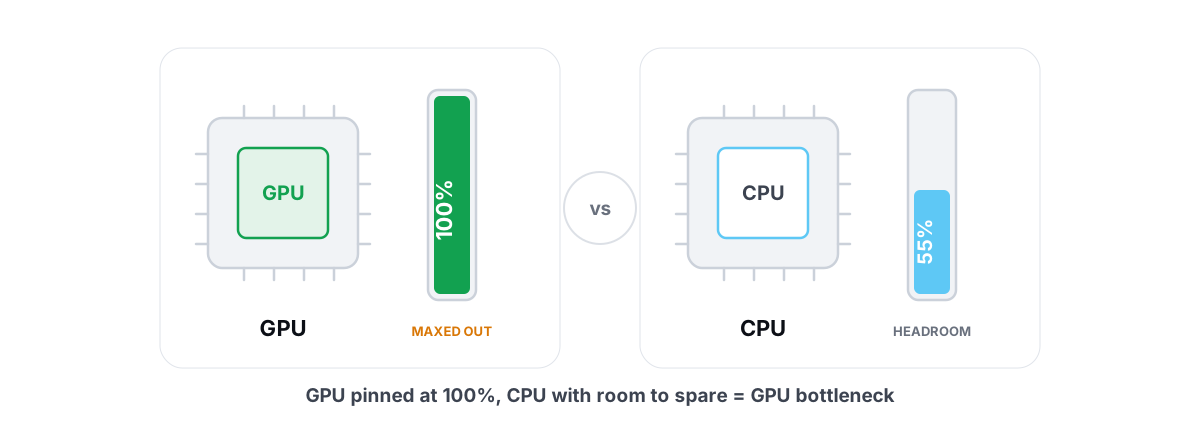
To know which camp you're in, you need to see whether your CPU or GPU is the limiter. That's the single most useful diagnostic before any RAM decision — walk through it in how to tell a GPU vs CPU bottleneck in gaming.
The free speed upgrade most people miss
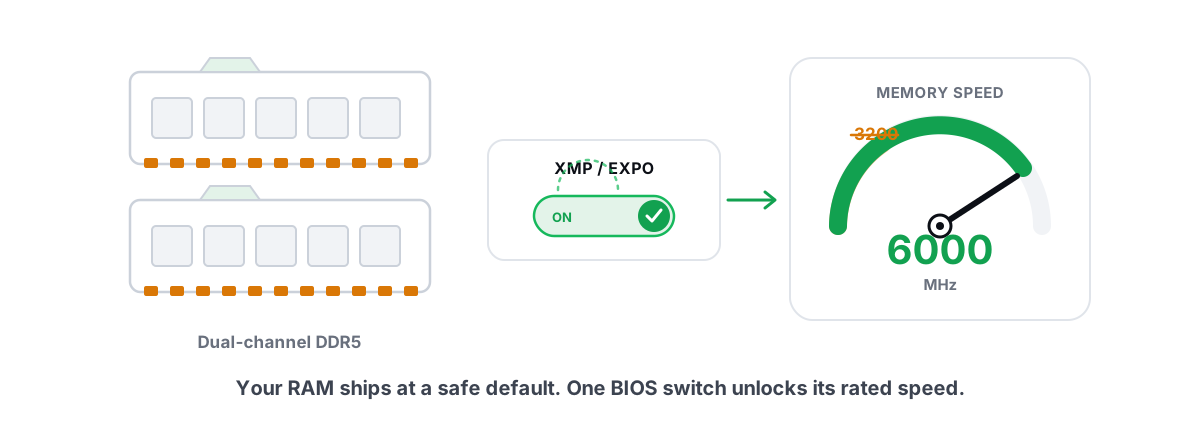
New kit, factory defaults, and your DDR5-6000 is quietly running at DDR5-4800. Windows reports the full capacity, so nobody notices the speed loss. Enabling XMP (Intel) or EXPO (AMD) in BIOS loads the rated data rate and timings the RAM was sold for.
This is the one BIOS toggle that's worth flipping for almost everyone, and it costs nothing — you already paid for the speed. We cover exactly how, and the rare gotchas, in XMP and EXPO: the one BIOS toggle worth flipping. If you suspect your RAM is slow, this is the first thing to check, before buying anything.
Dual-channel and matched kits matter more than size
Here's where a "bigger" upgrade can actually make a game slower. RAM talks to the CPU over memory channels. Two matched sticks run in dual-channel, doubling the effective bandwidth versus a single stick. That bandwidth matters a lot for gaming.
So a single 16 GB stick (single-channel) can lose to two 8 GB sticks (dual-channel) in games, despite identical capacity. The dual-channel pair feeds the CPU on two lanes instead of one. People who "add more RAM" by buying one big stick to sit next to a mismatched one sometimes drop into single-channel or a flaky asymmetric mode and lose frames.
The integrated-graphics case makes this brutal, because the iGPU steals system RAM as its video memory and is starved by single-channel bandwidth. There, dual-channel can swing frame rates dramatically.
Practical order of preference for a gaming build, best first:
- Two matched sticks (dual-channel), running their rated XMP/EXPO speed.
- Two matched sticks at default speed — fix this for free with one BIOS toggle.
- A single stick (single-channel) — works, but you're leaving bandwidth and FPS on the table.
The integrated-GPU exception
Everything above assumes a discrete graphics card with its own dedicated VRAM. If you game on integrated graphics — a laptop or desktop with no separate GPU — the rules change, because the iGPU has no memory of its own. It carves out a slice of your system RAM and uses that as video memory.
Two consequences follow:
- RAM speed becomes graphics performance. The iGPU is fed by the same memory bus as the CPU. Faster RAM and dual-channel directly raise frame rates, often substantially — this is the one scenario where memory bandwidth is one of the biggest levers you have.
- Capacity needs a little more breathing room. Because a chunk of RAM is reserved for graphics, an iGPU machine feels the squeeze sooner. On an integrated-graphics laptop, 16 GB in dual-channel is meaningfully better than 8 GB in single-channel — for both the capacity and the bandwidth.
If you're on integrated graphics, the single highest-impact thing you can do is make sure you're running two matched sticks at their rated speed. That's not a minor tweak there; it's the difference between a playable game and a slideshow.
How to tell if RAM is your bottleneck
Before you spend a rupee, find out whether memory is actually limiting you. Two questions, answered with tools you already have.
Is it a capacity problem?
Open Task Manager (Ctrl+Shift+Esc) → Performance → Memory, then play normally for a while and alt-tab back to check. Watch the Available figure (not "In use"). If Available drops near zero while gaming and the game stutters or pops textures in, you're capacity-limited and more RAM will genuinely help.
If Available stays comfortable the whole session, you have enough. Adding capacity will not raise your FPS, full stop. If your memory usage looks alarmingly high but games run fine, that's usually Windows caching doing its job — see fixing high RAM usage in Windows without boosters.
Is it a speed problem?
Two checks. First, confirm your RAM is actually running at its rated speed: Task Manager → Performance → Memory shows the current Speed in MT/s, and whether you're in single- or dual-channel-style slot usage. If that number is below what's printed on your kit, you have free FPS waiting behind an XMP/EXPO toggle.
Second, find out if you're even CPU-bound, because RAM speed only pays off when you are. While gaming, watch CPU and GPU utilization. GPU pinned near 100% means the GPU is the limit and faster RAM won't move much. GPU sitting well below 100% while frames are capped means the CPU (and its memory feed) is holding you back — exactly where faster RAM earns its keep.
An anti-cheat-safe overlay makes both readable at a glance. BRUTAL Optimizer's free FPS overlay shows FPS, 1% lows, frametimes, and live CPU/GPU/RAM together, so you can watch your 1% lows and utilization in the same scene and judge whether a faster kit (or just enabling XMP) would help. It reads composition frames rather than hooking the game, so it runs alongside Vanguard, EAC, and BattlEye.
Spend the money where it helps
Put the RAM question in order of return on money spent.
| Your situation | The honest move |
|---|---|
| On 8 GB, stuttering, Available near zero in games | Upgrade to a matched 2×8 GB (16 GB) kit. Real, large improvement. |
| On 16 GB, RAM running below its rated speed | Enable XMP/EXPO in BIOS. Free FPS, no purchase. |
| On a single stick | Add a matching stick (or replace with a matched pair) for dual-channel. Real gain, especially on an iGPU. |
| On 16 GB, dual-channel, rated speed, games run fine | Don't buy RAM. Spend on the GPU or a faster monitor. More RAM here buys nothing. |
| Want lower 1% lows in CPU-bound games | A faster, lower-latency kit at rated speed — but only after confirming you're CPU-bound. |
The pattern across every row: fix the limiter, not the spec that's easiest to buy. For most gamers the biggest single jump is GPU, then making sure RAM is at rated dual-channel speed, then capacity only if you're actually running out.
None of this needs an app. But if you'd rather measure than guess, the free side of BRUTAL Optimizer gives you the overlay and a live CPU/GPU/RAM monitor to see your real bottleneck before you spend — and it refuses placebo, so there's no fake "RAM booster" meter pretending idle gigabytes are the problem. Watch your Available memory and your 1% lows, confirm whether you're CPU- or GPU-bound, and put your money where the numbers point.
Frequently asked questions
Is 16GB enough for gaming in 2026?
For most people, yes. 16GB is still the sweet spot for the large majority of games at typical settings with normal background apps open. A few of the most demanding new releases, plus heavy multitasking or streaming, are the cases that push you to 32GB. If games run fine, jumping to 32GB for more FPS is the wrong reason to spend.
Does RAM speed matter for gaming?
Yes, when the CPU is the bottleneck. In CPU-heavy and esports titles at high frame rates, faster, lower-latency RAM can lift average FPS and especially the 1% lows you actually feel. When you are fully GPU-bound at high settings, the gap shrinks toward nothing, so check whether you are CPU- or GPU-bound first.
Is 32GB better than 16GB for gaming?
Only if 16GB is actually running out. Once a game has enough RAM headroom, more capacity buys zero extra FPS, since the GPU and CPU render from data already loaded. 32GB helps if you keep many tabs open, stream, run a RAM-hungry title, or also do creative work, but for pure gaming it is headroom, not free frames.
More RAM or faster RAM, which should I buy?
Add capacity only if you are actually running out, which you can check in Task Manager by watching the Available figure while gaming. If you have enough, faster or rated-speed dual-channel RAM is the better spend for FPS. And first enable XMP or EXPO, since most kits run below their rated speed at default, which is free performance.
Does dual-channel RAM matter more than capacity?
Often, yes. Two matched sticks run in dual-channel and feed the CPU on two lanes, so a single large stick can lose to two smaller matched sticks in games despite equal capacity. It matters most on integrated graphics, where the iGPU uses system RAM as video memory and is starved by single-channel bandwidth.
Keep reading
 Myths & Honest Truths
Do RAM Boosters Work? What Free RAM Really Means
Why free RAM is wasted RAM, how aggressive trimming causes stutter, and the rare times a memory tool actually helps.
 Hardware & Drivers
GPU vs. CPU Bottleneck: How to Tell in Gaming
Read GPU and CPU utilization to find which part is capping your frames — then tweak or upgrade the right one instead of guessing.
 Hardware & Drivers
XMP and EXPO: The One BIOS Toggle Worth Flipping
Most PCs run RAM below its rated speed because XMP/EXPO is off by default. Here is how to enable that one BIOS toggle safely.
Stop guessing. Measure it.
BRUTAL Optimizer is the honest way to speed up Windows — 17 free modules, a real FPS overlay, verified disk cleanup and drive health. No kernel driver of our own, no game hooks, every setting change reversible.