Fortnite High Ping Fix: What Works and What's Placebo
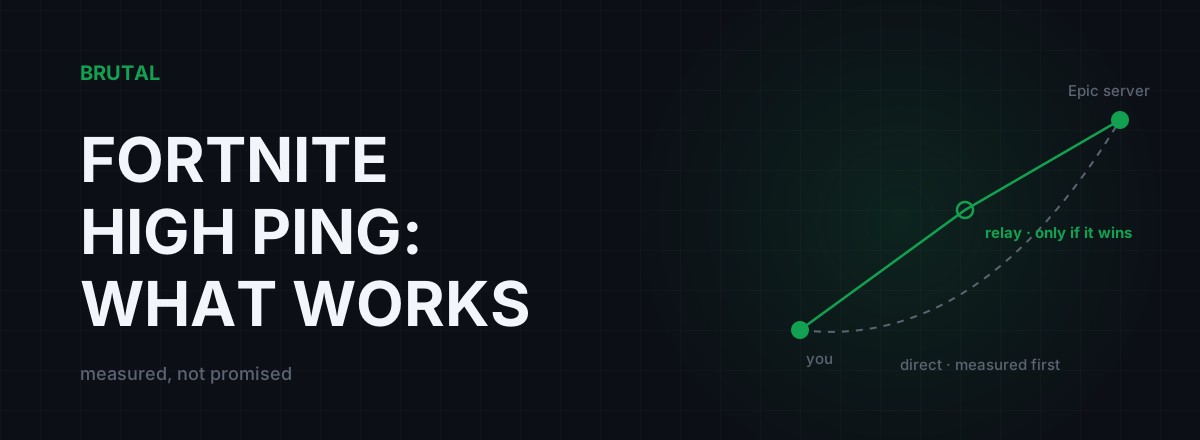
Most of what's sold as a Fortnite high ping fix is placebo. Real high ping almost always comes from one of three places: you're matched to the wrong server region, your home connection is drowning under someone else's traffic, or your ISP takes a bad route to Epic's servers. Everything else, including Performance Mode, doesn't touch the network at all. Here's how to figure out which problem you have and what actually fixes it.
What Fortnite's ping number actually measures
Turn on the ping readout under Settings → Game UI → Net Debug Stats. The number you see is the round trip time from your machine to the Epic server hosting your match and back, in milliseconds. That's the whole story. It measures a physical path: your PC or console, your router, your ISP's network, an internet backbone or two, then Epic's data center.
Notice what's not in that path. Your graphics card isn't in it. Your FPS isn't in it. Your Windows install isn't in it. Any fix that doesn't change the physical path between you and Epic's servers cannot change the number, and that single fact rules out most of the advice you'll find on forums.
For reference: wired, in the same region as your server, 15 to 40 ms is normal depending on distance. 40 to 60 ms is playable but you'll lose some 50/50 piece control fights. Above 80 ms, you're seeing the world roughly a tenth of a second late, and every box fight feels slightly unfair because, for you, it is.
One more distinction before the fixes: a steady 60 ms plays better than a 30 ms that spikes to 150 every few seconds. Those spikes are jitter, and they're usually a symptom of the router congestion problem covered below rather than raw distance. If your ping number bounces around instead of sitting still, skip straight to the family router section.
Check your matchmaking region first
This is the fastest fix and the most commonly broken setting. Fortnite lets you pick your matchmaking region in the settings, and it shows a live ping estimate next to each one. Epic runs regional server clusters (as of this writing: NA, Europe, Brazil, Asia, Middle East, and Oceania), and sitting on the wrong one costs more ping than every other fix in this article can save combined.
It goes wrong three ways. You set it manually years ago and forgot. It's on Auto and Auto guessed wrong, which happens more often than it should, especially on ISPs with odd routing. Or you're partied with a friend abroad and matchmaking pulls the whole squad onto their servers. That last one has no real fix; the match has to run somewhere, and someone in the party is going to eat the distance.
Distance is physics, not a settings problem. Light in fiber covers roughly 100 km per millisecond one way, before any equipment adds its own delay. A player in New York on EU servers carries an 80 ms floor that no app, tweak, or purchase removes. So if every region in the list shows high ping, your region setting is fine and your problem is further down this page.
Performance Mode won't lower your ping
Performance Mode is the most repeated Fortnite ping fix on the internet, and it does not touch your network. It's a rendering mode. It strips graphical detail so weaker machines can push more frames per second. Your round trip to Epic's servers is identical before and after you enable it.
Here's why the myth refuses to die: higher and more stable FPS genuinely reduces input latency, the delay between your click and the game responding. The game feels snappier, so people report their ping "improved". The feel is real. The number isn't different, and neither is your actual position on the server compared to a low-ping opponent peeking you.
The same verdict covers DirectX 12 versus 11, lowering resolution, turning meshes off, and every other video setting. It also covers clearing the game cache and reinstalling, which fix corrupted files, not routing. If your ping reads 110 before all of that, it reads 110 after.
Fortnite's ping number doesn't know what graphics card you have. It measures your house, your ISP, and the distance to Epic's servers.
The family router problem
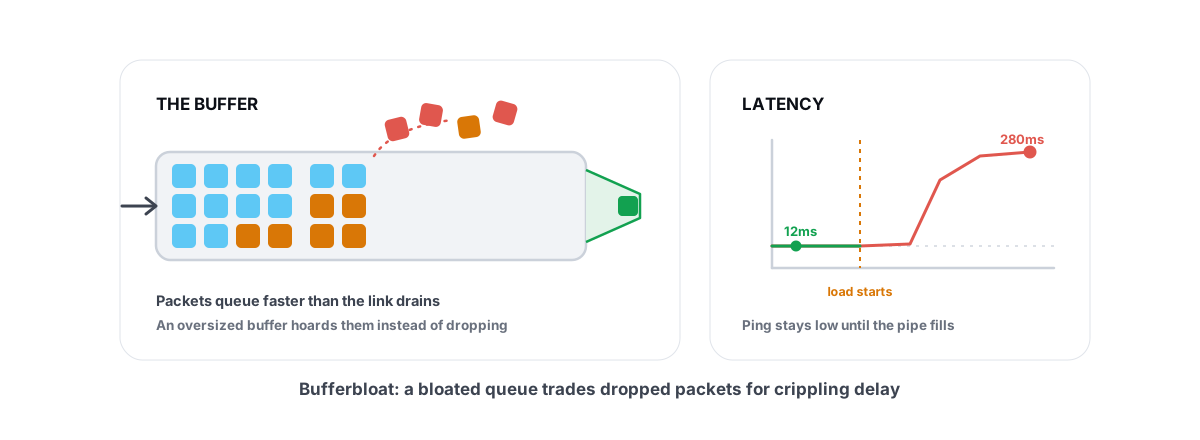
Now for the cause almost every guide skips, and in shared households it's the most common one: bufferbloat. Someone streams 4K in the next room, someone joins a video call, a phone quietly backs up photos to the cloud. Your router's buffer fills, your game packets wait in line behind everyone else's, and your ping climbs from 25 to 180 without anything being "broken".
The tell is timing. If your ping is clean at 7 a.m. and ugly at 8 p.m., you probably don't have a Fortnite problem, you have a congestion problem. We cover the pattern in why ping spikes only when you're gaming, but the short version is that gaming is the only thing you do that notices a 150 ms queue. A video stream just buffers through it, which is why nobody else in the house believes you.
Test it in two minutes. Run the Waveform bufferbloat test, which measures your latency while deliberately saturating your connection. If your ping under load is two or three times your idle ping, you've found your problem. Most stock ISP routers grade C or worse on this test.
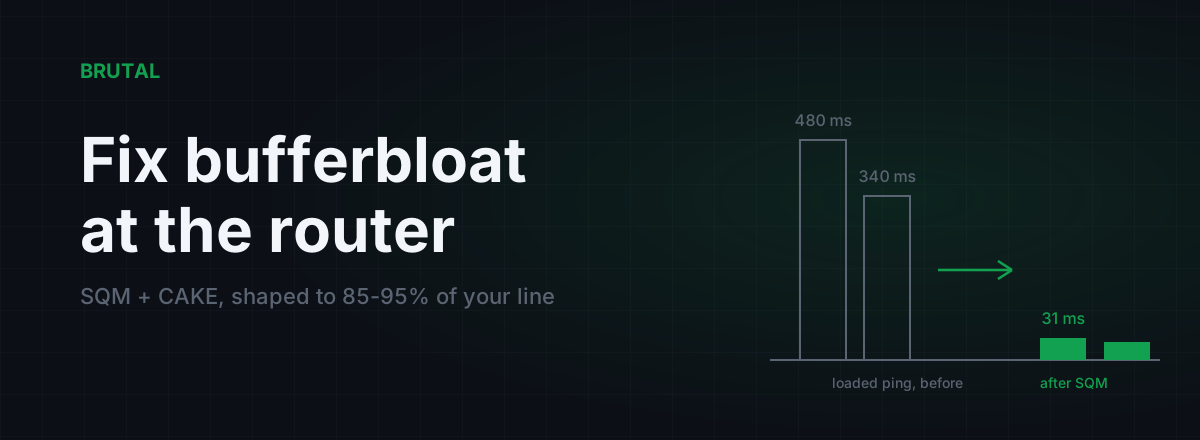
The fix is Smart Queue Management, usually labeled QoS or SQM in your router's admin page. It stops any single stream from hogging the buffer, and it's free if your router supports it. The walkthrough is in fixing bufferbloat with router settings, and the theory is in what bufferbloat actually is. For a shared family connection this is the single highest-value change you can make, and it costs nothing.
Console and controller notes
Everything above applies identically on PS5, Xbox, and Switch. Ping is a property of your network, not your platform. The difference is that consoles give you fewer knobs: there are no client-side network settings worth touching, so every real fix lives on your router. Wired connection, correct region, QoS. That's the whole console toolkit, and honestly it's most of the PC toolkit too.
Two console-specific notes. First, Wi-Fi hurts consoles the same way it hurts PCs, mostly through jitter and retransmits rather than a worse average. If the console sits anywhere near the router, a cable is the cheapest real upgrade available; the measured difference is in Ethernet vs Wi-Fi for gaming latency. Second, if you play on a TV, make sure it's in Game Mode. A TV running its cinematic processing can add 50 to 100 ms of display lag that feels exactly like high ping but never shows up in the ping counter. Clean ping number, laggy game: suspect the screen.
Controller players on PC, nothing changes for you. Your input device has zero effect on network latency. Aim assist works at any ping; being half a build behind at 130 ms is the part that loses fights.
Fortnite high ping fix: what works versus what doesn't
One honest table covering every common fix for high ping in Fortnite, so you can stop reading forum threads:
| Fix | Lowers ping? | When it actually helps |
|---|---|---|
| Matching your server region | Yes, hugely | Wrong region set, Auto guessed wrong, or a party pulled you abroad |
| QoS / SQM on the router | Yes, under load | Shared household; ping spikes when others stream or upload |
| Ethernet instead of Wi-Fi | A little; mostly kills jitter | Any Wi-Fi setup, especially far from the router |
| Measured relay routing (GPN) | Sometimes | Bad ISP route to Epic; wins maybe one case in ten, 10-40 ms when it does |
| Performance Mode | No | Raises FPS on weak PCs; input feels better, ping unchanged |
| Clearing cache / reinstalling | No | Corrupted files only; not a network fix |
| Closing background apps | Rarely | Only if something is actively uploading (backups, torrents) |
| A faster internet plan | Usually no | Bandwidth isn't latency; helps only if your line is saturated |
VPNs and routed paths, honestly
Sometimes the region is right, the router is fixed, the cable is in, and your ping is still high. That usually means your ISP hands traffic to Epic over a congested or geographically silly route. This is real, it's worse in the evenings, and it's the one situation where sending your traffic through a relay can genuinely help.
Be careful with that sentence, though. A general-purpose VPN adds a detour plus encryption overhead, and most of the time it makes ping worse, not better. The honest numbers are in does a VPN lower ping for gaming: a better route exists for maybe one connection in ten, and when it does, the saving is typically 10 to 40 ms, not the fantasy figures in the ads.
Because the win is rare and depends entirely on your ISP and location, the only defensible approach is measurement. That's the entire design of Smart Route: it detects your Fortnite server connection read-only (no injection, no hooks, no kernel driver), measures the direct path against its relays for your specific connection, and routes only when the relay measurably wins. When direct wins, it stays direct and writes "Direct won" on the session's Route Receipt. The decision logic is documented in how Smart Route decides relay or direct. Any tool that can't tell you "no" is selling a feeling, not a fix.
The 20-minute checklist
Run these in order. Most people with high ping in Fortnite are fixed by step 2 or step 4.
- Get a baseline. Measure your ping to your region while the network is quiet. The measurement tools in the free download (ping test, traceroute, bufferbloat grade, DNS benchmark) cost nothing, but any ping tool works. Write the number down so later steps have something to beat.
- Check the matchmaking region. Open Fortnite's settings and compare the ping estimates per region. If Auto picked a distant one, set it manually to the closest region and requeue.
- Go wired if you can. A cable removes Wi-Fi retransmits and jitter. If a cable is impossible, at least move closer to the router and off the crowded 2.4 GHz band.
- Run the loaded test. Saturate your connection with a stream or a big download and watch your ping. If it balloons, enable QoS/SQM on the router and re-test until the loaded number sits close to the idle one.
- Rule out the display. If your ping reads clean but the game feels late, check the TV or monitor is in Game Mode before blaming the network.
- Only then, consider routing. If idle ping to your nearest region is still high after all of the above, your ISP's route is the suspect. Measure a relayed path against direct before paying for anything, and expect "direct wins" to be the most common answer.
And if all six steps come back clean but your evening ping is still bad, the congestion probably lives inside your ISP's network, not your house. No local tweak fixes that. Your realistic options are complaining to the ISP with traceroute evidence, switching providers, or making peace with it. Not a satisfying sentence, but a true one.
Frequently asked questions
Why is my Fortnite ping suddenly high when it was fine before?
Usually one of three things changed: your matchmaking region flipped (check settings, especially after playing in a party), someone on your network started streaming or backing up files, or your ISP changed its route to Epic's servers. Run a ping test while the network is busy and another while it's quiet. The difference tells you whether the problem is inside your house or beyond it.
Does Performance Mode reduce ping in Fortnite?
No. Performance Mode raises FPS by simplifying rendering, which makes input feel more responsive, but your network round trip to Epic's servers is unchanged. If your ping was 110 before enabling it, it's 110 after.
What is a good ping for Fortnite?
Under 30 ms is great, 30 to 60 ms is fine for most players, and above 80 ms you'll noticeably lose edit and build fights against low-ping opponents. Stability matters too: a steady 45 ms plays better than a 25 ms that spikes to 120.
How do I change my server region in Fortnite?
Open Settings, go to the Game tab, and find Matchmaking Region. Fortnite shows a live ping estimate next to each region, so pick the lowest number, which is almost always the region physically closest to you. If you queue with friends abroad, matchmaking may still pull the party onto distant servers.
Does a VPN fix high ping in Fortnite?
Occasionally. When your ISP's route to Epic is bad, a relayed path can save maybe 10 to 40 ms, but most of the time a VPN adds latency instead. Measure the direct route against the relayed one for your own connection before paying for anything; a tool that can't show you that comparison is guessing.
Is Fortnite ping worse on console than PC?
No. Ping is a network property, so the same house and ISP give the same ping on PS5, Xbox, Switch, or PC. Consoles just have fewer things to fiddle with, which means every real fix (wired connection, correct region, router QoS) happens on your router.
Keep reading
 Network & Latency
Ping Spikes Only When Gaming but Internet Is Fine
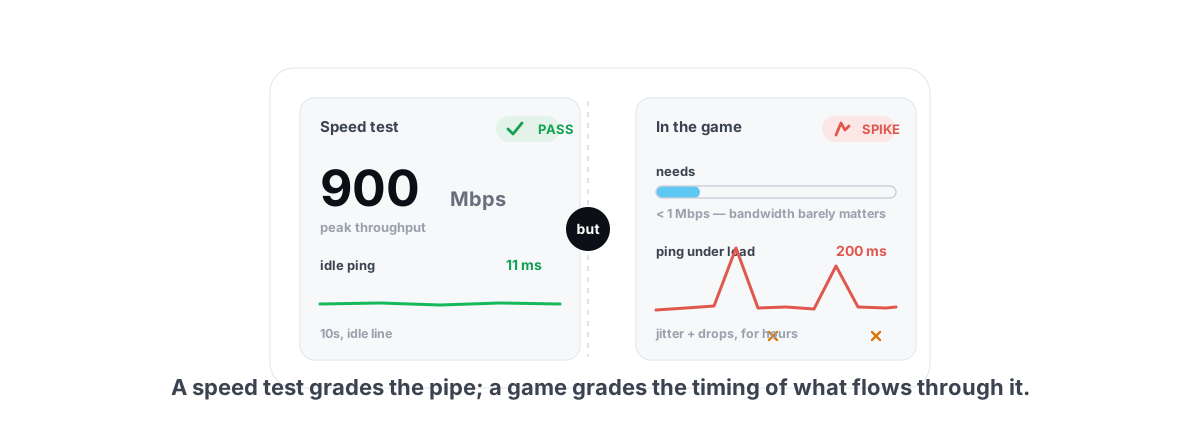
Speed test passes but games spike? The real causes are background apps, adapter power saving, Wi-Fi and bufferbloat - all verifiable, none placebo.
 Network & Latency
What Is Bufferbloat? The Hidden Lag in Your Net
Why your ping spikes the moment anything downloads, how to grade it A-F, and the one router-side fix (SQM) that actually works.
 Network & Latency
How to Fix Bufferbloat: Router Settings That Actually Work
The real fix is smart queue management: CAKE or fq_codel with your line shaped to 85-95% of measured speed. Setup for OpenWrt, ASUS, and stock ISP boxes, plus what SQM can't fix.
Stop guessing. Measure it.
BRUTAL Optimizer is the honest way to speed up Windows — 17 free modules, a real FPS overlay, verified disk cleanup and drive health. No kernel driver of our own, no game hooks, every setting change reversible.