Genshin Impact Lag Fix: Co-op, Asia Servers, and Honest Answers
Most Genshin Impact lag isn't network lag. Solo play runs almost entirely on your device, so stuttery fights and slideshow cities are nearly always a frame-rate problem, and no router setting will touch them. The network shows up in three places: login, co-op, and being far from your account's server region. The honest Genshin Impact lag fix starts with figuring out which of those you've actually got.
First, work out which lag you have
Neither Genshin nor Honkai: Star Rail shows you a ping counter, which is why so many players blame their internet for problems their GPU is causing. The symptoms separate cleanly once you know what to look for.
| Symptom | Most likely cause | Where to look |
|---|---|---|
| Stutter in solo fights, frame drops in cities | Your hardware (GPU, CPU, storage) | Graphics settings, not your router |
| Enemies teleporting in co-op, hits landing late | Latency or packet loss to the region server | Your route, WiFi, time of day |
| Stuck at login, error 4201 | Connection trouble between you and HoYo | Traceroute, ISP, server status |
| Fine on mobile data, bad on WiFi | Your WiFi, not your ISP | Band, channel congestion, distance to router |
| Smooth all day, laggy every evening | Congestion on the route at peak hours | ISP peering, bufferbloat |
One test settles most arguments. Turn on an FPS counter and watch it during the hitching. If the number dips when the game stutters, it's your device, full stop. If frames hold rock steady while enemies rubber-band around you, you have a genuine network problem worth chasing.
Why solo play almost never lags from the network
Genshin's open world is simulated on your device. Enemy behavior, physics, elemental reactions, your damage numbers: all of it is computed locally. In solo, the server is mostly a bookkeeper. It records progress, validates rewards, spot-checks for cheating, and syncs your world state in the background. That traffic is tiny, kilobytes per second, and it isn't twitch-sensitive the way a shooter's netcode is.
This is why players in Europe run Asia-server accounts at 250 to 300 ms every day and solo combat still feels normal. You might notice a beat of delay when a chest opens or domain rewards appear, because those actions are confirmed by the server. That's roughly the whole cost.
Solo Genshin is a single-player game with a server heartbeat. Fix your frame rate before you interrogate your router.
So when solo play stutters, look at the usual client-side suspects: settings too high for the hardware, the game installed on a mechanical hard drive, an overheating phone quietly throttling itself, or overlay apps fighting for frame time. The Genshin Impact lag fix most people actually need is a graphics settings pass. A DNS change has never rescued a GPU that's out of breath.
HoYo's server regions are locked to your account
The first time you log in, you pick a server: America, Europe, Asia, or TW/HK/MO. Your characters, your pulls, and your exploration progress live on that server and only that server. There is no transfer. Genshin and Star Rail both work this way.
That one early decision quietly sets your network ceiling for the life of the account. Light in fiber covers roughly 200 km per millisecond, routes never run in straight lines, and every piece of equipment along the way adds its own delay. A player in Berlin on the Asia server is looking at something like 150 ms as a hard physical floor and 250 to 300 ms in practice. No app, no VPN, no setting gets under that floor. Good routing gets you close to it; nothing gets past it.
If you're starting fresh, pick the region where the people you'll actually co-op with live. Solo play tolerates distance fine, as we just covered. Co-op doesn't.
Co-op is where network lag actually lives
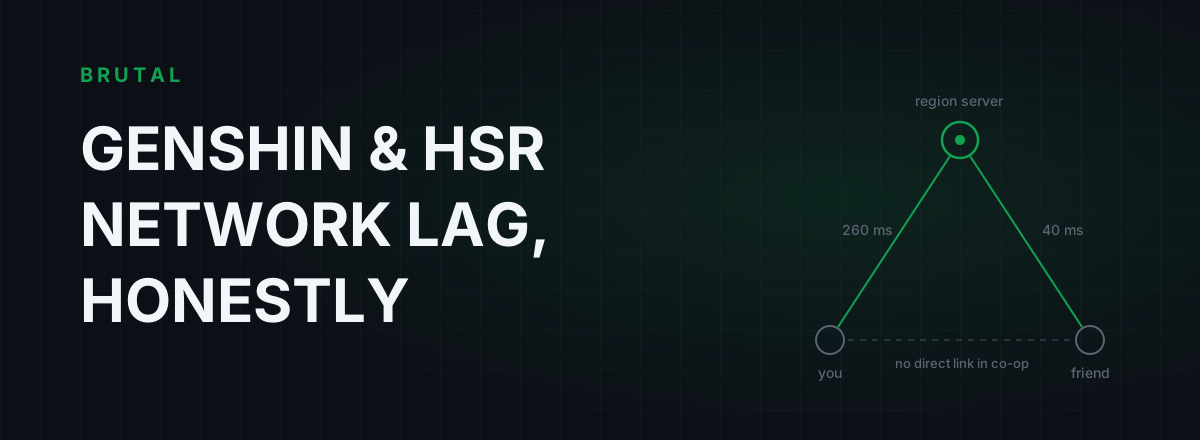
HoYo doesn't publish its networking internals, but the measured behavior is consistent with server-relayed co-op: you connect to the region server, your friends connect to the same server, and the server keeps everyone's world in sync. You're never talking to your friend's device directly.
Two things follow from that. First, even a friend in the same city is reached through the server, so co-op always carries a little more delay than solo. Second, and this is the one that actually hurts, cross-region co-op pays the full geographic bill. If you're in Europe joining a friend's world on the Asia server, every dodge, every pickup, every burst makes a round trip to Asia and back. At 260 ms, enemies teleport, your burst lands a visible beat after you press the button, and domain doors take a moment to acknowledge you exist.
The host matters less than people think. Whoever owns the world, your inputs still sync through the region server, so the big lever is your distance to that server, not your friend's PC. What a distant partner adds is that both long legs are in play at once: your 260 ms and their 40 ms don't average out, they stack into how out-of-sync the fight feels.
Co-op also amplifies problems solo play hides. A packet-loss blip you'd never notice alone shows up as a mob snapping ten meters sideways. And if your sessions are fine at noon and rubbery at 9 pm, that's classic evening congestion on your ISP's route, not the game.
Honkai: Star Rail barely cares about ping
Star Rail deserves its own honest paragraph, because searches for HSR lag spike after every patch and the answer is nearly always the same: it isn't the network.
Combat is turn-based. The server confirms your actions, but there's no timing window tight enough for even 250 ms to break. If your ultimate animation hitches, that's frame rate. If loading screens crawl, that's storage or an older phone. If the overworld feels floaty, that's frame pacing. The network shows up in Star Rail at exactly two moments: logging in, and the rare mid-session disconnect.
Don't buy anything to fix Star Rail combat lag. There's nothing there for a network product to fix.
WiFi and phone quirks that read as game lag
Genshin's biggest platform is the phone, and phones on WiFi have habits that look exactly like server lag.
- Power-save batching. Phones save battery by letting the WiFi radio doze and collecting packets in bursts. The result is periodic ping spikes with a full signal bar. Exempting the game from battery optimization helps more than any in-game setting.
- The 2.4 GHz trap. Walk two rooms away from the router and your phone quietly falls back to 2.4 GHz, a band you share with every neighbor, microwave, and Bluetooth speaker in range. If your WiFi channel is congested, co-op turns rubbery even though your internet plan is fine.
- Bufferbloat. Someone in the house starts a cloud backup or a 4K stream, your router's queues balloon, and your ping triples under load. The Waveform bufferbloat test grades this in about two minutes.
- A VPN app left running. Plenty of phones have a privacy VPN quietly routing everything through another country. That's an instant 100 to 200 ms detour nobody remembers turning on.
The fixes are unglamorous: use the 5 GHz band, sit closer to the router, pause the big uploads while you play, and check the status bar for a VPN icon.
The honest Genshin Impact lag fix, in order
Run these in order and stop as soon as one finds the problem. Most people never get past step three.
- FPS counter first. If frames drop when the game stutters, it's a settings and hardware conversation, and you can stop reading network guides. Lower shadows and crowd density, get the game onto an SSD, and on phones drop the render resolution one notch.
- Measure before you change anything. Run a traceroute toward your server's part of the world: Tokyo or Singapore for Asia, Frankfurt for Europe, the US for America. You're looking for the hop where latency jumps. The free download includes a ping test, traceroute, bufferbloat grade, and DNS benchmark, no purchase involved.
- Remove the WiFi variable. On PC, plug in a cable for one evening and see whether the complaints disappear. On phone, 5 GHz and ten steps closer to the router accomplish most of the same thing.
- Check the clock. If everything's clean at 11 am and ugly at 9 pm, your ISP's route is congested at peak hours. That's fixable, but not by anything on your device.
- Grade your bufferbloat. If ping spikes whenever the connection is busy, tune the router's QoS or SQM before blaming HoYo's servers.
- Only then think about routing. If the route itself is the problem, a measured relay is the honest last step, covered next.
When a relay genuinely helps, and when it won't
There are two situations where routing genuinely moves the needle for HoYo games.
The first is cross-region co-op. Long intercontinental routes usually have slack in them: your ISP hands traffic to whichever transit provider is cheapest, and at peak hours that path can be congested or comically indirect. A relay that enters the destination region through a cleaner path can cut 20 to 60 ms depending on distance and, often more noticeably, take the packet loss and jitter out of the connection. Rubber-banding usually dies before the ping number impresses anyone.
The second is a chronically bad route to your own region: the traceroute from step two shows your traffic detouring through another country, or one hop where latency doubles every evening.
What a relay won't do: help when you're in the same metro as your server on a clean route, fix a single frame of FPS stutter, or make Star Rail combat feel different. A relay adds a hop; if the direct path is already good, the relay loses, and any tool that won't admit that is selling you something.
One more thing worth saying plainly, because HoYo's anti-cheat is famously protective: anything that injects into the game or hooks its process is a risk not worth taking for a few milliseconds. A route-level relay changes the path your packets travel, not the game. Smart Route, part of BRUTAL Optimizer for Windows, works that way on purpose: it reads which server your session is talking to without touching the game process, measures your direct route against its relay locations for your specific connection, and engages only when the numbers prove a win. Every session ends in a receipt: milliseconds saved, or "Direct won."
Expect "Direct won" a lot if you're same-region with a clean line, maybe nine sessions in ten. Cross-region co-op flips those odds, because long routes leave more room to do better. Here's exactly how it decides.
And if the measurement says direct wins? Keep your money. A lag fix you can't measure isn't a fix, it's a subscription.
Frequently asked questions
Why is Genshin Impact lagging even though my internet is fast?
Because internet speed and latency are different things, and solo Genshin barely uses the network anyway. Solo stutter is almost always frame rate: settings too high, the game on a slow drive, or an overheating device throttling itself. Bandwidth beyond a few Mbps changes nothing. Check an FPS counter during the stutter before you touch your router.
Can I change my Genshin or Star Rail server to reduce lag?
No. Progress is locked to the server region you picked at first login (America, Europe, Asia, or TW/HK/MO), and there's no transfer. Switching regions means starting from zero. If you're making a new account, pick the region where the friends you'll co-op with actually live.
Why is Genshin co-op so much laggier than solo play?
Solo runs on your device with light server check-ins, so distance barely matters. Co-op syncs every player through the region server, so your round trip to that server shapes the whole fight. Cross-region co-op pays the full geographic distance, which is why enemies teleport and bursts land late.
Does a VPN or ping reducer fix Genshin Impact lag?
Only when the route is actually the problem: cross-region co-op, a congested evening path, or an ISP route that detours. On a clean same-region connection a relay adds a hop and usually loses, maybe nine times in ten. Measure first, and remember nothing route-based fixes FPS stutter.
Does Honkai: Star Rail need low ping?
No. Combat is turn-based with no tight timing windows, so even 250 ms plays fine. Network problems in Star Rail show up at login and in rare disconnects. Combat hitches are frame rate, and slow loading screens are storage or an older phone.
What does Genshin error 4201 mean?
It's the generic connection-lost error between your device and HoYo's server. It's usually transient: a route hiccup, a WiFi drop, or ISP congestion rather than anything on your PC. If it keeps happening, test on a wired connection, run a traceroute toward your server region, and note whether it clusters in the evening.
Keep reading
 Network & Latency
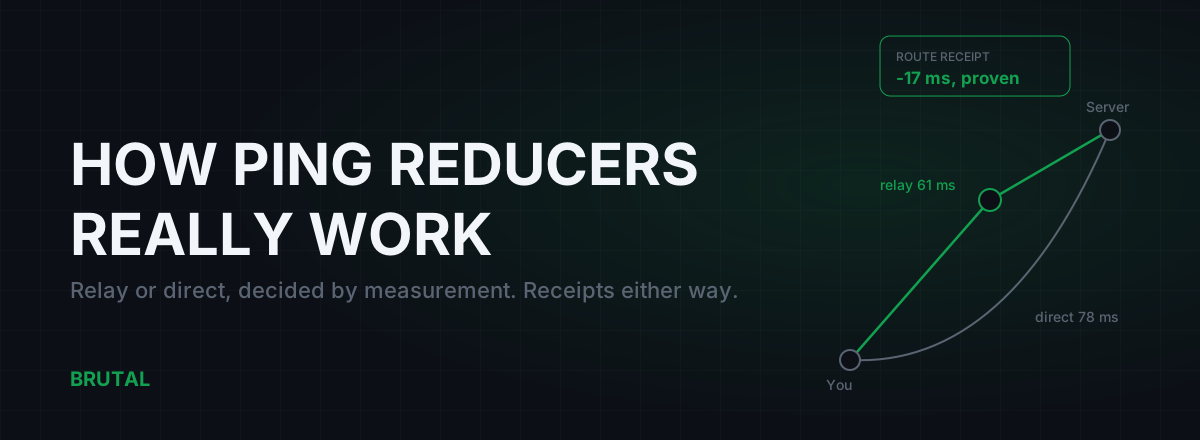
How Do Ping Reducers Work? Relay vs Direct, With Receipts
A ping reducer only helps when a relay path genuinely beats your ISP's route. Here's how Smart Route detects the server, measures both paths, and decides, with a receipt either way.
 Network & Latency
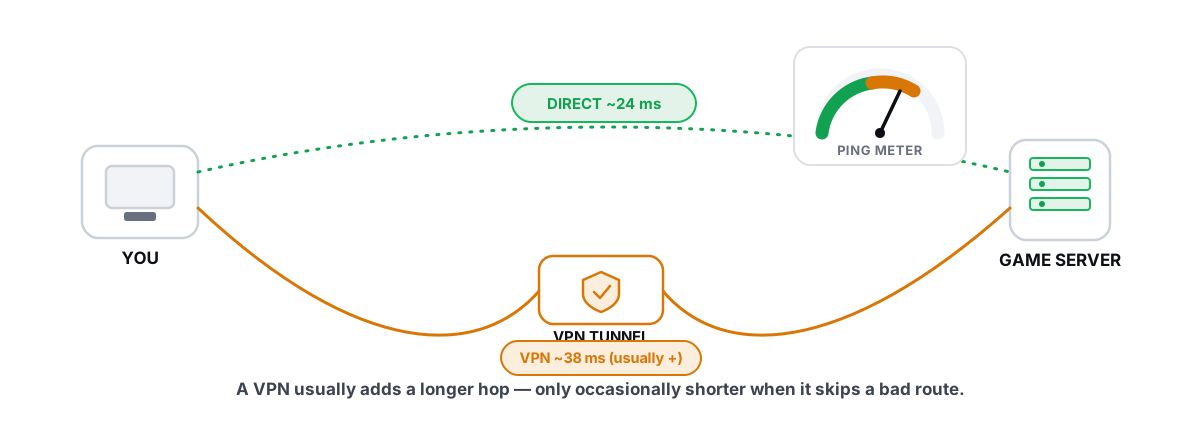
Does a Gaming VPN Lower Ping? The Honest Answer
A gaming VPN usually adds latency, but a bad ISP route is the rare case where it helps. Here is how to tell which you are in.
 Network & Latency
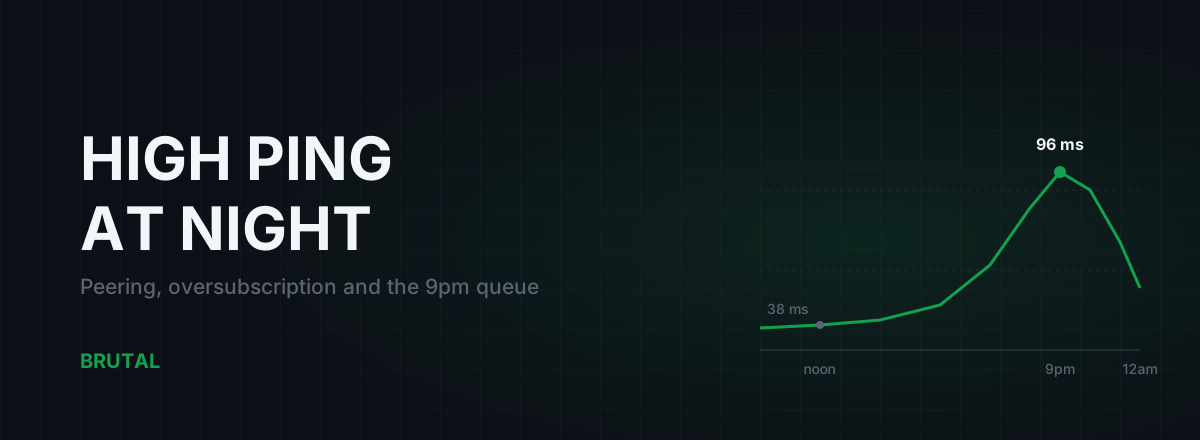
High Ping at Night? ISP Peering and Congestion, Explained
Evening lag isn't your PC. It's shared links filling up when everyone gets home. How oversubscription and peering work, how to prove it with traceroutes, and what realistically helps.
Stop guessing. Measure it.
BRUTAL Optimizer is the honest way to speed up Windows — 17 free modules, a real FPS overlay, verified disk cleanup and drive health. No kernel driver of our own, no game hooks, and per-module undo for the settings it changes.